56 TM1700-SERIES ZP-BL16E BL1448GE
4 CABA LOCAL
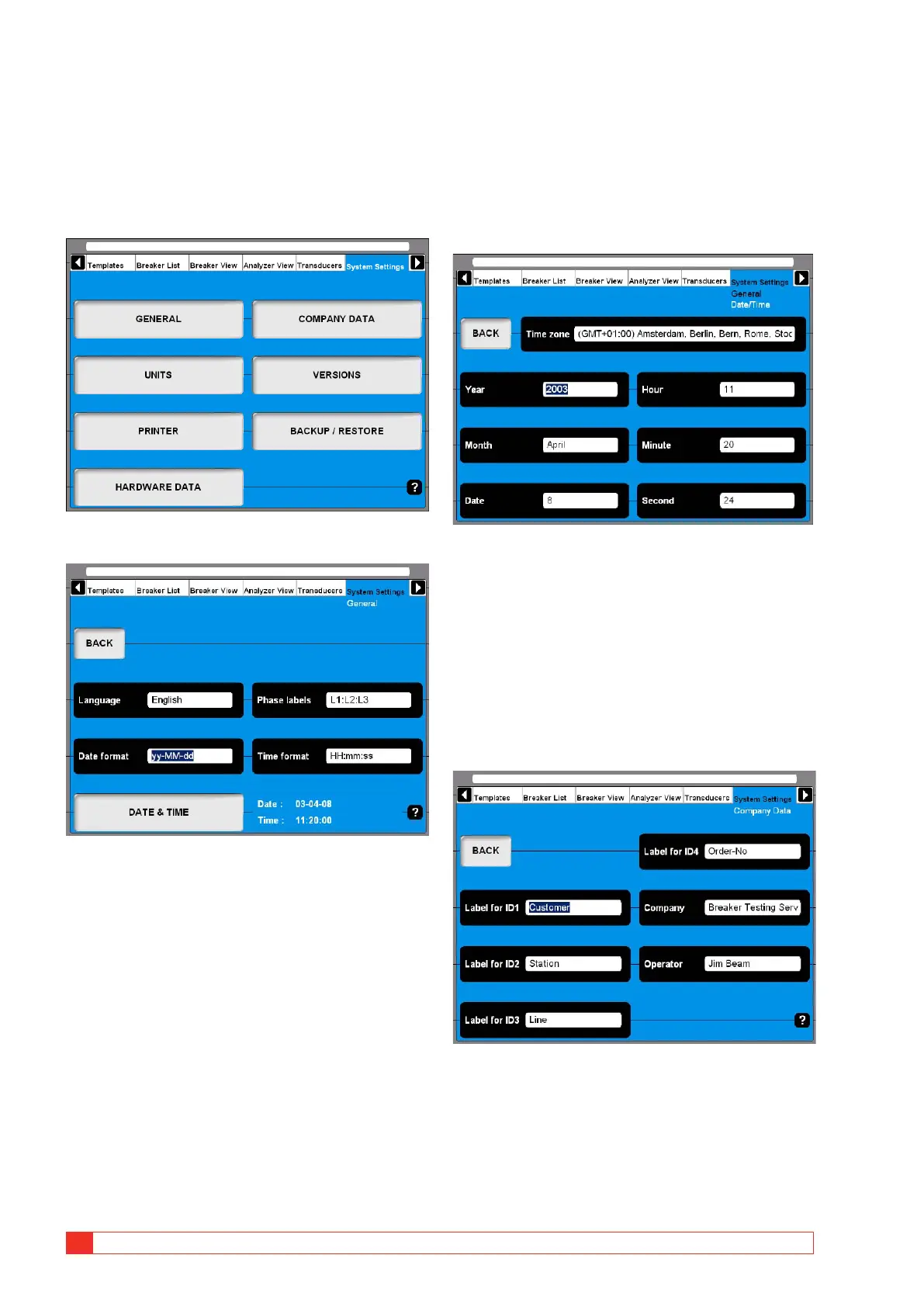
4.14 System Settings menu
In the System Settings you define basic settings that
influence test procedures and measurements. Further-
more backup tools and hardware information can be
obtained. Each button you press leads to a certain
group of settings that are described following.
General
Language
1]
By pressing the button repeatedly you alter
the CABA Local language.
Phase labels
1]
By pressing the button repeatedly you alter
the Phase labels.
Date format
1]
Press the button repeatedly to alter the Date
format.
Time format
1]
Press the button repeatedly to alter the Time
format.
DATE & TIME
1] Press the button to set date and time as de-
scribed below.
Date & time
1]
Select “Systems Settings”, “GENERAL” and
“DATE & TIME”.
2] To set “Time zone”, “Month” and “Date”:
Press the respective button repeatedly to
alter the settings or use the keyboard (arrow
keys, up and down).
3] To set Year, Hour, Minute and Second:
Enter the desired value via the keyboard to
change the settings.
Company data
Label for ID1 – ID4
CABA Local uses 4 different labels to unify a test
object (CB). The naming of the labels can be defined
here by typing in your own significant terms.
Company
This field can be used to enter your company name.



 To Next Page