13 Malfunctions
76
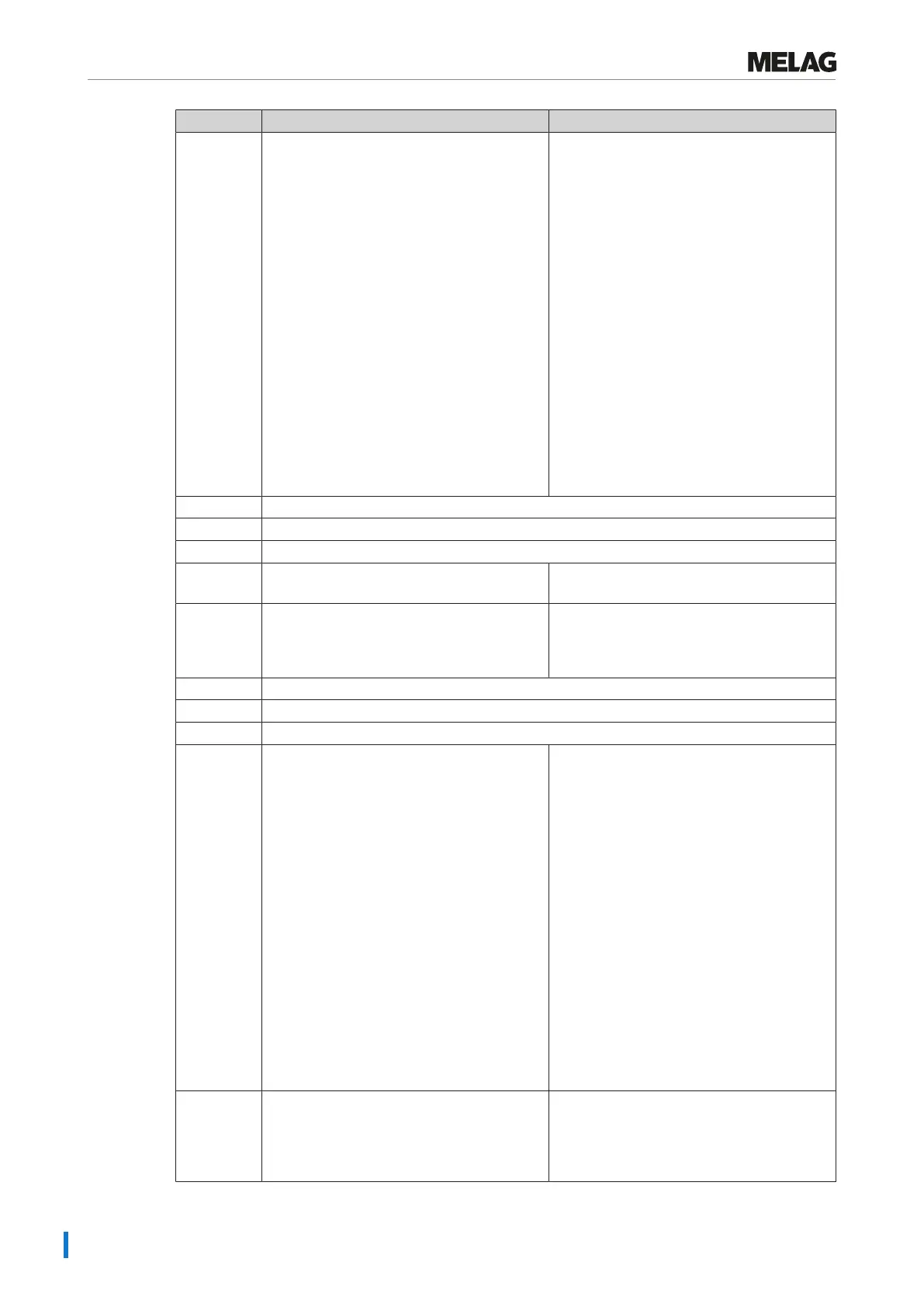
Incident Possible causes What you can do
183 a) The steam sterilizer is overloaded.
b) The steam sterilizer was operated without
an insert rack and the load (especially the
textiles) comes into direct contact with the
chamber wall.
c) The chamber filter is soiled/blocked.
d) The cooling water supplied to the steam
sterilizer is too hot.
a) Comply with the maximum permissible
load quantities (see Selecting the program
[}page27]). If necessary, perform a vacuum
test.
b) Always operate the steam sterilizer with
an insert rack and comply with the loading
information (see Loading the steam sterilizer
[}page23]).
c) Remove the "Vacuum" chamber filter (in
the rear area of the sterilization chamber
below) and check whether it is e.g. soiled/
blocked by packaging. If necessary, clean
the chamber filter.
d) Check whether the cooling water inflow
hose warms up during operation. If it does,
check whether the hose has been connected
to the warm water connection by mistake.
Please note: In summer, a heat
accumulation in the supply line can lead the
water to warm up. Restart the program so
that new, cold water is flushed.
185 see event 110
186 see event 110
187 see event 102
203 No log output options have been set. Check the configuration in the menu
Settings > Logging.
204 The internal log memory is full. Output the log saved in the steam sterilizer
on any output medium or adapt the general
output options in the Settings > Logging
menu.
207 see event 203
208 see event 204
211 see event 204
214 The steam sterilizer has not recognized the
CF card; it cannot be read, it is full or it is
damaged.
1. Check whether the CF card has been
inserted correctly (do not insert under
voltage).
2. Make sure that the CF card is not larger
than 4 GB.
3. Check whether the write-protection has
been set on the CF card by mistake.
4. Test the CF card on a computer.
5. Check whether the memory on the CF is
full. If the memory is full, transfer the log files
on the CF card to a computer and delete the
files on the CF card.
6. Transfer the log files on the CF card to a
computer and re-format the CF card in the
steam sterilizer.
7. The CF card is defective or incompatible.
It is possible that a non-MELAG CF card has
been used.
Please note: We recommend using only
original MELAG CF cards.
218 The attempt was made to overwrite a write-
protected log with a log of the same name.
1. Transfer the log file the CF card to another
computer and delete the file from the CF
card.
2. Insert the empty CF card in the card slot
and enter the log again.












 To Next Page