4 Description of the device
16
Energy-saving key
Pressing the energy-saving key activates the energy-saving mode and switches off the display. The dou-
ble jacket will not be heated until the next program start. This corresponds to waiting time 2, see also Ener-
gy-saving mode [}page62].
Pressing the energy-saving key again will switch the display back on.
PLEASE NOTE
The energy-saving mode can not be activated during a program run.
State Meaning
Lighted The energy-saving mode can be activated.
Not lighted The energy-saving mode can not be activated.
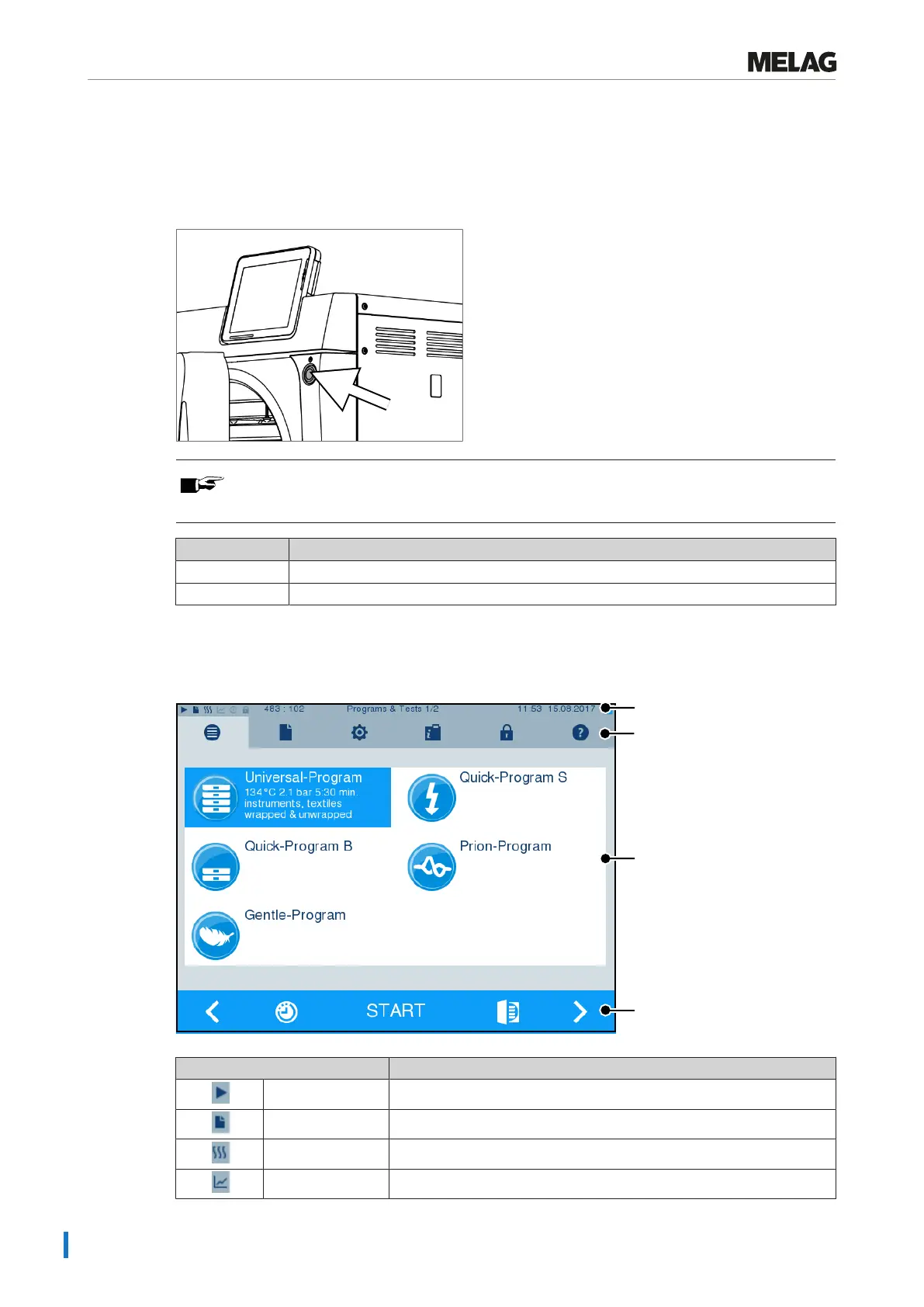
Colour touch display
The operating panel consists of a colour 5 inch touch display.
Status bar
Menu bar
Main area
Action bar
Symbols in the status bar Meaning
Program/tests Indicates whether a program/test is running
Immediate output Indicates whether immediate output is activated/deactivated
Additional drying Indicates whether additional drying is activated/deactivated
Graphic logs Indicates whether the graphic log recording is activated/deactivated












 To Next Page