Home
Metapace
Barcode Reader
S-2
Page 155
Metapace S-2 - Page 155
210 pages
Manual
Save Page as PDF
To Next Page
To Next Page
To Previous Page
To Previous Page
Loading...
145
Update
Chapter 5
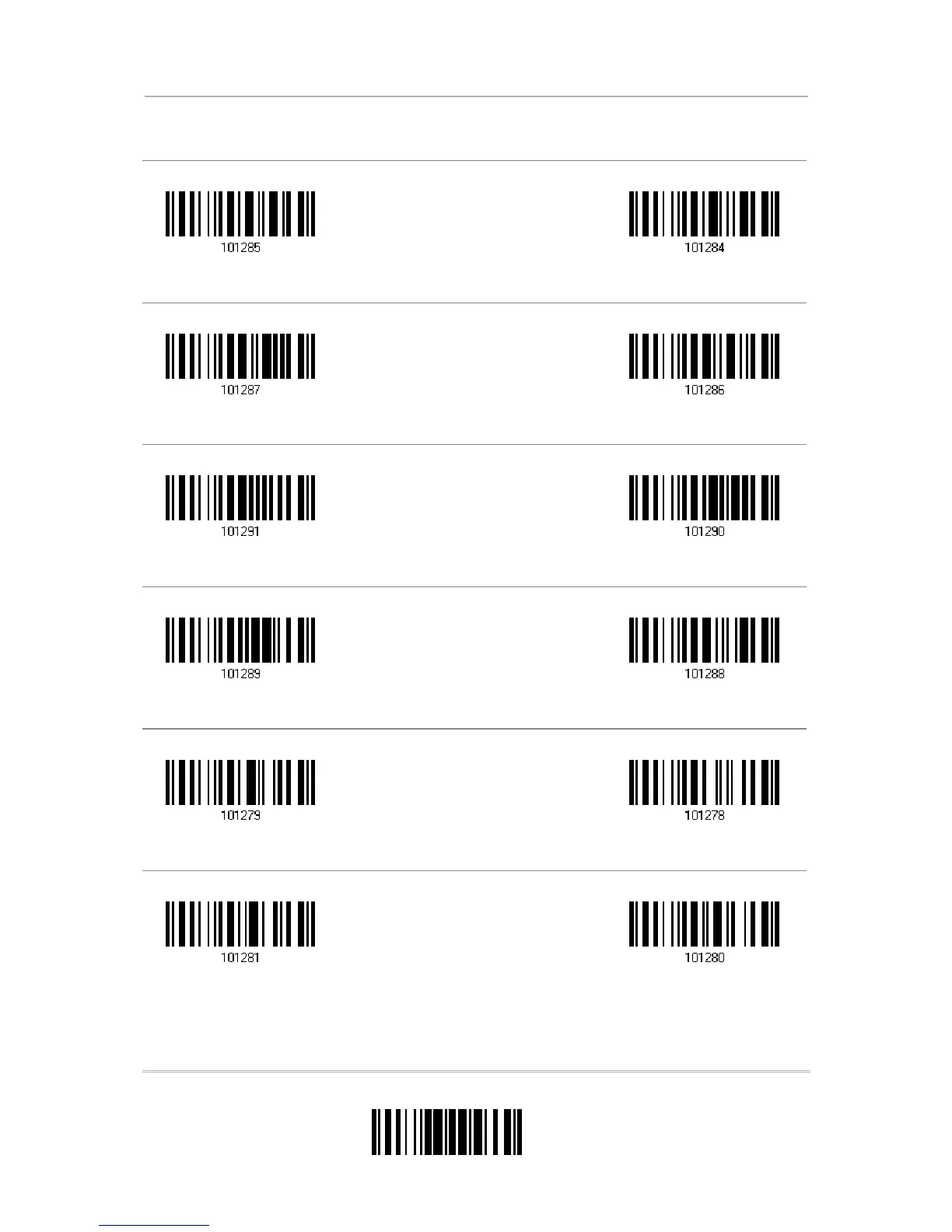
Defining Output Format
Character Substitution for MSI
Character Substitution for Plessey
Character Substitution for GS1 Dat
aBar
Character Substitution for Tele
pen
Character Substitution for UPC-A (No Addon)
Character Substitution for UPC-A
Addon 2
*Apply
D
o Not Apply
*Apply
D
o Not Apply
*Apply
D
o Not Apply
*Apply
D
o Not Apply
*Apply
D
o Not Apply
*Apply
D
o Not Apply
154
156
Table of Contents
Main Page
Default Chapter
3
Care & Maintenance
3
Important Notices
3
Release Notes
4
Table of Contents
5
Introduction
11
Getting Familiarized with Metapace S-2 and the Cradle
12
Installing the Battery
12
Setting up the Cradle
13
Charging Battery Via the Cradle
15
Inside the Package
16
Product Highlights
16
Symbologies Supported
17
Quick Start
19
Enter Configuration Mode
21
Exit Configuration Mode
21
Default Settings
22
Save User Settings as Defaults
22
Restore User Defaults
22
Restore System Defaults
22
Read a Setup Label
23
Configure Parameters
23
List the Current Settings
27
Chapter 1
29
Battery
29
How to Operate the Scanner
29
Auto Power off & Power-Saving
30
Understanding the Barcode Scanner
29
Memory
32
Transmit Buffer
32
Memory Mode
33
Send Data
34
LED Indicator
35
Good Read LED
36
Good Read LED Duration
36
Beeper
37
Beeper Volume
38
Good Read Beep
39
Low Battery Alarm
40
Send "NR" to Host
41
Scan Modes
42
Continuous Mode
43
Test Mode
44
Laser Mode
44
Auto off Mode
44
Auto Power off Mode
45
Aiming Mode
45
Multi-Barcode Mode
46
Alternate Mode
46
Scanning Timeout
47
Delay between Re-Read
48
Read Redundancy for All Symblogies
49
Addon Security for UPC/EAN Barcodes
50
Auto-Sense Mode
51
CCD Sensor Always Active
52
Negative Barcodes
52
Effective Decoding Area
53
Positioning Window
53
Adjusting Window
53
Selecting Output Interface
55
Chapter 2
56
Bt Hid
56
Activate BT HID & Select Keyboard Type
56
Reset Connection
57
Keyboard Settings
58
Inter-Function Delay
64
HID Character Transmit Mode
64
BT SPP Slave
65
Activate BT SPP Slave Mode
65
Inter-Function Delay
65
ACK/NAK Timeout
66
BT SPP Master
67
Activate BT SPP Master Mode
67
Inter-Function Delay
69
ACK/NAK Timeout
70
Switch between Master/Slave Mode
70
Keyboard Wedge Via the Cradle
71
Activate Keyboard Wedge & Select Keyboard Type
71
Keyboard Wedge Via
71
Keyboard Settings
72
Inter-Character Delay
78
Inter-Function Delay
78
Via the Cradle
79
Activate RS-232 Interface
79
Baud Rate
79
Via
79
Data Bits
80
Parity
80
Stop Bit
81
Flow Control
81
Inter-Character Delay
82
Inter-Function Delay
82
ACK/NAK Timeout
83
USB HID Via the Cradle
84
Activate USB HID & Select Keyboard Type
84
USB HID Via
84
Keyboard Settings
86
Inter-Function Delay
92
HID Character Transmit Mode
92
USB Virtual COM Via the Cradle
93
Activate USB Virtual COM
93
Inter-Function Delay
93
USB Virtual COM Via
93
ACK/NAK Timeout
94
Setting up a Wpan Connection
95
Connecting Via the Cradle
96
Connect to the Cradle
96
Change Interface
97
Configure Related Settings
98
Connecting Via Bluetooth ® Dongle
99
Change Interface
99
Configure Related Settings
100
Connect to Dongle
103
Changing Symbology Settings
111
Chapter 4
112
Codabar
112
Start/Stop Characters Selection
112
Start/Stop Transmission
113
CLSI Conversion
113
Code 25 - Industrial 25
114
Start/Stop Pattern Selection
114
Verify Check Digit
115
Transmit Check Digit
115
Code Length Qualification
116
Code 25 - Interleaved 25
117
Start/Stop Pattern Selection
117
Verify Check Digit
118
Transmit Check Digit
118
Code Length Qualification
119
Code 25 - Matrix 25
120
Start/Stop Pattern Selection
120
Verify Check Digit
121
Transmit Check Digit
121
Code Length Qualification
122
Code 39
123
Start/Stop Transmission
123
Verify Check Digit
123
Transmit Check Digit
124
Standard/Full ASCII Code 39
124
Code 39
124
Code 93
125
Code 128
125
Ean-8
126
116
126
Convert to EAN-13
127
Transmit Check Digit
127
118
128
ISBN Conversion
129
ISSN Conversion
129
Transmit Check Digit
129
Security Level
130
Gs1-128 (Ean-128)
131
Code ID Transmission
131
Field Separator (GS Character)
131
Isbt 128
132
Msi
133
Verify Check Digit
133
Transmit Check Digit
134
Code Length Qualification
135
French Pharmacode
136
Transmit Check Digit
136
Italian Pharmacode
137
Transmit Check Digit
137
Plessey
138
Convert to UK Plessey
138
Transmit Check Digit
138
GS1 Databar (RSS Family)
139
Code ID Selection
139
GS1 Databar Omnidirectional (RSS-14)
139
GS1 Databar Expanded (RSS Expanded)
140
GS1 Databar Limited (RSS Limited)
141
Check Digit
142
Telepen
143
Telepen Output - Full Ascii/Numeric
143
Upc-A
144
Convert to EAN-13
145
System Number Transmission
145
Transmit Check Digit
145
Upc-E
146
System Number Selection
147
Convert to UPC-A
147
System Number Transmission
148
Transmit Check Digit
148
Chapter 5
149
Letter Case
149
Character Substitution
150
Select a Set for Character Substitution
151
Symbologies for Character Substitution (All 3 Sets)
152
Prefix/Suffix Code
157
Code ID
158
Select Pre-Defined Code ID
158
Change Code ID
159
Clear Code ID Settings
161
Length Code
162
Multi-Barcode Editor
165
Edit a Concatenation of Barcodes
166
Activate the Concatenation of Barcodes
167
Removal of Special Character
168
Defining Output Format
149
Applying Formats for Data Editing
169
Chapter 6
170
Activating Editing Formats
170
Activate Editing Formats
170
Exclusive Data Editing
171
How to Configure Editing Formats
172
Select Format to Configure
173
Restore Default Format
174
Configuring Format - Define Data Criteria
175
Applicable Code Type
175
Data Length
179
Matching String & Location
180
Configuring Format - Define Data Field
181
Start Position
181
Field Adjustment
181
Total Number of Fields
182
Field Settings
183
Configuring Format - Define Transmission Sequence
189
Programming Examples
191
Example I
191
Example II
192
Specifications
193
Host Serial Commands
195
Scanner Serial Commands
195
Example
196
Cradle Serial Commands
197
Example
200
Keyboard Wedge Table
201
Key Type & Status
202
Key Type
202
Key Status
202
Example
203
Numeral Systems
205
Decimal System
205
Hexadecimal System
206
ASCII Table
207
Entering PIN Code for Authentication
208
Use Preset PIN
208
Disable Authentication or Use Random PIN
209
Other manuals for Metapace S-2
Bluetooth Connection Guide
2 pages
Related product manuals
Metapace S-3
54 pages
Metapace S-52
99 pages
Metapace S-61
35 pages
Metapace S-22
251 pages



 To Next Page