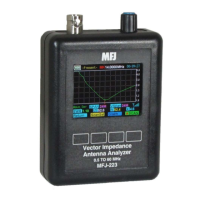
MFJ-223 Vector Impedance Antenna Analyzer
MFJ Enterprises, Inc
6 Version 1
the processor by locating the small reset-switch access hole
located on the left side of the case (about 1-inch down from the
top). To reset, insert the end of a paperclip or stiff wire into the
hole and press gently.
2.3 Turning Analyzer On and Off:
To apply power, press
and hold the Rotary Encoder knob down until you hear a
sequence of beeps, then release. This delay of about 3
seconds protects against accidentally turning the analyzer on
while in transit or during routine handling. When the analyzer
turns on, the Boot Screen will appear on the display.
Use the same procedure to turn the analyzer off. Press and
hold the Encoder Knob down until you hear the beep
sequence, then release. Note that the Boot Screen must be
selected before the analyzer will shut down. When other
screens are displayed, the Encoder is assigned to perform
other functions and the on-off function is disabled.
Important Operating Note: The Boot Screen must be
displayed in order to turn the analyzer off using the Rotary
Encoder Switch.
2.4 Enter Call Sign or Name:
You may personalize your
analyzer by posting call letters or a name (up to eight
characters) on the Boot Screen. To program these in, power up
the analyzer and follow the procedure below:
Press the switch labeled System to bring up the
system menu.
Press Select to toggle between Auto-Off and Callsign.
Select Callsign.
Press the Encoder Knob to toggle the curser to the
start (or left) position.
Rotate the Encoder Knob to scroll in your first
character
Press the Encoder Knob to move to the second
character.
Continue building the sequence until your call or name
is entered.
Press Exit to return to the MFJ Boot Screen and view
your entry.


 To Next Page