MFJ-226 Graphical Antenna Impedance Analyzer
16 Version 1A 1R02
Executing Global Calibration
The analyzer’s Global calibration data is normally locked to ensure it
cannot be accidentally erased or overwritten by a Local Cal entry.
However, it is a good idea to check the calibration and recalibrate
your analyzer if needed periodically as a normal preventive
maintenance procedure. In addition, in some circumstances, you may
wish to alter the Global Cal to compensate for a specific test cable or
test fixture. In that event, always re-calibrate before returning the
analyzer to general use! To execute a Global Cal:
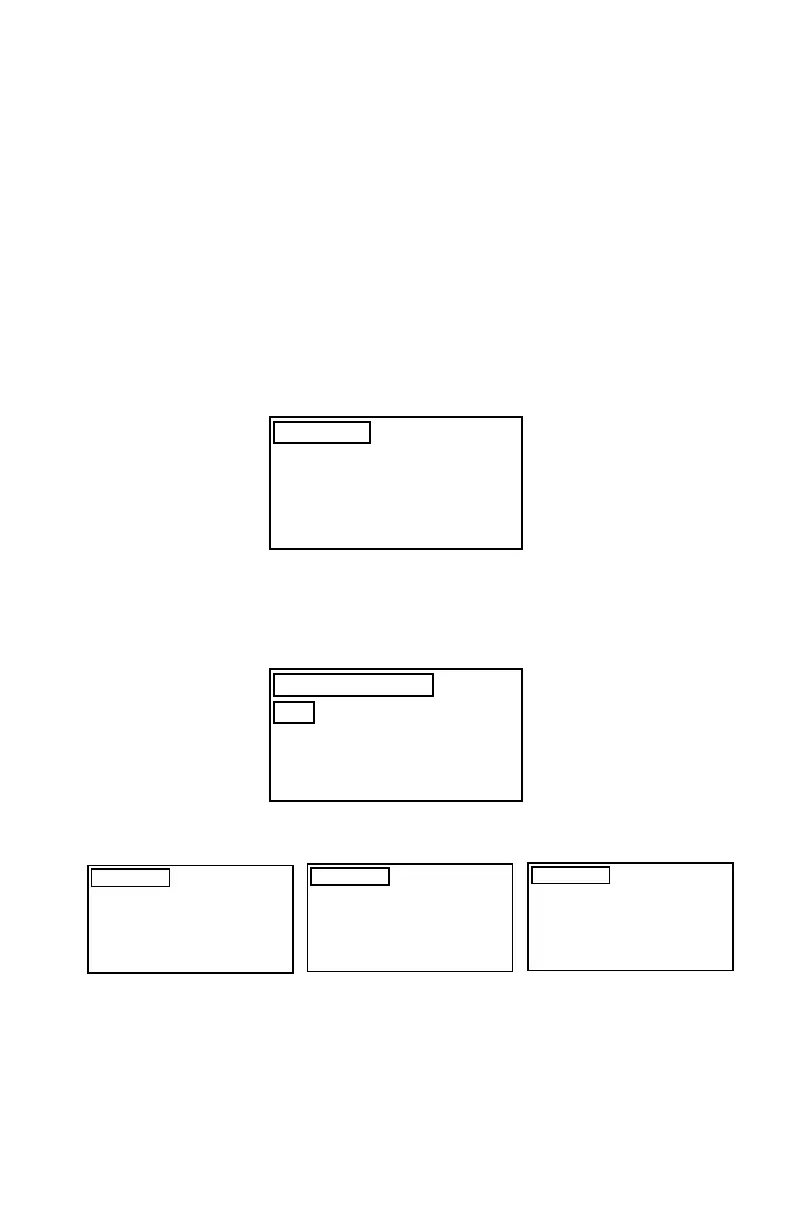
Go to the Main Menu and select the Calibrate option. When
you do, a “Data Locked” message will come up and direct you
to go to the Settings Menu.
Calibrate
DATA LOCKED
GOTO SETTING MENU
TO UNLOCK DATA FIRST
Go to the Settings menu and elect to unlock the Global data.
Return to the Main Menu and select Calibration again.
Select the ALL option and perform the OSL Calibration
(OSL).
SELECT OSL MENU
SHORT
OPEN
LOAD
ALL
The program will provide you with step-by-step prompts for executing
the entire Open/Short/Load cal procedure:
Calibrate
CONNECT OPEN
Calibrate
CONNECT SHORT
Calibrate
CONNECT LOAD
Note that Global Cal requires sampling a very large number of
frequencies between 1 MHz and 230 MHz, so each stage of the
procedure can take several minutes to complete. Also, by selecting
the ALL option, you must complete the entire cal procedure as one
continuous operation. Follow the prompts without interruption or


 To Next Page