MFJ-226 Graphical Antenna Impedance Analyzer
6 Version 1A 1R02
POWERING THE MFJ-226
The MFJ-226 requires two (2) good quality AA batteries. The battery
tray door is located on the back of the analyzer case near its base.
Press and slide the lid down to expose the tray.
You may use alkaline non-rechargeable or NiMH rechargeable cells.
Note that NiMH cells require an external charger (the analyzer does
not have one built-in). For longest life, use fresh premium-quality cells
from the same manufacturer. Carefully observe polarity during
installation and never remove batteries while the unit is powered up.
Abruptly cutting power can disrupt the unit's normal power-down cycle
and result in memory loss.
The MFJ-226 features a built-in battery indicator that must be set up
for the type of battery you intend to use. See the Settings Menu for
details.
Note the USB port does not power the MFJ-226 or charge batteries.
MENU STRUCTURE
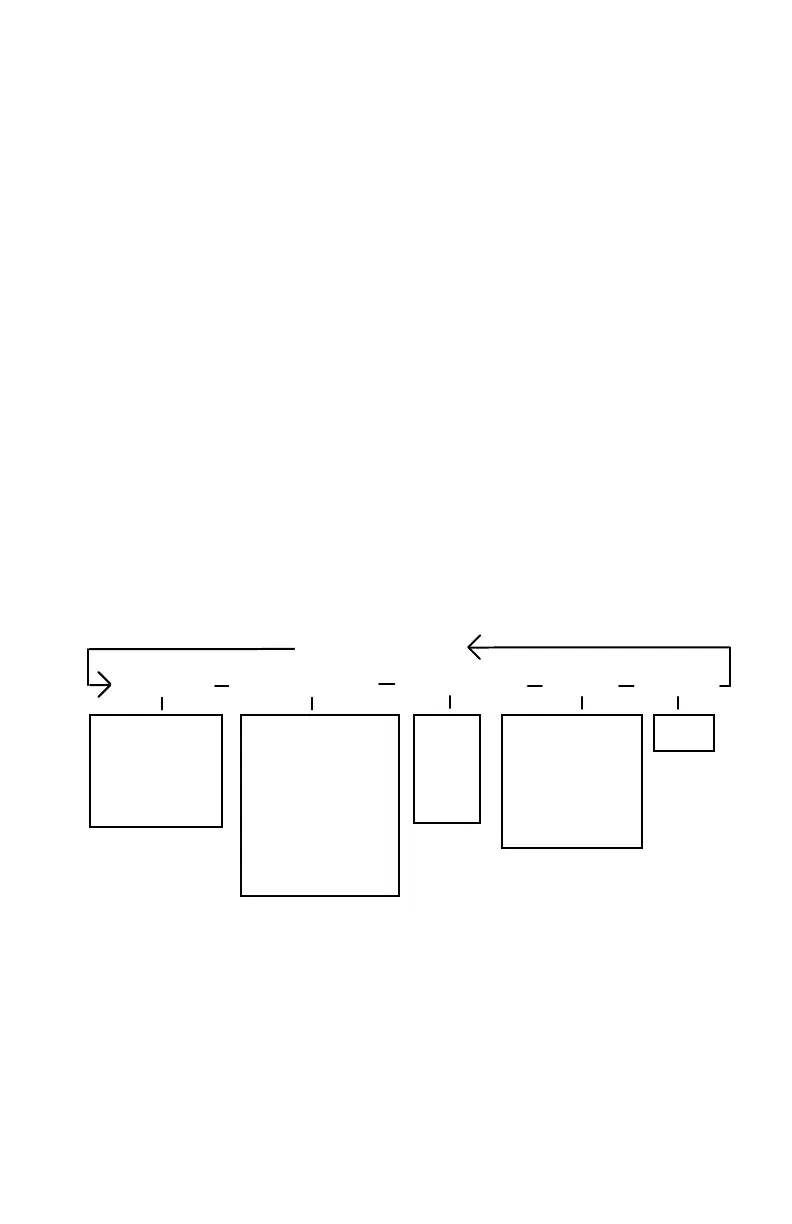
The MFJ-226 features short circular menus that allow you to identify
and access all functions quickly and easily. The Main Menu and its
five Sub-Menus are shown below:
Main Menu
Single Freq
Sweep Freq (Plot) Calibrate (OSL) Settings PC Mode
SWR, Z SWR
Impedance (Z)
Resistance (R)
Reactance (X)
Return Loss (S11)
Phase Angle
Smith Chart
All
Open
Short
Load
Backlight
Auto Power Off
Battery (Type)
Cal Data Protect
Info (System)
Host
Series Imp
Parallel Imp
S11
USING THE SETTINGS MODE
To check and change the analyzer's default settings, power up using
the Boot key. After a brief opening screen, the Main Menu will appear.
Using the Down-Arrow key, step to the Settings menu and press
Enter.
When the Settings menu opens, use the Up/Down keys to make
selections. To modify a setting, step to the desired option and press


 To Next Page