27
The MT-2400 is capable of displaying in for ma tion in
Amer i can En glish or standard Metric measurement. The
MT-2400 is shipped from the factory programmed for
English.
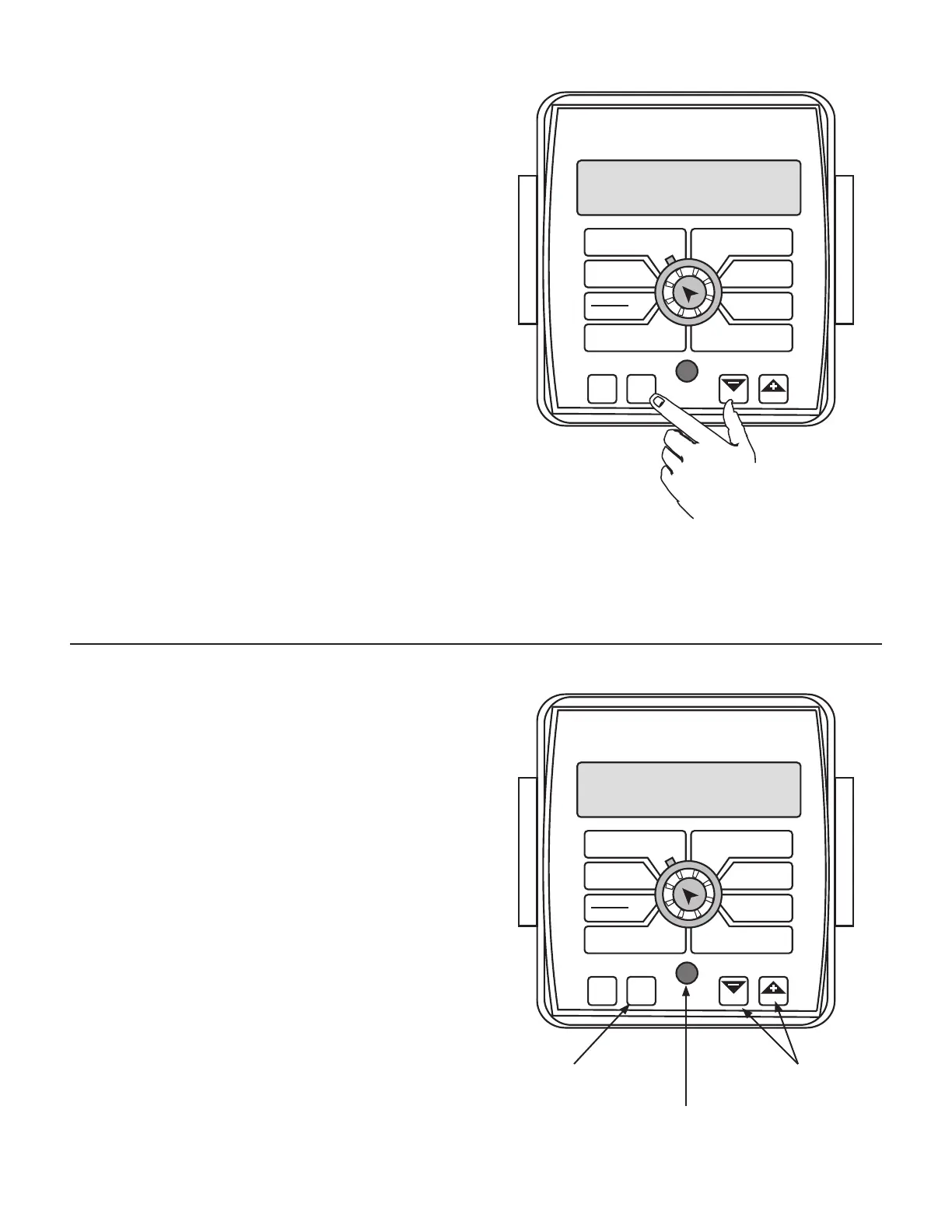
• To activate the English mode, turn power OFF and place the
ro ta ry switch at “TOTAL AREA.” Hold down both the “CAL”
and “-” keys and turn power ON. See Il lus tra tion 31. The
con sole will display English mea sure ments. Once powered
up, release the two keys. To “lock-in” English mode you
must enter cal i bra tion. Press and hold the CAL key until
“CAL” lights on the display. The console is now in cal i bra tion
and English mode is locked-in. Exit CAL by pressing and
holding the “CAL” key until CAL disappears from the display
(approximately 3 seconds). You must be in HOLD or have all
booms OFF to enter Cal.
• To activate the Metric mode, turn power OFF and place
the ro ta ry switch at “SUB AREA.” Hold down both the
“CAL” and “-” keys and turn power ON. See Il lus tra tion
31. The con sole will display Met ric mea sure ments. Once
powered up, release the two keys. To “lock-in” Metric
mode you must enter cal i bra tion. Press and hold the CAL
key until “CAL” lights on the display. The con sole is now
in cal i bra tion and Metric mode is locked-in. Exit CAL by
pressing and holding the “CAL” key until CAL disappears
from the display (ap prox i mate ly 3 seconds). You must be
in HOLD or have all booms OFF to enter Cal.
Entering Calibration Mode
IN ALL CALIBRATION OPERATIONS:
Turn all boom control switches OFF.
1. Press and hold the “CAL” key for three sec onds to select
the cal i bra tion mode. The con sole dis play will read
“CAL”, and the red warn ing light will turn on.
2. Turn the rotary dial to the desired “CAL” po si tion. Then
use the “+” or “-” key to adjust the dis played val ue
up or down as needed. Adjust ALL necessary values.
See Illustration 32.
3. Hold the “CAL” key again for three sec onds to exit
calibration. “CAL” will disappear from the dis play.
NOTE: The display will flash alternately be tween
distance and wheel circumference when in the CIRC po si-
tion, or total flow and flowmeter cal i bra tion when in the
FLOW CAL position. When “+” or “-” is pressed, the display
will “hold” the item that was displayed when that key
was pressed. The display will resume alternations after
64 seconds of no key being depressed. Please refer to
“Entering Calibration Values,” “DISTANCE/CIRC” or “TOTAL
FLOW/FLOW CAL” for details.
NOTE: In metric, the width will have a decimal point, in
English there is no decimal point. Also, changing from
En glish to Met ric mode may change or alter any pre vi ous ly
en tered cal i bra tion values. After switch ing mea sure ment
modes, con firm that all cal i bra tion val ues are correct.
Press to enter or exit
calibration mode
Press to increase or
decrease values
Red warning light will
be lit when in CAL.
Calibration
English or Metric?
Illustration 31
Illustration 32
WIDTH
CIRC
MIN
FLOW
FLOW
CAL
AREA
HOUR
APP. RATE
TOTAL AREA
SPEED
DISTANCE
FLOW
RATE
TOTAL FLOW
SUB AREA
BOOM
SEL
TEST
SPEED
ADJUST
RATE
TARGET
RATE
AUTO
MAN
CAL
RESET
MANAUTO
HOLD
MT-2400
™
LR
WIDTH
CIRC
MIN
FLOW
FLOW
CAL
AREA
HOUR
APP. RATE
TOTAL AREA
SPEED
DISTANCE
FLOW
RATE
TOTAL FLOW
SUB AREA
BOOM
SEL
TEST
SPEED
ADJUST
RATE
TARGET
RATE
AUTO
MAN
CAL
RESET
MANAUTO
HOLD
MT-2400
™
LR



 To Next Page