WIDTH: Enter the effective working width, in inches
(meters) for the boom
section currently shown
on the display. Re peat
this procedure for each
boom sec tion. Enter a value of “0” (.000) for
any unused boom sections.
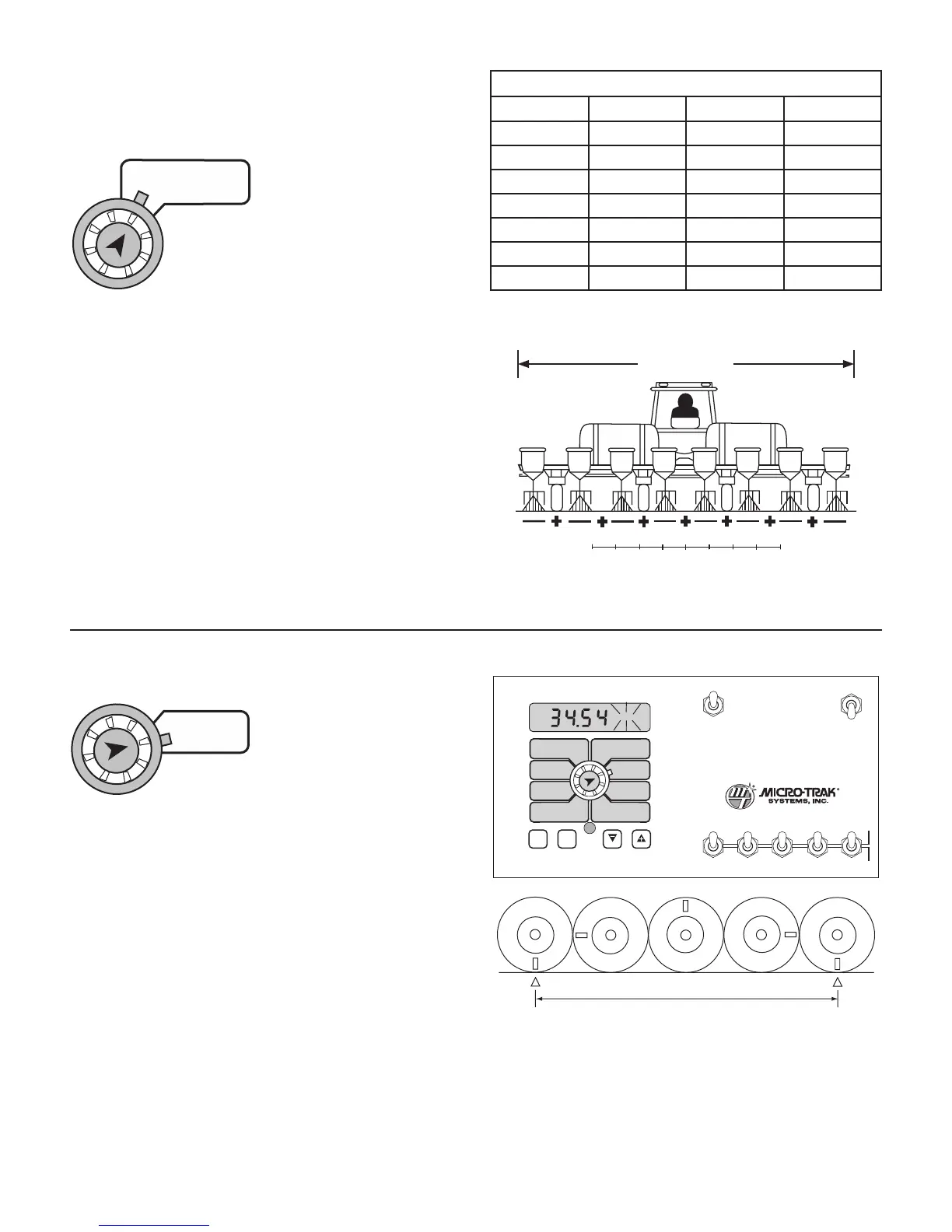
Band Coverage Width
Working Width
Banding Application Calibration
In banding applications, you will still need to enter the total
width of each boom section so that area counts correctly, but
you must also calculate the percentage of your total width
the band is covering and reduce your target rate to match.
For example, if you are planting with an eight-row planter
with 30-inch spacing, your total working width, regardless
of the width of bands, is 240 inches (8 x 30 inches). Now, for
purposes of this example, you have eight 12” bands. Your
total band coverage is 96 inches (8 x 12 inches). Based on
that, your band is covering 40 percent of your total width
(96 divided by 240). If you want to apply 20 GPA in the band,
enter 8 GPA as your target rate (40 percent of 20 GPA). See
Illustration 25.
26
Calibration (cont)
Entering Calibration Values (cont)
UNITS OF MEASURE CHART
ENGLISH METRIC TURF
AREA
Acres hectares 1000 Sq Ft
VOLUME
Gallons liters Gallons
SPEED
Miles/Hr kilometers/Hr MIles/Hr
DISTANCE
Feet meters Feet
PRESSURE
Lbs/Sq In bar Lbs/Sq In
FLOW RATE
Gallons/Min liters/Min Gallons/Min
SPRAY RATE
Gallons/Acre liters/hectare Gal/1000 Sq Ft
Illustration 25
Band Width / Working Width x GPA = Target Rate
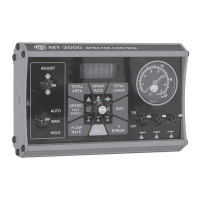
CIRC: This position is used to calibrate the speed sensor
for ac cu rate speed and dis tance measurement. When this
position is selected, the display will alternately show, every
three seconds, the wheel
circumference value and
the distance value. The
wheel circumference value
is the number shown along with “CAL” on
the display. See Illustration 26. The distance
value is the number shown when “CAL” is not shown on the
display. Either one may be selected to calibrate for speed
and distance measurement. Select by pressing the “+” or “-”
button when the desired value is being displayed.
WIDTHBOOM
SELECT
TEST
SPEED
TARGET
RATE
ADJUST
RATE
CIRC
MIN
FLOW/
PRESSURE
FLOW
CAL
SPEED
DISTANCE
FLOW
RATE
TOTAL AREA
APP. RATE TOTAL FLOW
SUB AREA
ON
OFF
ON
OFF
12345
B O O M S
RUN
HOLD
PRESSURE
CAL
AUTO
MAN
RESET
MT-3405 M
™
AUTOMATIC RATE CONTROLLER
MANAUTO
CALHOLD
V 1 2 3 4 5
To determine circumference, measure the
distance of one complete wheel revolution
and divide by the number of magnets installed.
Determining Wheel Circumference
For the console to calculate the correct number of acres,
both the circumference of the sen sor-equipped wheel
and the implement width must be entered. Determine the
circumference of the sensor-mounted wheel to the nearest
tenth of an inch (millimeter) with the fol low ing method:
METHOD
Mark tire with a piece of chalk and mea sure distance traveled
on the ground for one com plete revolution. See Figure 3.6.
For accuracy, measure the wheel rev o lu tion sever al times
and take the average. Divide that val ue by the num ber of
magnets installed on the wheel hub to get your starting
wheel cir cum fer ence (CIRC) calibra tion val ue.
Illustration 26



 To Next Page