September 2012
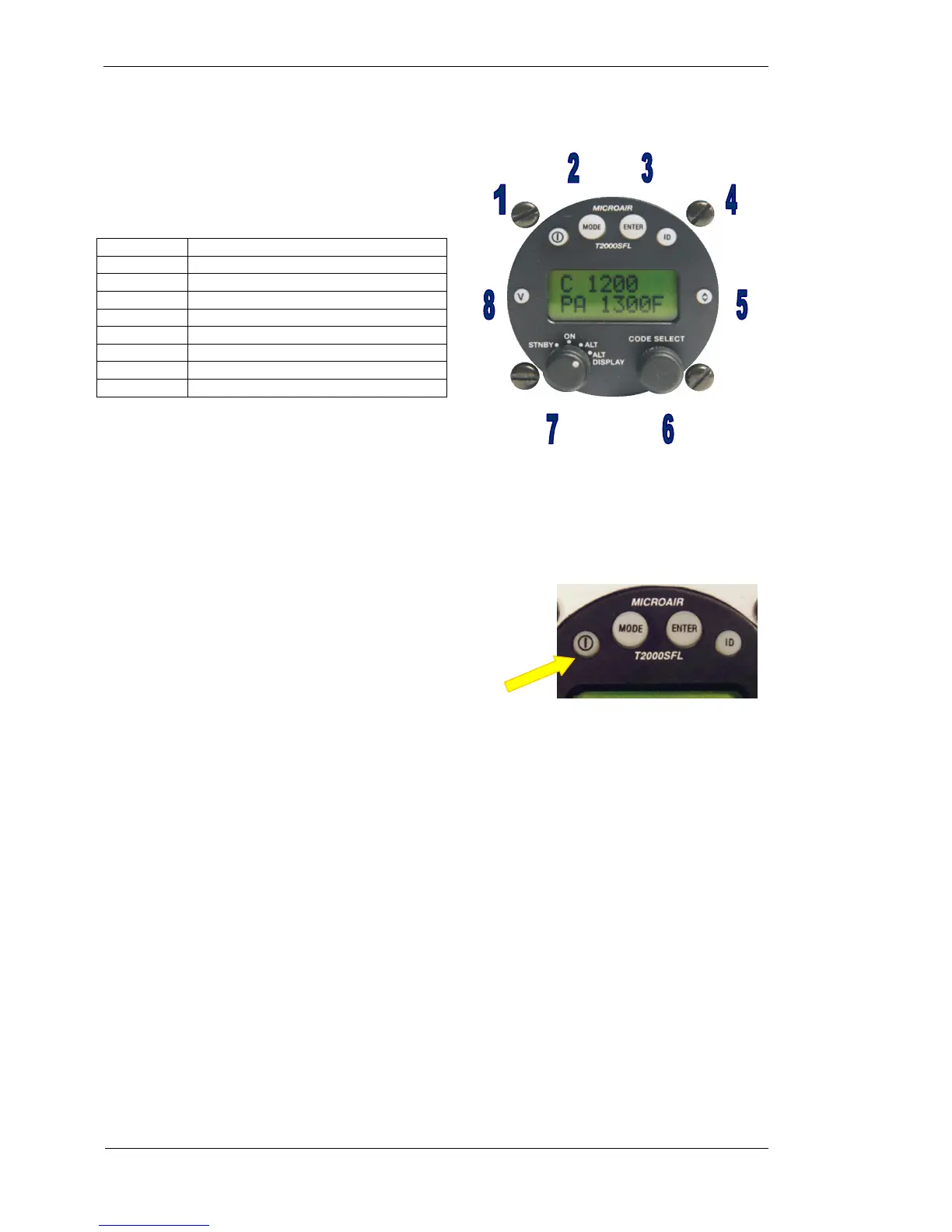
1.1 T2000SFL CONTROLS
All of the T2000SFL’s functions and features can be
accessed from the controls on the front face.
CONTROL DESCRIPTION
1 ON Key
2 MODE Key
3 ENTER Key
4 IDENT Key
5 TOGGLE Key
6 CODE SELECT Knob
7 SELECTMODE Knob
8 VFR Key
All of the keys are covered in a soft rubberized plastic, which is backlight with the display. When the key is
pressed a small click can be discerned. The selected function will operate on the release of the key.
1.2 TURNING ON
The T2000SFL is turned on by pressing the ON key. The T2000SFL
will go through a start up routine displaying self test messages,
including the display of the transponder’s serial number, a backlight
test, and ending with the operational display.
1.3 TURNING OFF
To turn off, press the ON key again, and the unit will immediately turn off.
ON KEY



 To Next Page