EasyManua.ls Logo

MicroElektronika EasyPIC4 - LCD 2 x16 in 4-Bit Mode

Default Icon
34 pages
Print Icon
To Next Page IconTo Next Page
To Previous Page IconTo Previous Page
Loading...
EasyPIC4 Users Manual
MIKROELEKTRONIKA SOFTWARE AND HARDWARE SOLUTIONS FOR THE EMBEDDED WORLD
2233
page
MikroElektronika
Development
tools
EasyPIC
ICD
4
LLCCDD 22XX1166 IINN 44--BBIITT MMOODDEE
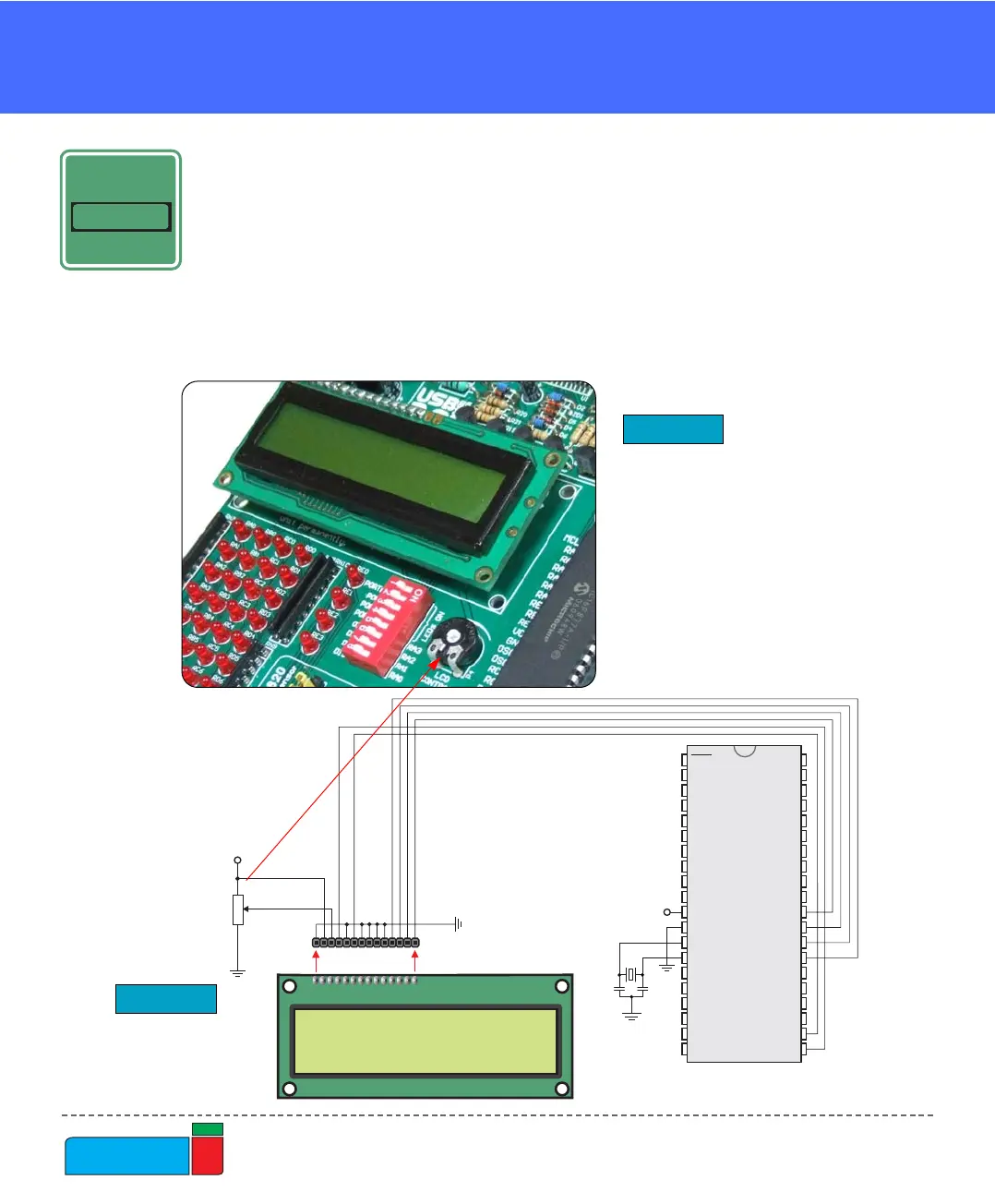
A standard character LCD is probably the most widely used data visualization com-
ponent. Usually, it can display two lines of 16 alphanumeric characters, each made
up of 5x8 pixels. The character LCD communicates with the microcontroller via a
4-bit or 8-bit data bus, each requiring the use of a different connector on EasyPIC4.
For 4-bit data bus use, the LCD should be placed in the upper left of the board, just
above the LEDs. The connection to the microcontroller is shown in Fig. 32 where
there are only four data lines. It is important to note that the LCD should be placed
or removed from EasyPIC4 only when the power is off.
LCD 2X16 IN 4-BIT MODE

D7
D6
D5
D4
D3
D2
D1
D0
E
R/W
RS
VEE
VCC
GND
P4
10K
Contrast
Adjustment
VCC
114
PICxxxx
RA0
RA1
RA2
RA3
RC0
RC1
RA4
RA5
RE0
RE1
RE2
RC3
RD0
RD1
RC4
RD3
RD2
RC5
RC6
RC7
RD4
RD5
RD6
RD7
RB0
RB1
RB2
RB3
RB4
RB5
RB7
RB6
RC2
VDD
VSS
OSC1
OSC2
MCLR
VDD
VSS
VCC
X1
8MHz
C6
22pF
C7
22pF
LCD Display
4-bit mode
Figure 31.
Figure 32.
LCD 2x16 in 4-bit mode
LCD 2x16 in 4-bit
mode schematics
2x16 LCD
2x16 LCD
2x16 LCD
CONNECTOR
2x16 LCD
CONNECTOR
ON-BOARDON-BOARD