EasyManua.ls Logo

MicroElektronika EasyPIC4 - Page 25

Default Icon
34 pages
Print Icon
To Next Page IconTo Next Page
To Previous Page IconTo Previous Page
Loading...
EasyPIC4 Users Manual
MIKROELEKTRONIKA SOFTWARE AND HARDWARE SOLUTIONS FOR THE EMBEDDED WORLD
2255
page
MikroElektronika
Development
tools
EasyPIC
ICD
4
LLCCDD 22XX1166 IINN 88--BBIITT MMOODDEE
P3 10K
Vee
Vo
Contrast
Adjustment
JP12
GRAPH.CHAR.
D0
D1
D2
D3
D4
D5
D6
D7
RS
R/W
E
VCC
VCC
PICxxxx
RA0
RA1
RA2
RA3
RC0
RC1
RA4
RA5
RE0
RE1
RE2
RC3
RD0
RD1
RC4
RD3
RD2
RC5
RC6
RC7
RD4
RD5
RD6
RD7
RB0
RB1
RB2
RB3
RB4
RB5
RB7
RB6
RC2
VDD
VSS
OSC1
OSC2
MCLR
VDD
VSS
LCD8 contrast
selected
GLCD and LCD8
contrast not selected
GLCD contrast
selected
X1
8MHz
C6
22pF
C7
22pF
VCC
D7
D6
D5
D4
D3
D2
D1
D0
E
R/W
RS
VEE
VCC
GND
114
LCD Display
8-bit mode
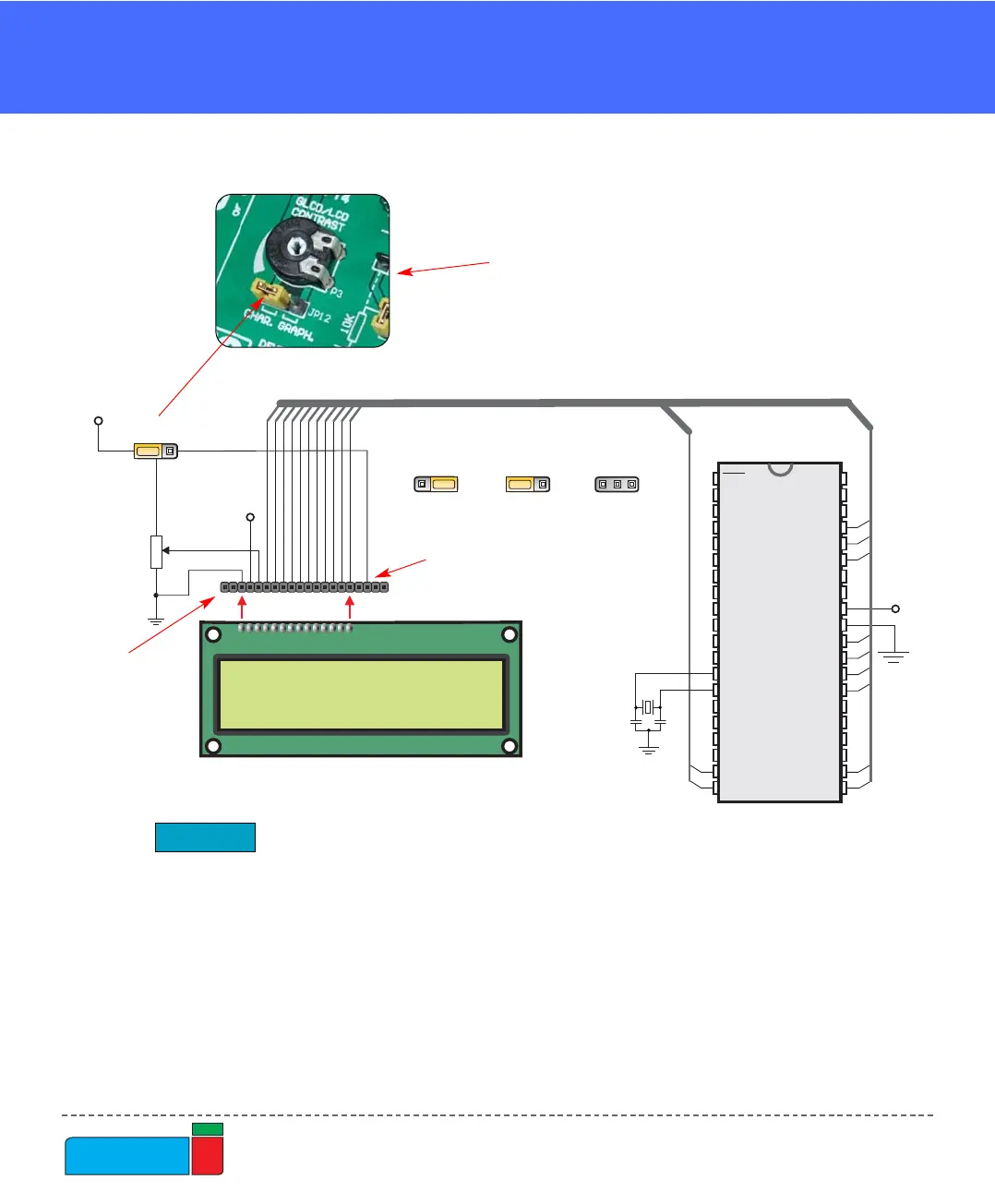
Figure 34.
LCD 8-bit mode schematics
Leave two free
pins to the left side
Leave four free pins
to the right side
In order to enable LCD,
jumper JP12 should be set
to the left position, labeled
as CHAR.