© Microhard Systems Inc. 44
4.0 Configuration
In some cases there may be multiple routes to reach a destination.
The Metric can be set to give certain routes priority, the lower the
metric is, the better the route. The more hops it takes to get to a
destination, the higher the metric.
Metric
Values (Integer)
255.255.255.0
Define the exit interface. Is the destination a device on the LAN, LAN1
(If physical WAN port is bridged as an independent LAN), 3G/4G
(cellular), USB or the WAN?
Interface
Values (Selection)
LAN / LAN1 / WAN / Cell / USB
None
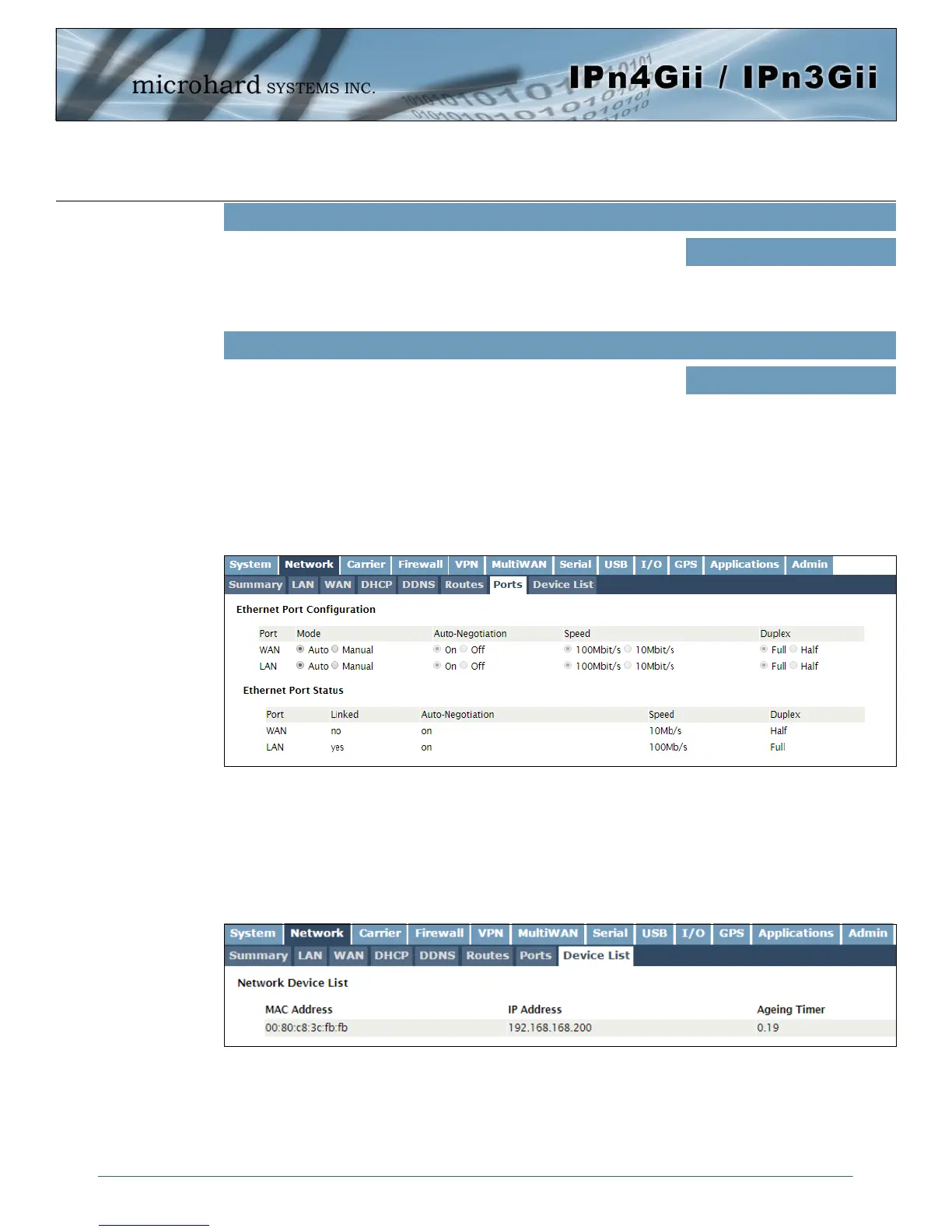
Image 4-2-9: Network > Device List
4.2.8 Network > Device List
The Network > Device List shows the current ARP table for the local network adapter. The MAC address
and IP address are shown, however not only DHCP assigned devices are listed in the device list, any
devices, even those statically assigned, that are connected through the local network interface (RJ45) are
displayed, including those connected through a hub or switch.
4.2.7 Network > Ports
The Network > Ports menu can be used to determine the characteristics of the physical Ethernet interfaces
on the IPnXGii. As seen below the Mode (Auto/Manual), Auto-Negotiation, Speed (10/100Mbit/s) and the
Duplex (Full/Half) can all be configured on the IPnXGii.
Image 4-2-8: Network > Ports



 To Next Page