© Microhard Systems Inc. 52
4.0 Configuration
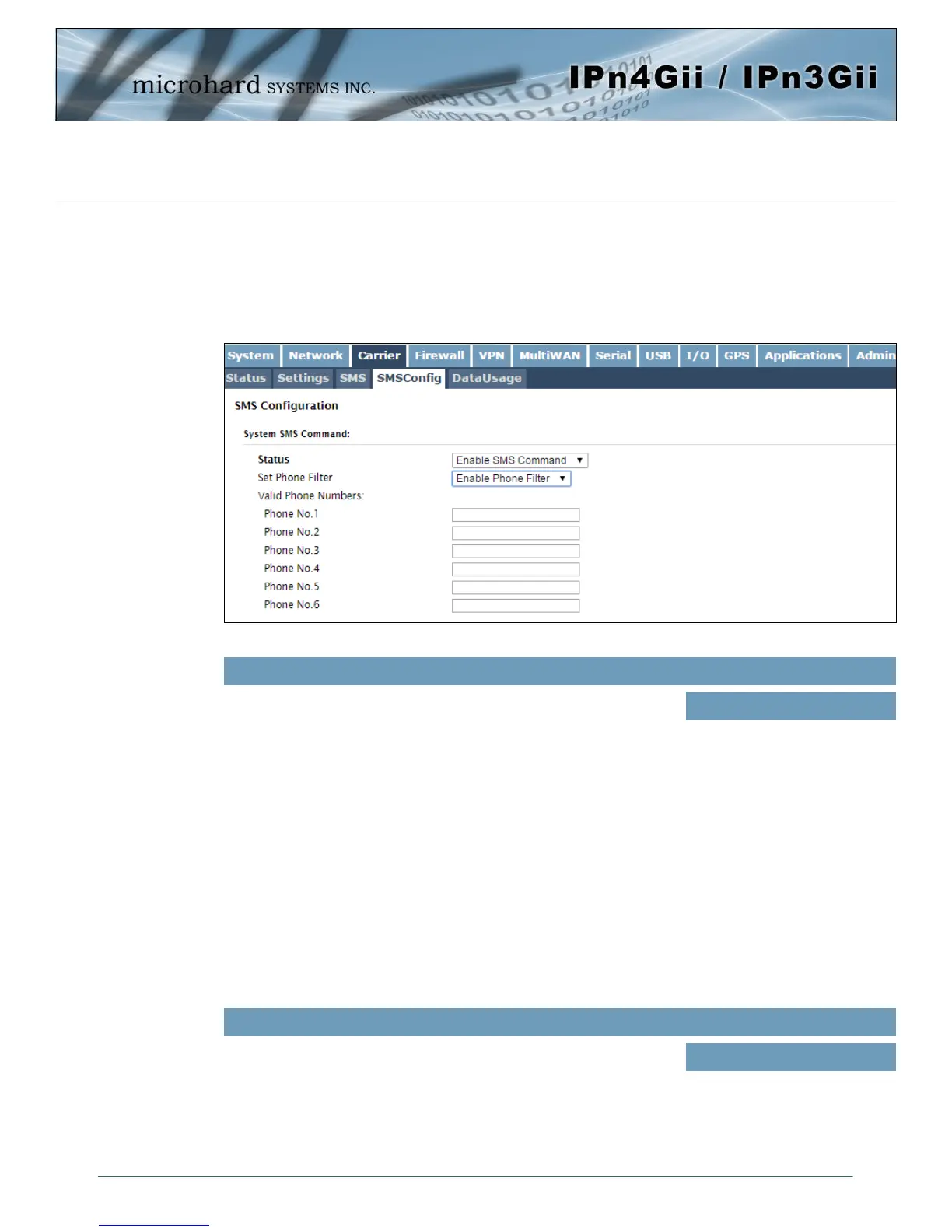
Image 4-3-5: SMS > SMS Configuration
4.3.4 Carrier > SMS Config
SMS messages can be used to remotely reboot or trigger events in the IPnXGii. SMS alerts can be set up
to get SMS messages based on system events such as Roaming status, RSSI,
Ethernet Link Status or IO Status.
System SMS Command
This option allows a user to enable or disable to use of the following
SMS commands to reboot or trigger events in the IPnXGii:
Status
Values (Selection)
Enable / Disable
If enabled, the IPnXGii will only accept and execute commands
originating from the phone numbers in the Phone Filter List. Up to 6
numbers can be added.
Set Phone Filter
Values (Selection)
Enable / Disable
MSC#REBOOT Reboot system
MSC#NMS Send NMS UDP Report
MSC#WEB Send web client inquiry
MSC#MIOP1 open I/O ouput1
MSC#MIOP2 open I/O ouput2
MSC#MIOP3 open I/O ouput3
MSC#MIOP4 open I/O ouput4
MSC#MIOP5 open I/O ouput5
MSC#MIOP6 open I/O ouput6
MSC#MIOP7 open I/O ouput7
MSC#MIOP8 open I/O ouput8
MSC#MIOC1 close I/O ouput1
MSC#MIOC2 close I/O ouput2
MSC#MIOC3 close I/O ouput3
MSC#MIOC4 close I/O ouput4
MSC#MIOC5 close I/O ouput5
MSC#MIOC6 close I/O ouput6
MSC#MIOC7 close I/O ouput7
MSC#MIOC8 close I/O ouput8
MSC#EURD0 trigger event report0
MSC#EURD1 trigger event report1
MSC#EURD2 trigger event report2
MSC#EURD3 trigger event report3
MSC#GPSR0 trigger gps report0
MSC#GPSR1 trigger gps report1
MSC#GPSR2 trigger gps report2
MSC#GPSR3 trigger gps report3



 To Next Page