© Microhard 66
4.0 Configuration
Master - A Master may provide a wireless data connection
to many slaves/remotes.
Slave/Remote - A Salve may sustain one wireless connection,
i.e. to an Master.
Mode
Values (selection)
Master
Slave
Relay (Future)
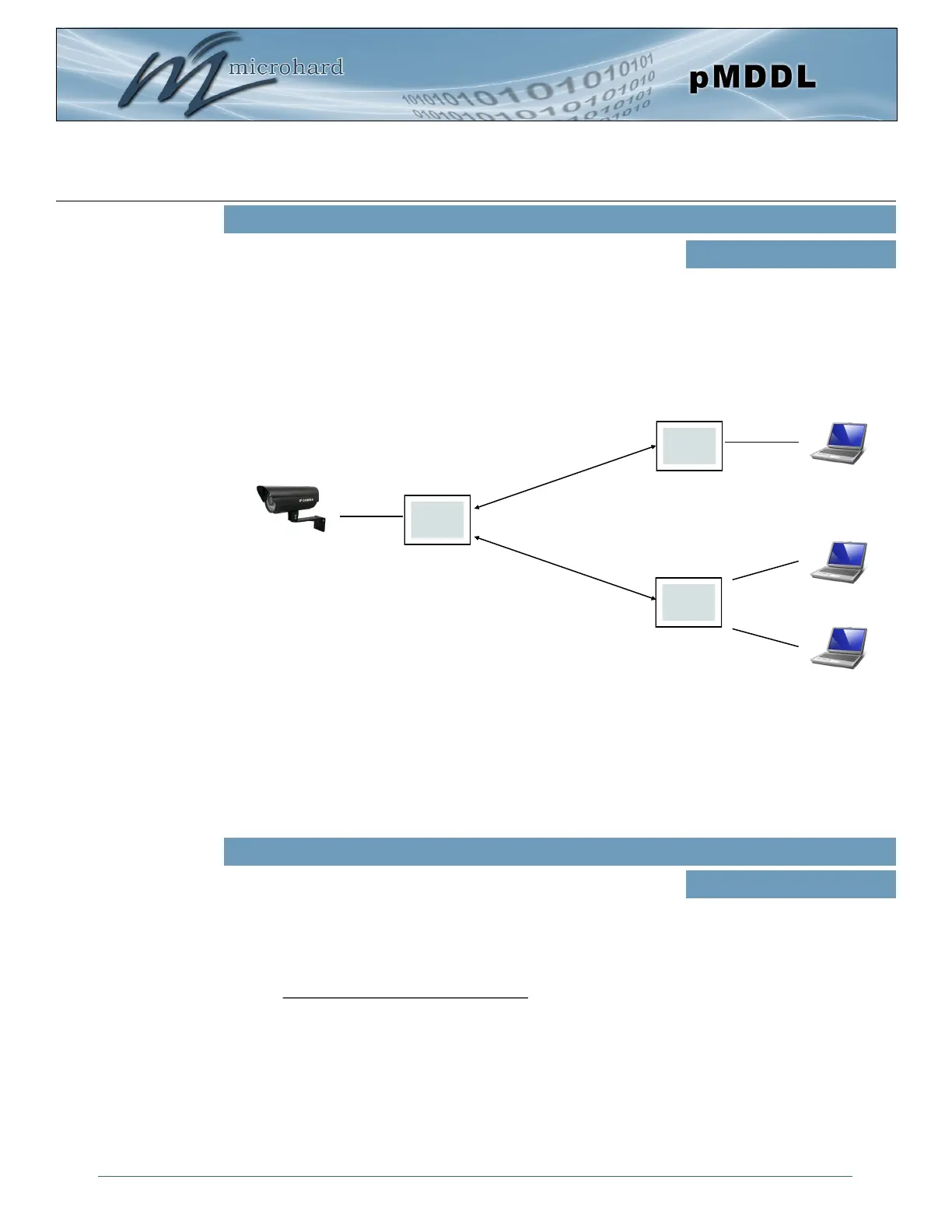
For video applications it is required to connect the video source (camera) to the radio designated as the
Master. Video receivers would then be connected to the Slave radios, this would allow for multiple viewing
stations. See the diagram below for an example.
M
S
Wireless
Ethernet
Ethernet
S
Ethernet
Wireless
The Video source should always be connected
to the Master radio.
Diagram 4-3-1: Operating Modes
This setting determines the modulation type and in turn the rate at
which the data is to be wirelessly transferred.
The default and recommended setting for both Master and Slave
units is ‘Auto’. When in ‘Auto’ the unit will transfer data at the highest
possible rate in consideration of the receive signal strength (RSSI).
Refer to Section 1.3 Performance Specifications for a table breakdown
of performance at selected rates. If setting a fixed TX Rate It is
recommended to retain a fade margin of at least 10 dBm for optimum
performance. For example, for a link (8MHz channel) with a signal
strength of at least –75dBm, a TX rate of 16-QAM 3/4 FEC is
recommended. Setting to the highest rate with a poor link may result
in reduced performance.
TX Rate
Values (selection)
Auto (recommended)
64-QAM 5/6 FEC
64-QAM 3/4 FEC
64-QAM 2/3 FEC
16-QAM 3/4 FEC
16-QAM 1/2 FEC
QPSK FEC 3/4
QPSK FEC 1/2
For multicast traffic sending from the Master to multiple receivers, it is recommended to configure the
system with “Extended Addressing” disabled and also select a proper multicast rate defined by the link
budget. In this case, the multicast traffic will be delivered on the specified RF rate to multiple receivers
without adding extra overhead to the RF link. Devices on the Slaves side just need to subscribe the
multicast address being used by the transmitting device connected on the Master side.



 To Next Page