© Microhard 93
4.0 Configuration
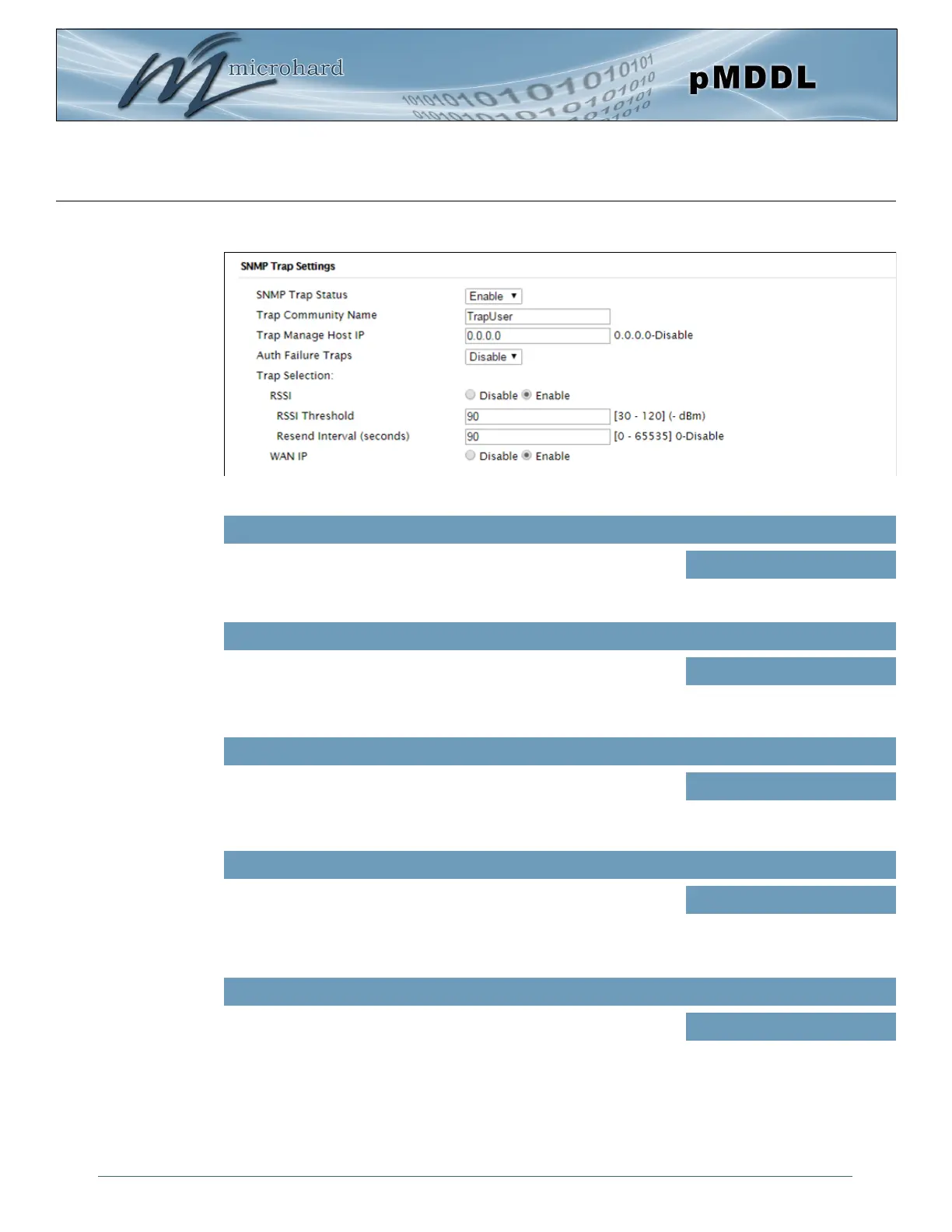
Image 4-7-4: Admin > SNMP Trap Settings
Enable or disable autonomous SNMP traps from the device.
SNMP Trap Status
Values (selection)
Disable / Enable
SNMP Trap Settings
Effectively a plain-text password mechanism used to weakly
authenticate SNMP queries. Being part of the community allows the
SNMP agent to process SNMP traps.
Trap Community Name
Values (string)
TrapUser
Enter the IP address of the SNMP host to which SNMP traps are sent
from the device.
Trap Manage Host IP
Values (IP Address)
0.0.0.0
Enable or Disable authentication requirements for outgoing configured
SNMP event traps.
Auth Failure Traps
Values (selection)
Disable / Enable
Enable or Disable RSSI traps. The threshold in which that traps are
triggered can also be configured, as well as the frequency at which the
traps are sent when the threshold has been crossed.
RSSI
Values (selection)
Disable / Enable
90 (30-120) in -dBm
90 (0 - 65535 seconds, 0=disabled.)



 To Next Page