Preva Installation/Service Manual, 00-02-1577, Revision E01
66
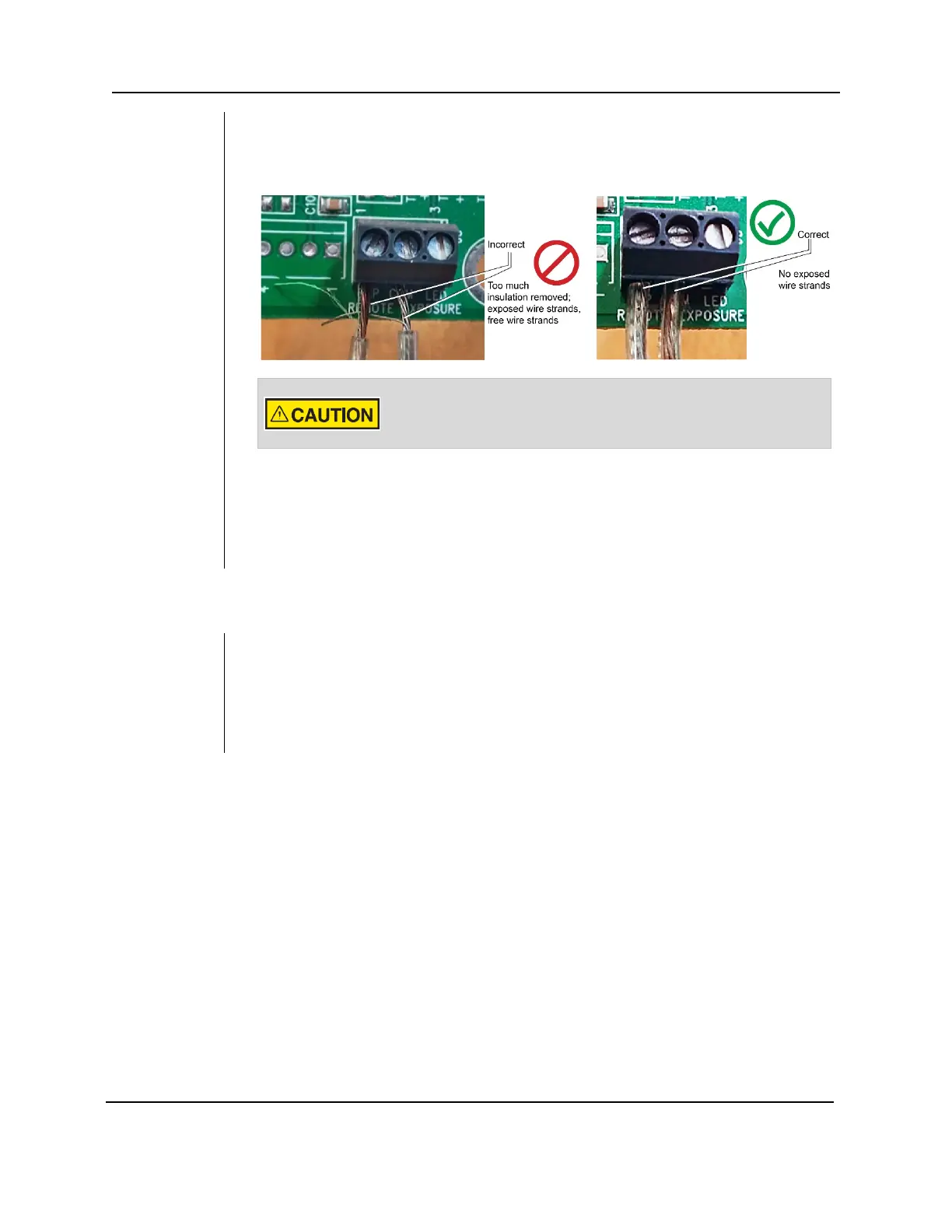
Figure 48
Correctly
connecting
wires to the
terminal
block
4. Use a small flat-head screwdriver to connect the remote exposure switch wires to
the “EXP” and “COM” terminals of terminal block J2. It is critical that there be no
exposed wire strands outside the terminal block (as shown the photograph on the
right).
The exposure switch wires must be connected to the terminal block
with no exposed strands of wire. Exposed wires can short circuit and
cause unintended exposure to radiation.
5. Swing the logic board closed and secure it with the locking screw
6. Replace the control unit cover.
7. Follow the manufacturer’s directions to connect the two-way switch to the other
ends of the wires.
Installing the 12 Inch [30 CM] Cone (30-A2200)
The Preva Dental X-ray System is factory set for use with the standard supplied 8 inch
[20 cm] Cone. The 12 inch [30 cm] Cone (30-A2200) is recommended when using
parallel film positioning techniques. Using the longer cone requires longer exposure
times. See the System Configuration section of this manual on page
67 or setting the
system to use the longer cone.



 To Next Page