Operation 2-4
NOTICE:
The
Attract Mode volume level is separate from the Game Mode volume level.
For greater profits, raise volume levels to add realism and draw attention to this game.
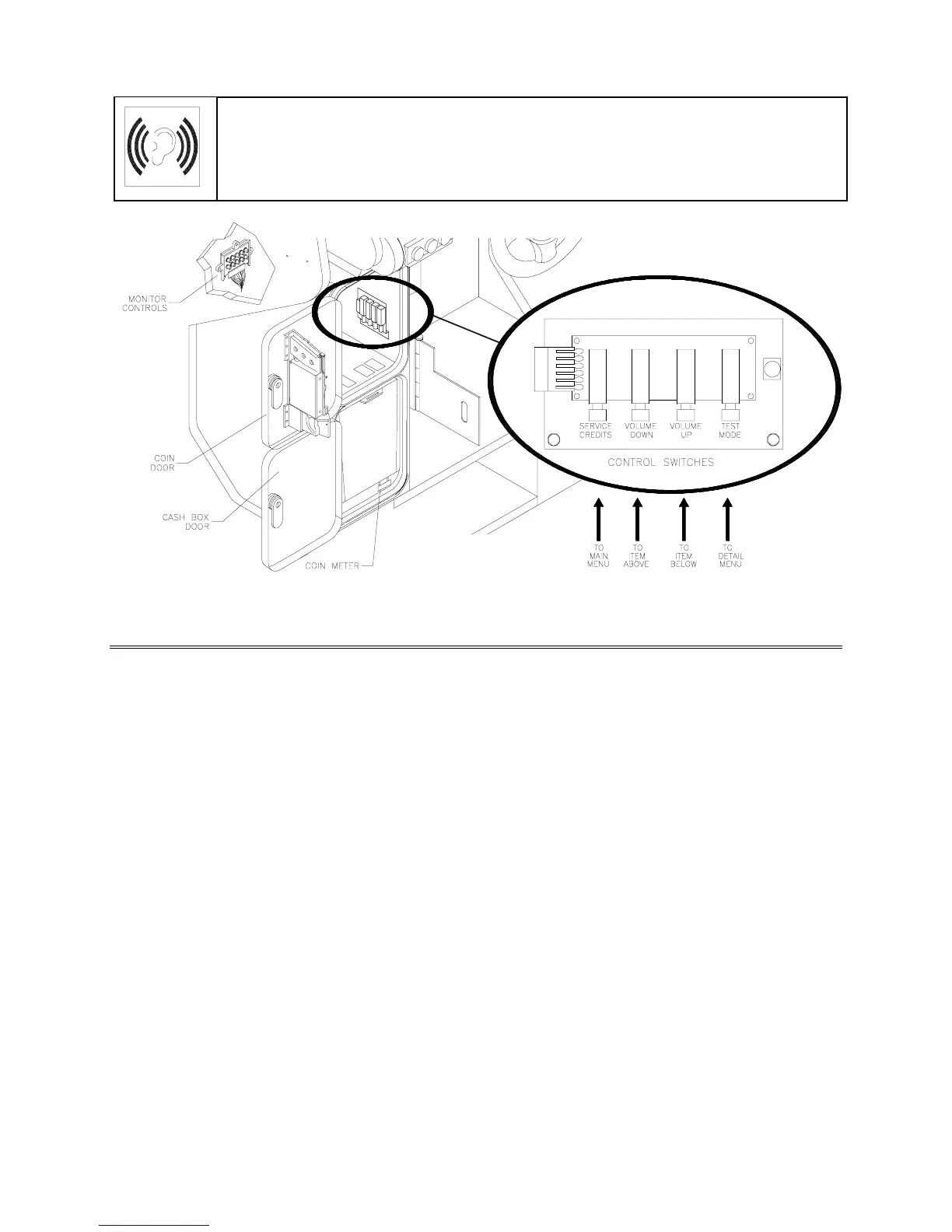
Operator Control Switch Locations
GAME FEATURES
GAME RULES
INSTRUCTIONS
Play instructions appear on the left and right sides of the video monitor.
ONE PLAYER
The player inserts currency or tokens to start the game. Next, the player chooses a truck and course and
presses the START button. The game displays individual statistics periodically, during and after the race.
Additional game information appears on screen as needed.
PLAYER CHOICES
The player can drive any truck on any course. Each truck handles and performs differently. Players learn
which trucks are best for a given course and driving style. Press one of the CAM buttons to select more
trucks.
CONTROLLING A TRUCK
The steering wheel, brake and accelerator control the truck. As in real trucks, the steering wheel directs
the truck. The brake slows or stops the truck, and the accelerator sets speed. A NITRO button on the
gearshift provides an extra burst of power. NITRO flashes to indicate nitro availability. Players must collect
nitro icons along a course by steering directly under the icons. A gauge meters the amount of stored nitro.
INDICATORS
Across the top of the screen, numeric indicators display truck statistics: A ghost image in the upper-left
screen corner indicates shift type, manual or automatic. A meter in the top-left screen corner displays












 To Next Page