Diagnostic, Audit & Adjustment Menu System 3-5
Operator Menu (continued)
Diagnostics Menu (continued)
Switch Test Menu
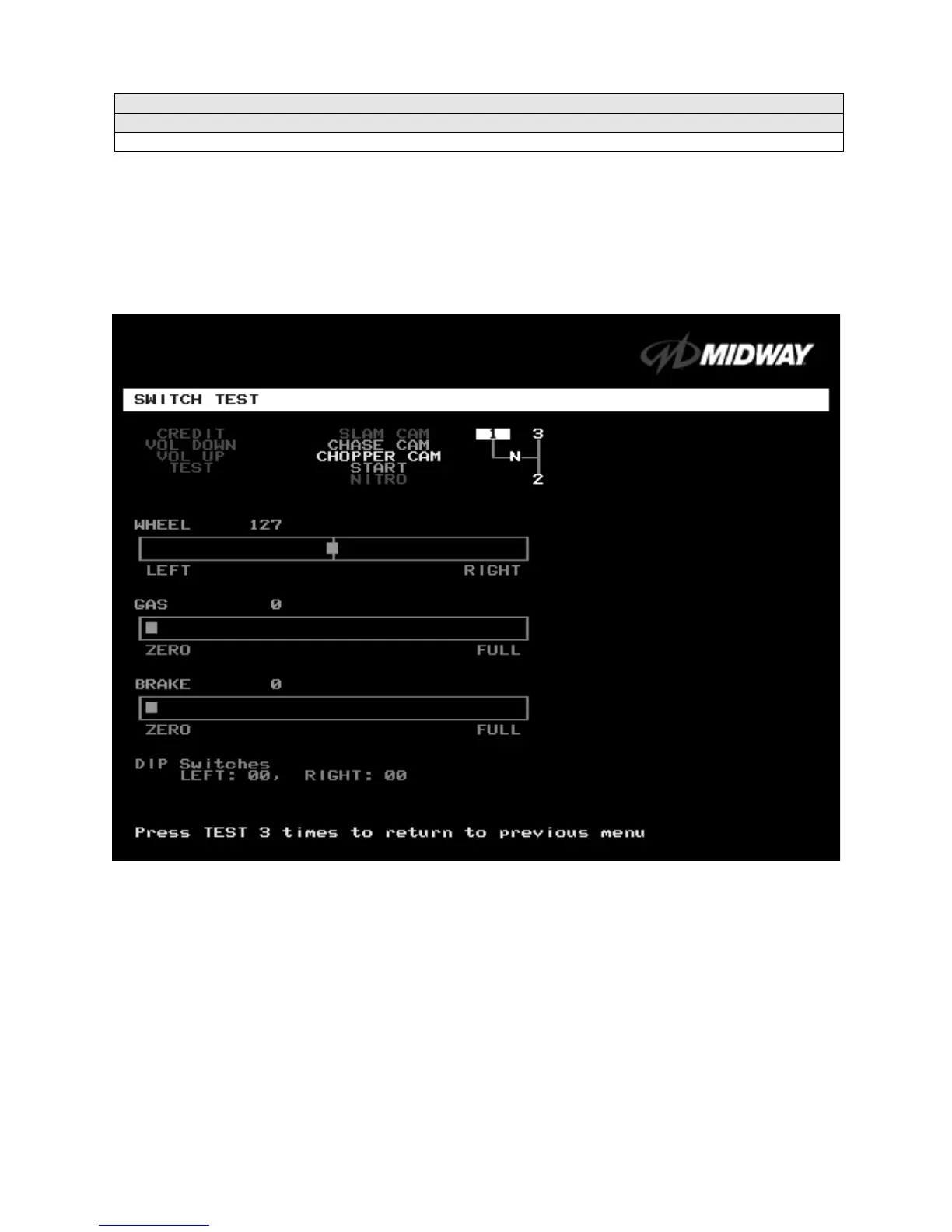
SWITCH TEST
Select SWITCH TEST at the Diagnostics Menu. Use the Switch Test to verify crossed wires, intermittent
conditions, and stuck switches.
Operate the switch and watch the screen display. After completing tests,
press TEST MODE three times
to return to the Diagnostics Menu.
SWITCH TEST SCREEN
BUTTON TESTS
check player and Diagnostic switches, such as CREDIT, TEST and SLAM CAM.
Activate each button, and the screen indicator changes state. (Gray means off and green means on.)
Release the button and the indicator returns to its previous state. A single indication on the screen should
exactly duplicate each button change.
THE WHEEL TEST
indicates the steering wheel position with a moving bar on a graph. The screen also
displays a wheel position number. This number varies between zero (full left) and 255 (full right).
THE GAS TEST
indicates the gas pedal position with a moving bar on a graph. The screen also displays a
pedal position number. This number varies between zero (full back) and 255 (full forward).
THE BRAKE TEST
indicates the brake pedal position with a moving bar on a graph. The screen also
displays a pedal position number. This number varies between zero (full back) and 255 (full forward).












 To Next Page