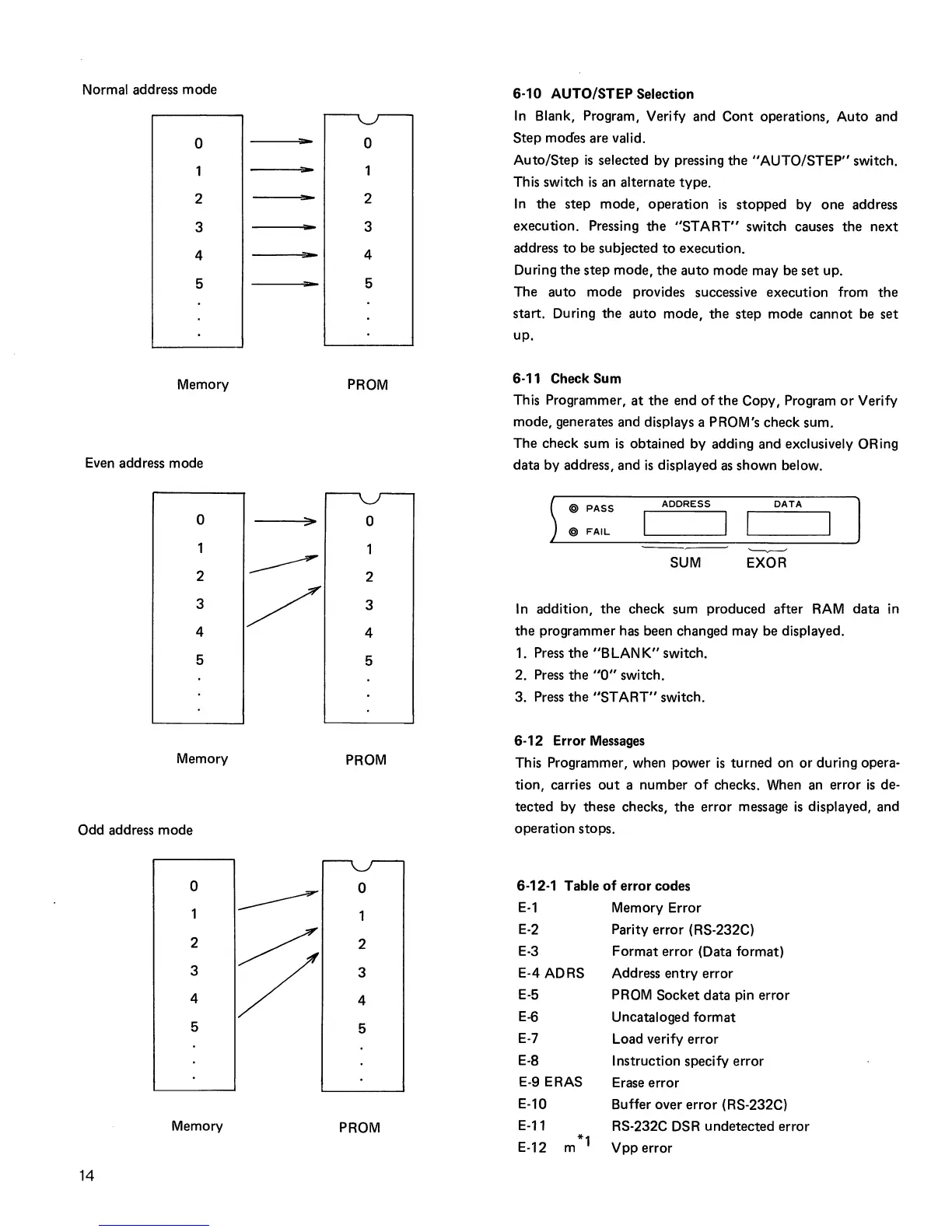
Normal address
mode
o
2
3
4
5
Memory
Even address mode
o
2
3
4
5
Memory
Odd address mode
14
o
2
3
4
5
Memory
"'"
-
o
2
3
4
5
PROM
o
2
3
4
5
PROM
o
2
3
4
5
PROM
6-10 AUTO/STEP Selection
In
Blank, Program, Verify and
Cont
operations,
Auto
and
Step
modes are valid.
Auto/Step
is
selected by pressing
the
"AUTO/STEP"
switch.
Th
is
switch
is
an alternate type.
In
the
step
mode, operation
is
stopped
by
one
address
execution. Pressing
the
"START"
switch causes
the
next
address
to
be subjected
to
execution.
During
the
step
mode,
the
auto
mode may be set up.
The
auto
mode
provides successive execution from
the
start. During
the
auto mode,
the
step
mode
cannot
be
set
up.
6-11 Check Sum
This Programmer,
at
the
end
of
the
Copy, Program
or
Verify
mode, generates and displays a PROM's check sum.
The check sum
is
obtained by adding and exclusively ORing
data by address, and
is
displayed
as
shown below.
) @ PASS
@
FAIL
ADDRESS
DATA
I I
'-------v------
SUM
EXOR
In
addition,
the
check sum produced after
RAM
data
in
the
programmer has been changed may be displayed.
1. Press
the
"BLANK"
switch.
2. Press
the
"0"
switch.
3.
Press
the
"ST
ART"
switch.
6-12 Error Messages
This Programmer, when power
is
turned
on
or
during opera-
tion, carries
out
a number
of
checks. When an error
is
de-
tected by these checks,
the
error message
is
displayed, and
operation stops.
6-12-1 Table
of
error codes
E-1
E-2
E-3
E-4 ADRS
E-5
E-6
E-7
E-8
E-9 ERAS
E-10
E-11
E-12
*1
m
Memory Error
Parity
error
(RS-232C)
Format
error
(Data format)
Address
entry
error
PROM Socket data pin error
Uncataloged format
Load verify error
Instruction specify error
Erase
error
Buffer over
error
(RS-232C)
RS-232C DSR
undetected
error
Vpp
error



 To Next Page