8-1-2 Setting
the
serial IIF
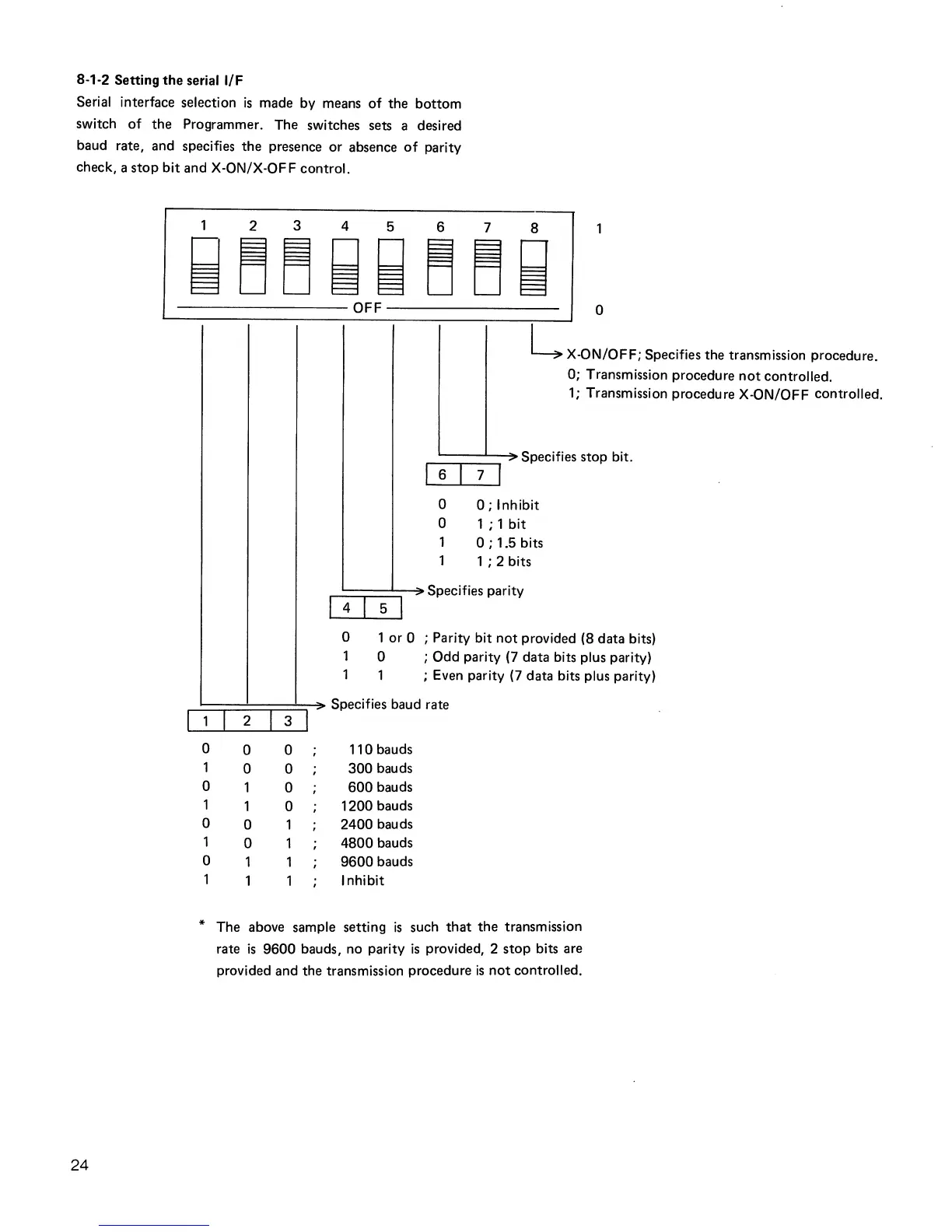
Serial interface selection
is
made by means of the bottom
switch of the Programmer. The switches sets a desired
baud rate, and specifies the presence or absence
of
parity
check, a
stop
bit and X-ON/X-OFF control.
24
12345678
~DD~~DD~
-----------------OFF-----------------
o
2
3
0
0
0
1
0 0
0
0
0
0
0
1
0
0
1
I
6
I
0
0
1
1
L X-ON/OFF; Specifies the transmission procedure.
0; Transmission procedure
not
controlled.
1;
Transmission procedure X-ON/OFF controlled.
I
' Specifies
stop bit.
7
0;
Inhibit
1 ; 1 bit
0;
1.5 bits
1 ; 2 bits
I 4 I 5 I
Specifies parity
o 1 or 0 ; Parity bit
not
provided (8 data bits)
1 0 ; Odd parity
(7
data bits plus parity)
1 1 ; Even parity
(7
data bits plus parity)
Specifies baud rate
110 bauds
300
bauds
600
bauds
1200
bauds
2400
bauds
4800
bauds
9600
bauds
Inhibit
* The above sample setting
is
such
that
the
transmission
rate
is
9600
bauds, no parity
is
provided, 2
stop
bits are
provided and the transmission procedure
is
not
controlled.



 To Next Page