5. Texas
SDSMAC
The following tags are appended
at
the
start, followed
by
data.
a)
I-!eader
o
or
K tag
This
is
located
at
the
start
of
an object, followed by
two
fields.
1st
field:
4 bytes. Total number
of
relative codes.
2nd
field: 8 bytes. Program name
b)
Data
B tag
The subsequent 4-digit ASCII code indicates two bytes
of
data.
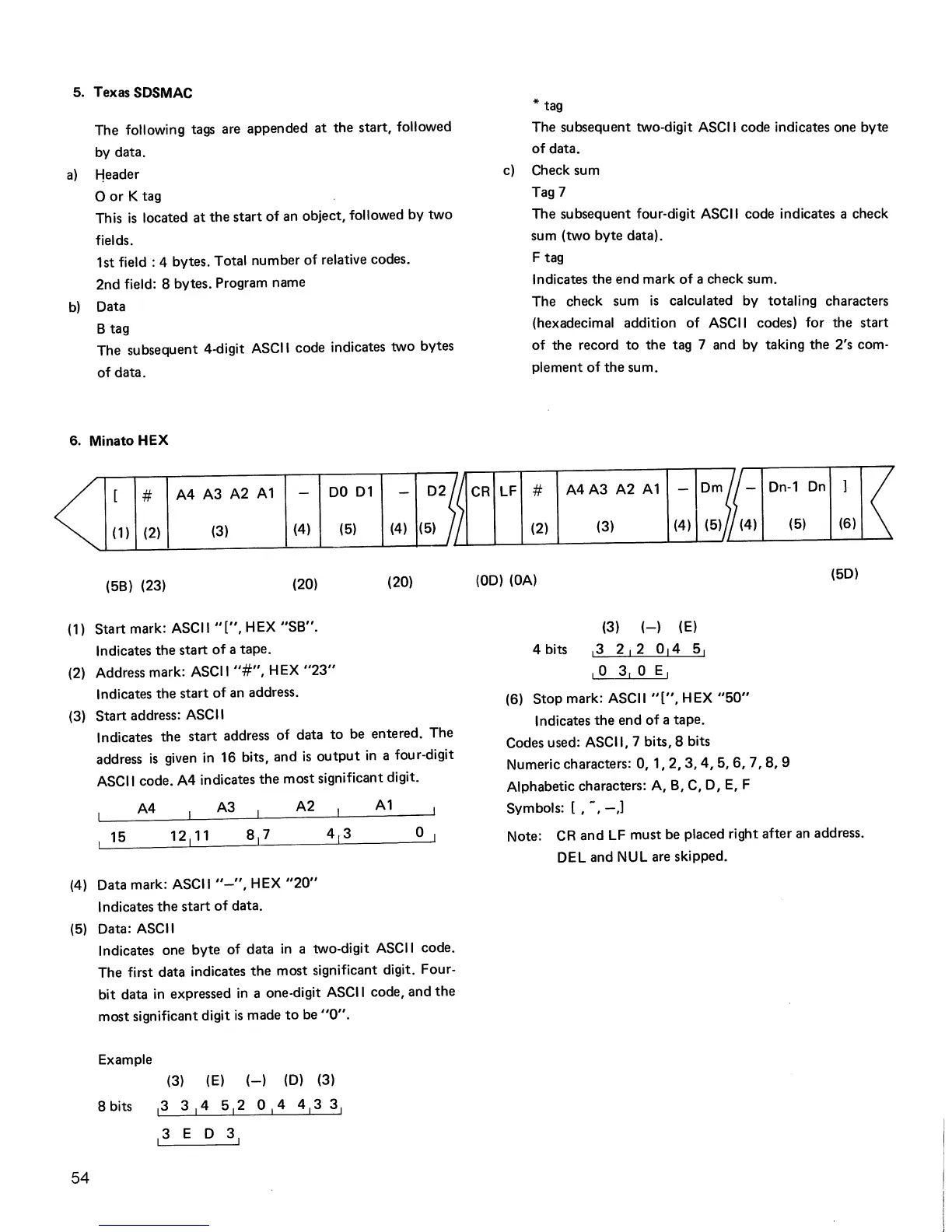
6. Minato
HEX
# A4 A3 A2
A1
DO
01
(1) (2)
(3)
(4)
(5)
(4) (5)
(5B) (23)
(20)
(20)
(1)
Start
mark: ASCII
"[",
HEX
"SB".
Indicates
the
start
of
a tape.
(2) Address mark: ASCII
"#",
HEX
"23"
Indicates
the
start
of an address.
(3)
Start
address: ASCII
Indicates
the
start
address
of
data
to
be entered. The
address
is
given
in
16 bits, and
is
output
in
a four-digit
ASCII code. A4 indicates
the
most significant digit.
A4 A3
A2
A1
15
o
(4) Data mark: ASCII
"-",
HEX
"20"
Indicates
the
start
of
data.
(5) Data: ASCII
54
Indicates one
byte
of
data
in
a two-digit ASCII code.
The first data indicates
the
most significant digit. Four-
bit data
in
expressed
in
a one-digit ASCII code,
and
the
most significant digit
is
made
to
be
"0".
Example
(3) (E)
(-)
(D) (3)
8 bits
13
3
1
4 5
1
2 0
1
4 4
1
3 3
1
13
E 0 3
1
* tag
The subsequent two-digit ASCII code indicates one byte
of
data.
c)
Check sum
Tag 7
The subsequent four-digit ASCII code indicates a check
sum (two byte data).
F tag
Indicates
the
end
mark
of
a check sum.
The check sum
is
calculated by totaling characters
(hexadecimal addition
of
ASCII codes) for
the
start
of the record
to
the
tag 7 and by taking the 2's com.
plement
of
the
sum.
CR
LF
# A4 A3 A2 A 1
Dn-1
On
(2)
(3)
(4) (5)
(00)
(OA)
(3)
(-)
(E)
4 bits
13
2 I 2 0
14
51
10
3,0
EI
(6)
Stop
mark: ASCII
"[",
HEX
"50"
Indicates
the
end
of
a tape.
Codes used: ASCII,
7 bits, 8 bits
Numeric characters:
0,
1,2,3,4,5,6,
7,8,9
Alphabetic characters: A, B, C,
0,
E,
F
Symbols: [ ,
~,
-,J
(5) (6)
(50)
Note: CR
and
LF must be placed right
after
an address.
DEL and NUL are skipped.



 To Next Page