OOA
AD
A1
A2
A3 A4 A5 CR
(5)(6)(5)(Sf(5)
(6)
(5)
(6)
(5) (6) (5) - m
(1) Enter
"I"
which signifies the insert instruction.
(2) Enter an address to which data
is
to
be inserted,
in
alphanumerics consisting
of
not
more
than
four digits.
(3) After entering the address,
enter
"CR".
(4)
The
entered address
is
displayed.
(5) Enter data. When entered data
is
of
not
less
than two
digits, the last
two
characters are valid.
(6)
Place
"SP"
between data.
(7) After
the
completion
of
insertion,
enter
"CR".
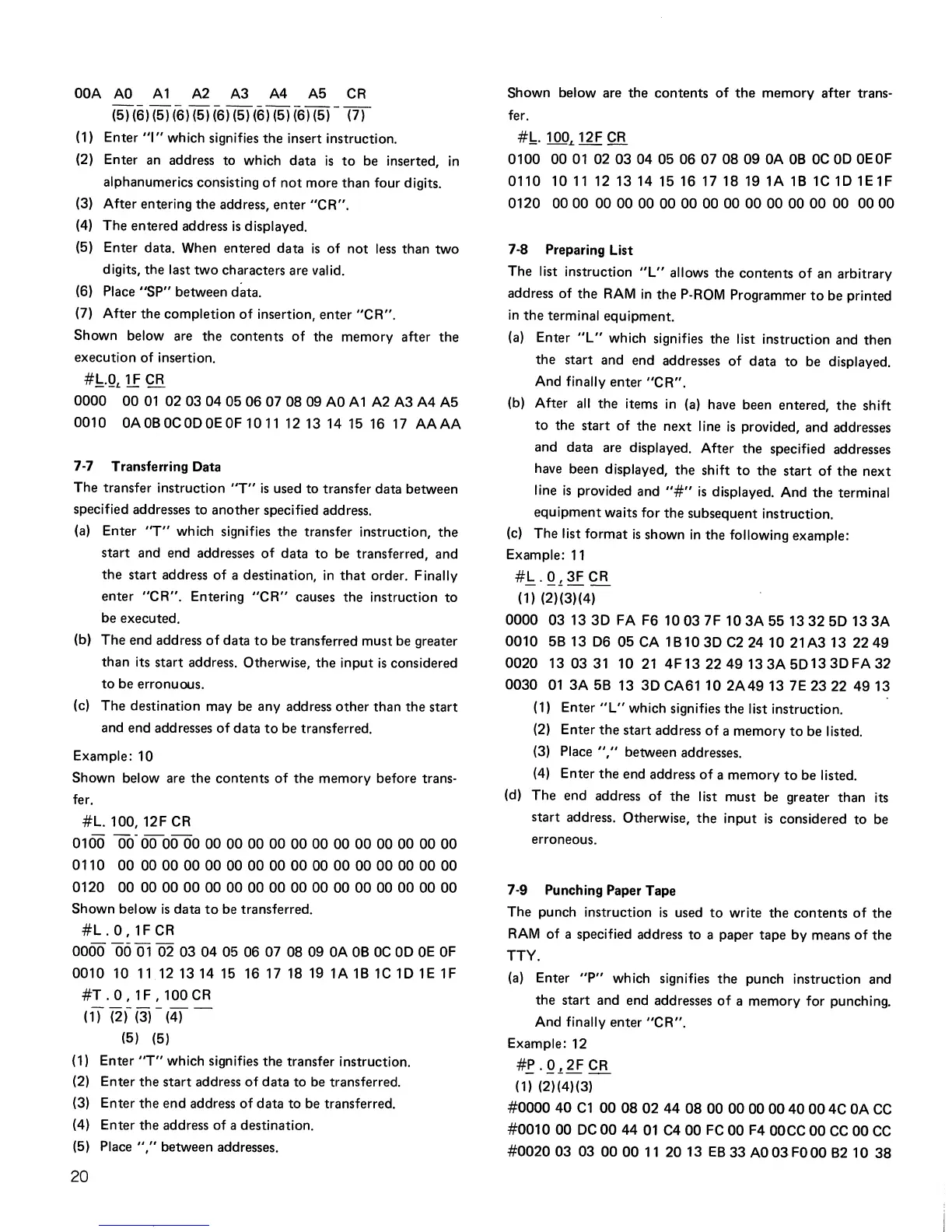
Shown below are the contents of the memory after
the
execution of insertion.
#!:,..QL
1F
CR
0000
0001
0203040506070809
AD
A1
A2 A3 A4 A5
0010
OAOBOCODOEOF101112131415
16
17
AAAA
7·7 Transferring Data
The transfer instruction
"T"
is
used
to
transfer data between
specified addresses
to
another specified address.
(a)
Enter
"T"
wh
ich
signifies
the
transfer instruction,
the
start
and end addresses
of
data
to
be transferred, and
the
start address of a destination,
in
that
order. Finally
enter
"CR".
Entering
"CR"
causes the instruction
to
be executed.
(b) The end address
of
data
to
be transferred must be greater
than
its
start
address. Otherwise,
the
input
is
considered
to
be erronuous.
(c)
The
destination may be any address
other
than the
start
and end addresses
of
data
to
be transferred.
Example: 10
Shown below are
the
contents
of
the
memory before trans·
fer.
#L.100,
12F CR
0100
00·
600000000000000000000000000000
0110
00
00
00
00
00
00
00
00
00
00
00
00
00
00
00
00
0120
00
000000000000000000000000000000
Shown below
is
data
to
be transferred.
#L.
0,
1F
CR
0000
06
01
02
03 04
05 06 07
0809
OA
DB DC
OD
DE
OF
0010
10
1112131415
16171819
1A
1B
1C
10
1E
1F
#T
.
0,
1 F ,
100
CR
(if
(2,- (3) -
(4)
-
(5)
(5)
(1) Enter
'T"
which signifies the transfer instruction.
(2) Enter
the
start
address
of
data
to
be transferred.
(3) Enter the end address of data to be transferred.
(4) Enter
the
address of a destination.
(5) Place
","
between addresses.
20
Shown below are
the
contents
of
the
memory after trans·
fer.
#,b. 1
DOL
12F
CR
0100
0001
02030405
06070809
OA
DB
DC
OD
OEOF
0110
1011
121314151617
18 19 1A
1B
1C
10
1E1F
0120
0000
000000
00000000
00 00
00
00
00
0000
7·8 Preparing List
The list instruction
"L"
allows the contents
of
an arbitrary
address of
the
RAM
in
the
P·ROM Programmer
to
be printed
in
the
terminal equipment.
(a)
Enter
"L"
which signifies the list instruction and then
the
start and end addresses
of
data
to
be displayed.
And finally enter
"CR".
(b) After
all
the items
in
(a)
have been entered,
the
shift
to
the
start
of
the
next
line
is
provided, and addresses
and data are displayed. After the specified addresses
have been displayed,
the
shift
to
the
start
of
the
next
line
is
provided and
"#"
is
displayed. And
the
terminal
equipment waits for
the
subsequent instruction.
(c)
The list format
is
shown
in
the following example:
Example:
11
#.!::..Q.t.
3FCR
(1) (2)(3)(4)
0000
03
13 3D FA F6
1003
7F
10
3A
551332
5D 13
3A
0010
5B
13
D6
05
CA
1B10
3D
C2
2410
21A313
2249
0020
130331
1021
4F13
2249133A5D133DFA32
0030
01
3A
5B 13
3D
CA6110
2A49
13 7E
23
22
4913
(1) Enter
"L"
which signifies
the
list instruction.
(2) Enter
the
start address
of
a memory
to
be listed.
(3) Place
","
between addresses.
(4)
Enter
the
end address
of
a memory
to
be listed.
(d)
The
end address of the list must be greater than its
start
address. Otherwise,
the
input
is
considered
to
be
erroneous.
7·9
Punching Paper Tape
The punch instruction
is
used
to
write
the
contents
of
the
RAM
of a specified address
to
a paper tape
by
means
of
the
TTY.
(a)
Enter
"P"
which signifies the punch instruction and
the start and end addresses
of
a memory for punching.
And finally enter
"CR".
Example: 12
#f·Q.t.
2FCR
(1) (2)(4) (3)
#000040
C1
0008024408000000004000
4C
OA
CC
#0010
00
DC
00
44
01
C4
00
FC
00
F4
OOCC
00
CC
00
CC
#002003
03
0000
11
2013
EB
33
AD
03FOOO
B2
10
38



 To Next Page