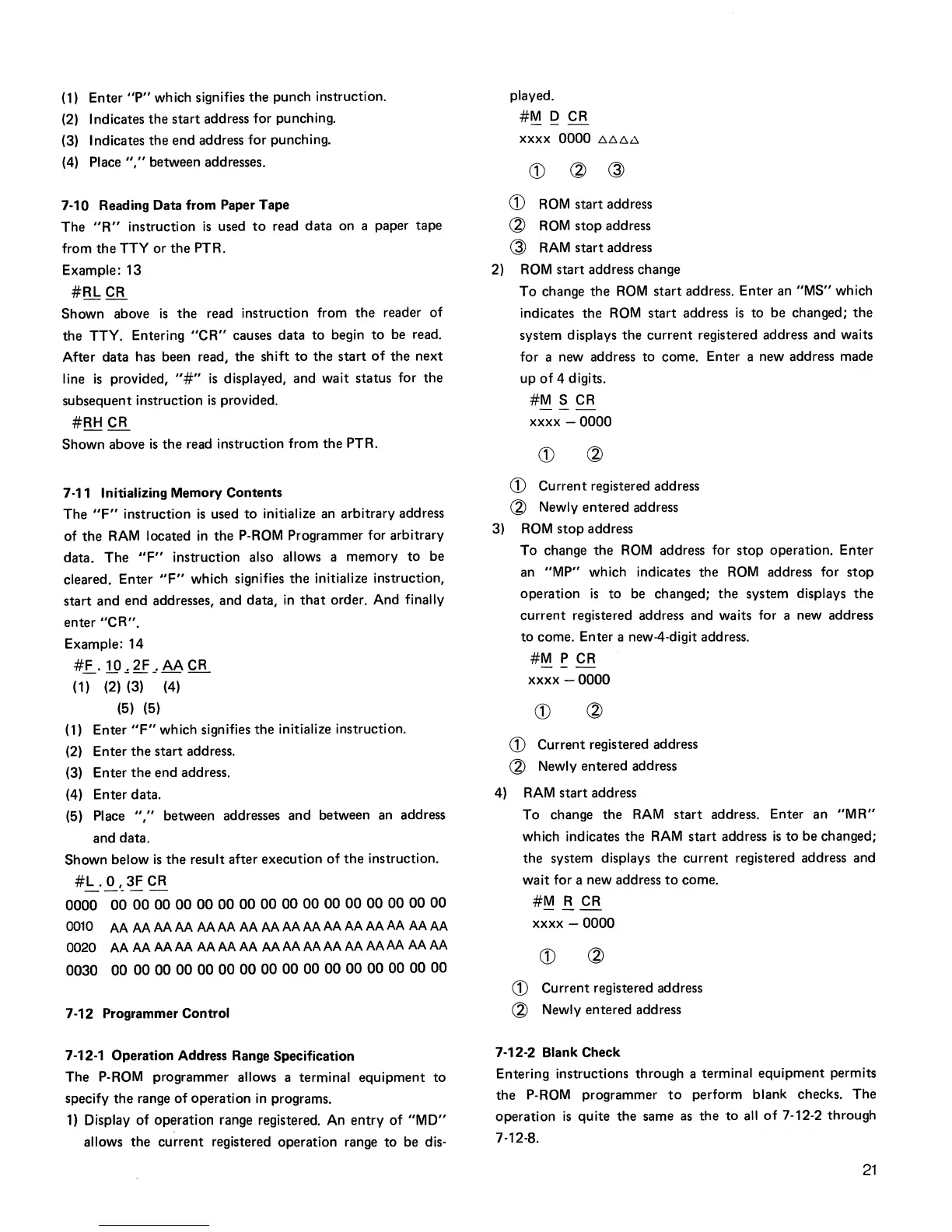
(1) Enter
"P"
which signifies
the
punch instruction.
(2) Indicates
the
start
address for punching.
(3) Indicates
the
end
address for punching.
(4) Place
","
between addresses.
7-10 Reading Data from Paper Tape
The
"R"
instruction
is
used
to
read
data
on a paper tape
from
the
TTY
or
the
PTR.
Example: 13
#RLCR
Shown
above
is
the
read instruction from
the
reader
of
the
TTY. Entering
"CR"
causes
data
to
begin
to
be read.
After data has been read,
the
shift
to
the
start
of
the
next
line
is
provided,
"#"
is
displayed, and
wait
status for
the
subsequent instruction
is
provided.
#RH
CR
Shown above
is
the
read instruction from
the
PTR.
7-11 Initializing Memory Contents
The
"F"
instruction
is
used
to
initialize an arbitrary address
of
the
RAM
located
in
the
P-ROM Programmer for arbitrary
data_
The
"F"
instruction also allows a
memory
to
be
cleared. Enter
"F"
which signifies
the
initialize instruction,
start
and end addresses, and data,
in
that
order. And finally
enter
"CR".
Example: 14
#E....
19
~
2F
-'
AA CR
(1) (2) (3) (4)
(5) (5)
(1)
Enter
"F"
which signifies
the
initialize instruction.
(2) Enter
the
start
address.
(3) Enter
the
end
address.
(4) Enter data.
(5) Place
","
between addresses and between an address
and data.
Shown below
is
the
result after execution
of
the
instruction.
#!:..
.
.Q.,_
3F CR
0000
00 00
00
00 00
00 00 00 00 00 00 00 00 00 00 00
~o
MMMMMMMMMMMMMMMM
OO~MMMMMMMMMMMMMMMM
0030
00
00 00
00
00 00 00 00 00
00
00 00 00
00 00
00
7-12 Programmer Control
7-12-1 Operation Address Range Specification
The P-ROM programmer allows a terminal
equipment
to
specify
the
range
of
operation
in
programs.
1)
Display
of
operation range registered. An
entry
of
"MD"
allows
the
current
registered operation range
to
be dis-
played.
#M
D CR
xxxx
0000
!::,!::,!::,i:;,
CD
~
~
CD
ROM
start
address
~
ROM
stop
address
~
RAM
start
address
2)
ROM
start address change
To
change
the
ROM
start
address. Enter an
"MS"
which
indicates
the
ROM
start
address
is
to
be changed;
the
system displays
the
current
registered address and waits
for a new address to come. Enter a new address made
up
of
4 digits.
#M
S CR
xxxx -
0000
CD
Current
registered address
~
Newly entered address
3)
ROM
stop
address
To
change
the
ROM
address for
stop
operation. Enter
an
"MP"
which indicates
the
ROM
address for
stop
operation
is
to
be changed;
the
system displays
the
current
registered address and waits for a new address
to
come. Enter a new-4-digit address.
#M
P CR
xxxx
-0000
CD
CD
Current registered address
~
Newly entered address
4)
RAM
start
address
To change
the
RAM
start
address. Enter an
"MR"
which indicates
the
RAM
start
address
is
to
be changed;
the
system displays
the
current
registered address and
wait
for a new address
to
come.
#M
R CR
---
xxxx -
0000
CD
CD
Current registered address
~
Newly entered address
7-12-2 Blank Check
Entering instructions through a terminal
equipment
permits
the
P-ROM
programmer
to
perform blank checks.
The
operation
is
quite
the
same as
the
to
all
of
7-12-2 through
7-12-8.
21



 To Next Page