EasyManua.ls Logo

MINATO 1866 - Display; Key Switches

Default Icon
64 pages
Print Icon
To Next Page IconTo Next Page
To Previous Page IconTo Previous Page
Loading...
4-2
Display
I
---0
P A
SS
2 1
---0
~
AIL
Q)
C
® 0
([J
8
@ 9
15
ADDR
ESS
In'-""'
I
~
'-'
'-,
'-'
@ E
rID
A
16
17
n A
TA
r
CCLL
I
'-' '-'
L'
'-'
J
® F
@ B
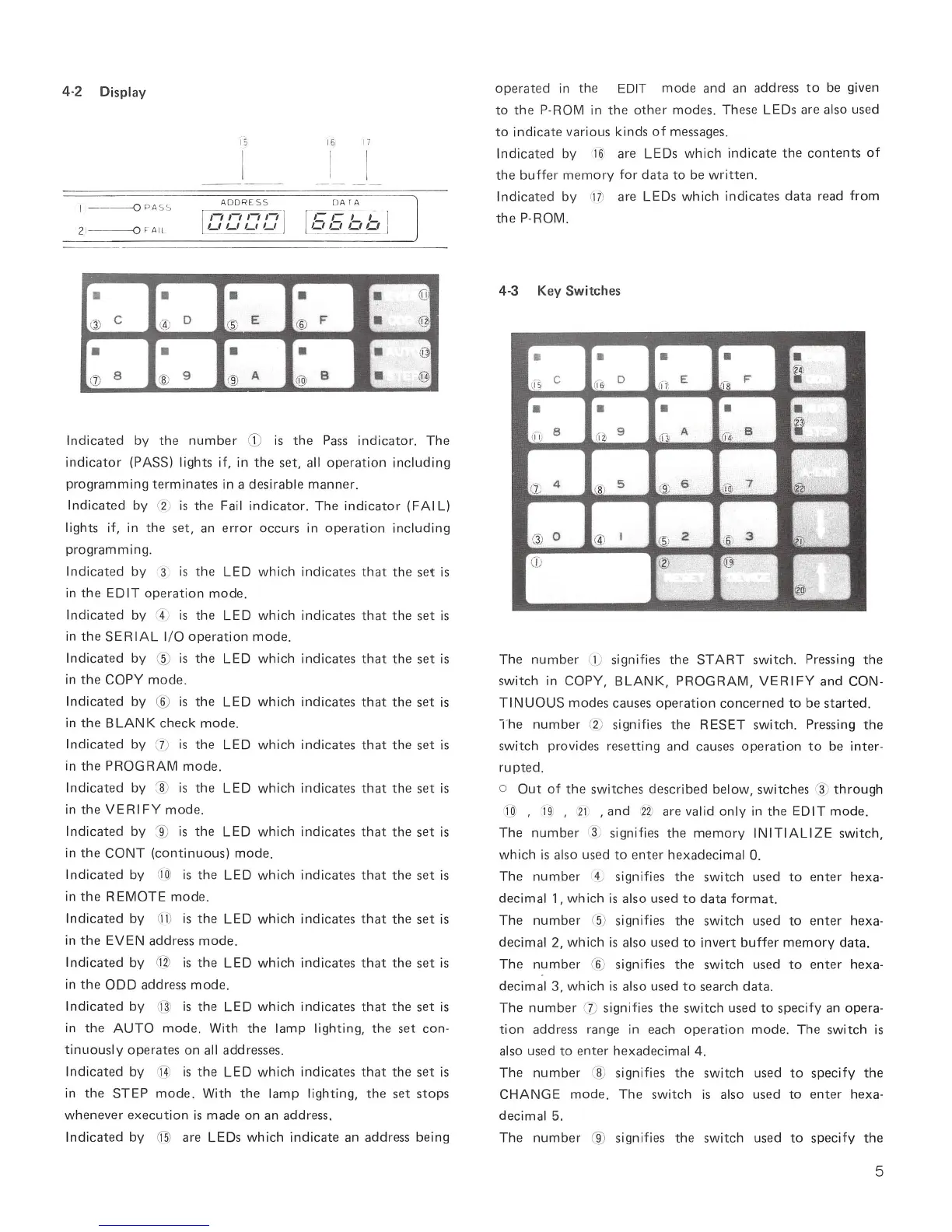
Indicated
by
the
number
CD
is
the
Pass
indicator.
The
indicator
(PASS) lights if, in
the
set,
all
operation
including
programming
terminates
in a
desirable
manner.
Indicated
by
(2;
is
the
Fail
indicator.
The
indicator
(FAI L)
lights if, in
the
set,
an
error
occurs
in
operation
including
programming.
Indicated
by
(3
is
the
LED
which
indi
cates
that
the
set
is
in
the
EDIT
operation
mode.
Indicated
by
r4
)
is
the
LED
which
indicates
that
the
set
is
in
the
SERIAL
I/ O
operation
mode
.
Indicated
by
®
is
the
LED
which
indicates
that
the
set
is
in
the
COpy
mode.
Indicated
by
®
is
the
LED
which
indicates
that
the
set
is
in
the
BLANK
check
mode.
Indicated
by
(
7)
is
the
LED
which
indicates
that
the
set
is
in
the
PROGRAM
mode.
Indicated
by
~
is
the
LED
wh
i
ch
i
ndicates
that
the
set
is
in
the
VERIFY
mode
.
Indicated
by
~
is
the
LED
which
indicates
that
the
set
is
in
the
CONT
(continuous)
mode.
Indicated
by
'1Ql
is
the
LED
which
indicates
that
the
set
is
in
the
REMOTE
mode
.
Indicat
ed
by
OJ)
is
the
LED
which
indicates
that
the
set
is
in
the
EVEN
address
mode.
Indicated
by
C11l
is
the
LED
wh
i
ch
i
ndicates
that
the
set
is
in
the
ODD
address
mode.
Indicated
by
@
is
the
LED
which
indicates
that
the
set
is
in
the
AUTO
mode.
With
the
lamp
lighting,
the
set
con-
tinuously
operates
on
all
addresses.
Indicated
by
rj]
is
the
LED
which
indicates
that
the
set
is
in
the
STEP
mode.
With
the
lamp
lighting,
the
set
stops
whenever
execution
is
made
on
an
address.
Indicated
by
~
are
LEDs
which
indicate
an
address
being
operated
in
the
EDIT
mode
and
an
address
to
be given
to
the
P-ROM
in
the
other
modes.
Th
ese LEDs
are
also
used
to
indicate
various
kinds
of
messages.
Indicated
by
16
)
are
LEDs
which
indicate
the
contents
of
the
buffer
memory
for
data
to
be
written.
Indicated
by
M)
are
LEDs
which
indicates
data
read
from
the
P-ROM.
4-3
Key
Switches
The
number
(1; signifies
the
START
switch.
Pressing
the
switch
in
COPY,
BLANK,
PROGRAM,
VERIFY
and
CON-
TI
NUOUS
modes
causes
operation
concerned
to
be
started.
The
number
(2)
signifies
the
RESET
switch.
Pressing
the
switch
provides
resetting
and
causes
operation
to
be
inter-
ru
pted.
o
Out
of
the
switches
described
below,
switches
~
through
I
OJ
,
I
~
,
21
,and
n
are
valid
only
in
the
EDIT
mode.
The
number
3
~
signifies
the
memory
INITIALIZE
switch,
which
is
also
used
to
enter
hexadecimal
O.
The
number
4) signifies
the
switch
used
to
enter
hexa-
decimal
1,
which
is
also
used
to
data
format.
The
number
(5) signifies
the
sw
itch
used
to
enter
hexa-
decimal
2,
which
is
also
used
to
invert
buffer
memory
data.
The
number
(6)
signifies
the
switch
used
to
enter
hexa-
decimal
3,
wh
ich
is
also
used
to
search
data.
The
number
(j)
signifies
the
switch
used
to
specify
an
opera
-
tion
address
range
in
eac
h
operat
i
on
mode.
The
switch
is
also
used
to
enter
hexadecimal
4.
The
number
® signifies
the
switch
used
to
specify
the
CHANGE
mode.
The
switc
h
is
also
used
to
enter
hexa-
decimal
5.
The
number
® signifies
the
switch
used
to
specify
the
5

Table of Contents