mindray
DC7 Diagnostic Ultrasound System
11
1. If the printer cannot support the [Film Size] of 8IN*10IN, please modify it that the
printer can support.
2. It will implement color printing when [Settings] is set as RGB, black and white printing
when it is set as MONOCHROME2.
3. For [Media Type], select Blue Film or Clear Film for black and white printing; select
Paper for color printing.
4. Other parameters can use defaulted values. If there are special requirements for
printer, please modify it.
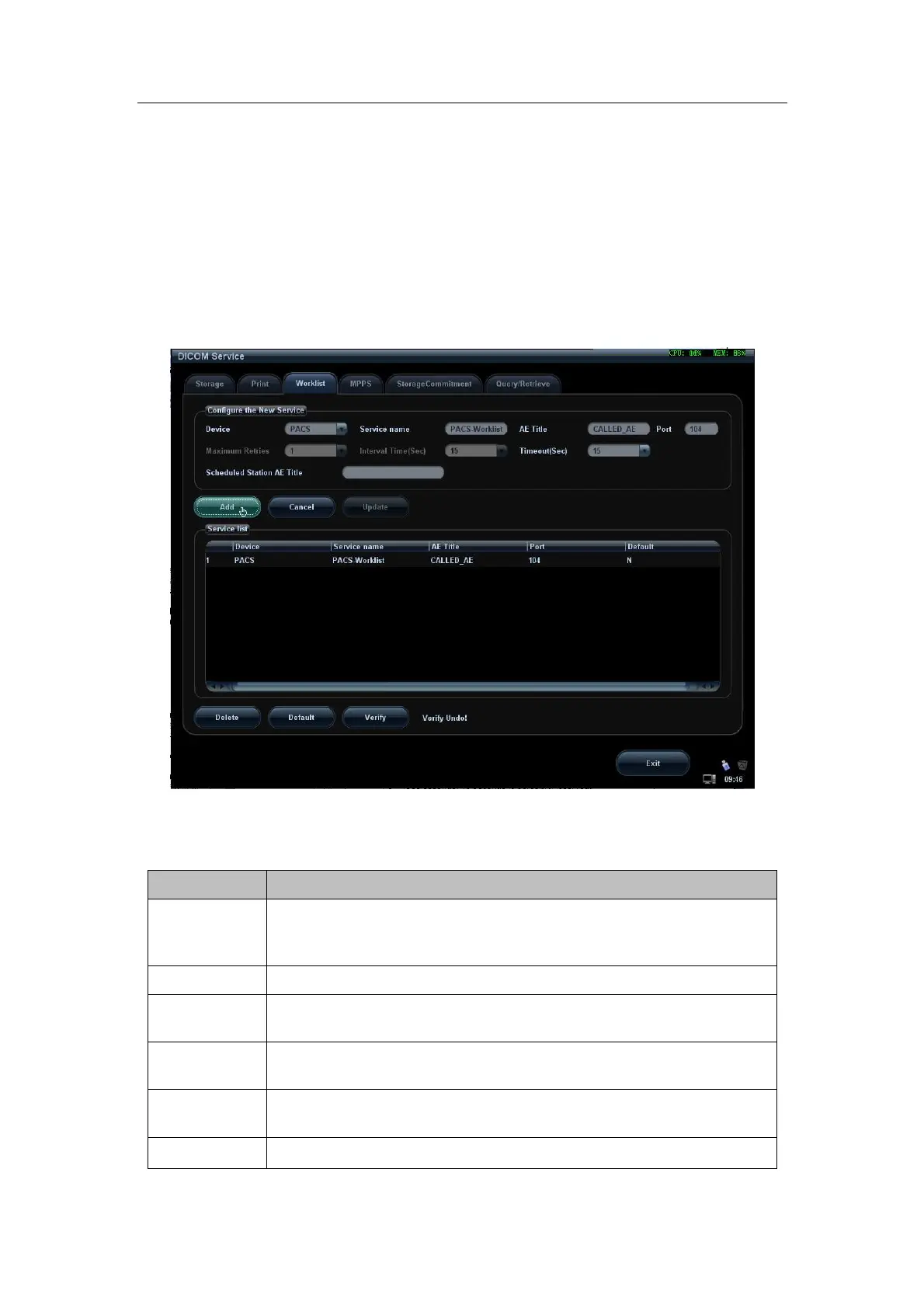
1.4.3 Worklist Preset
Figure 6 DICOM Worklist Preset Screen
The main parameters of DICOM Worklist are described as below:
Name Description
Devices
After you set the server (s) in DICOM Server screen, the name (s)
will appear in the drop-down list, select the name of the Worklist
server.
Service name
Default is xxx-Worklist, user-changeable.
AE Title
Application Entity title, here, it should be consistent with that of the
Worklist server.
Port
DICOM communication port, 104 is default. Here, the port should be
consistent with that of the Worklist server port.
Maximum
Retries
0-9 times are optional, the default is 3. (Reserved)
Interval Time
5-1800 seconds, 15 seconds is default. (Reserved)


 To Next Page