minnkota.johnsonoutdoors.com | 47 ©2023 Johnson Outdoors Marine Electronics, Inc.
STOWING WITH THE OBN APP
Stowing with the OBN App
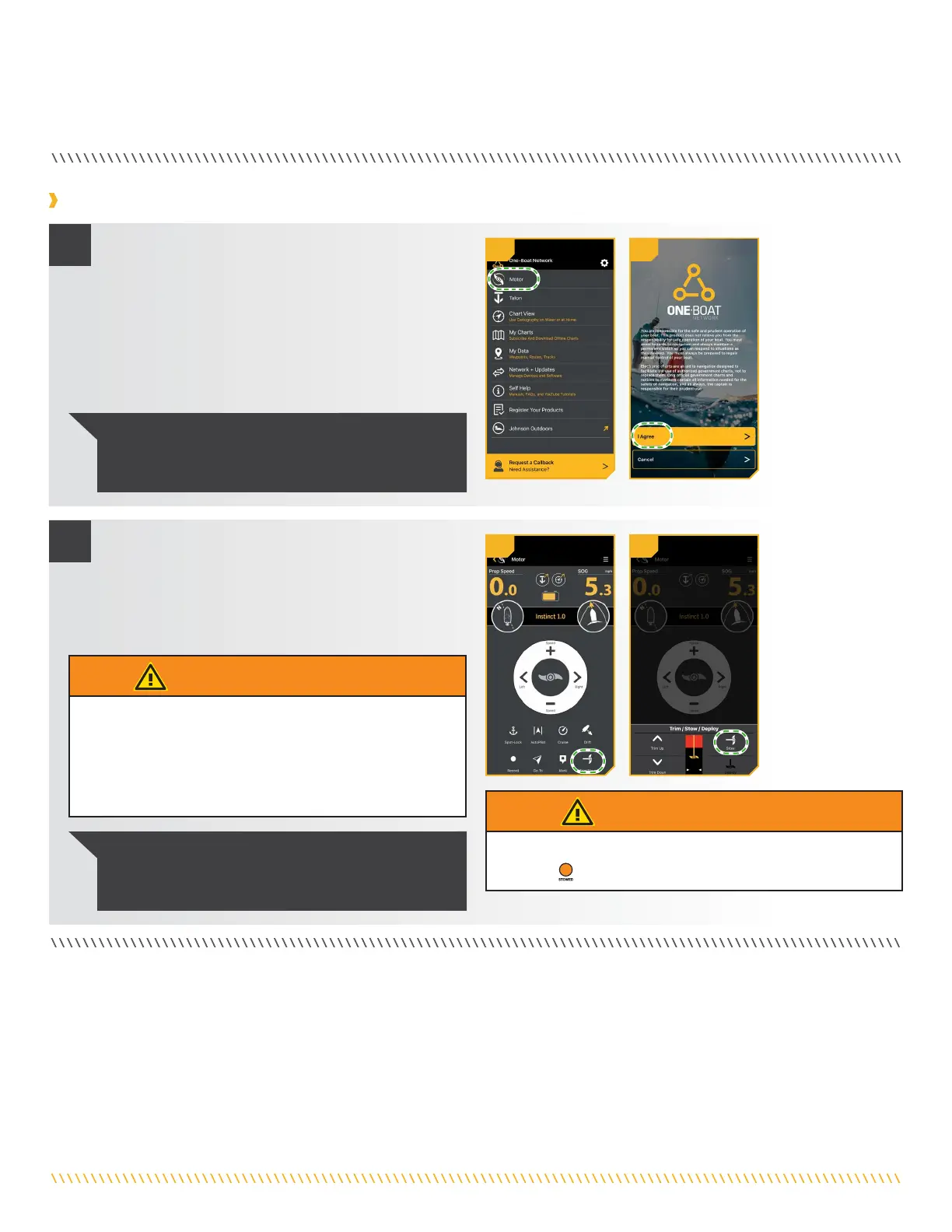
a. Open the One-Boat Network (OBN) app on the
mobile device. Make sure the mobile device is paired
with the trolling motor.
b. From the OBN home screen, tap the Motor menu.
The Motor menu opens the Motor home screen.
c. Before the Motor home screen will open, tap Agree
on the on-screen prompt.
1
2
WARNING
As soon as Stow is tapped, the motor will automatically stow.
Be sure the motor is clear from obstructions and has
a clear path of travel. The Prop is disabled while the motor
is stowing or deploying to prevent accidental contact with
the rotating Prop.
NOTICE: The on-screen prompt will only display once
each time the app is launched. If the prompt has
displayed, the Motor home screen appears after.
d. Tap Trim/Stow on the bottom of the screen to open
the Trim/Stow/Deploy menu.
e. Tap Stow to automatically stow the motor. The Prop
will be disabled and "Motor Stowed" will display on
the screen.
NOTICE: While the motor is stowing, it is possible to
stop the action by tapping Pause. To resume, tap the
desired action.
1b1a
WARNING
The motor is not safely stowed for transport until the orange
STOWED
LED on the Indicator Panel is illuminated.
2d 2e



 To Next Page