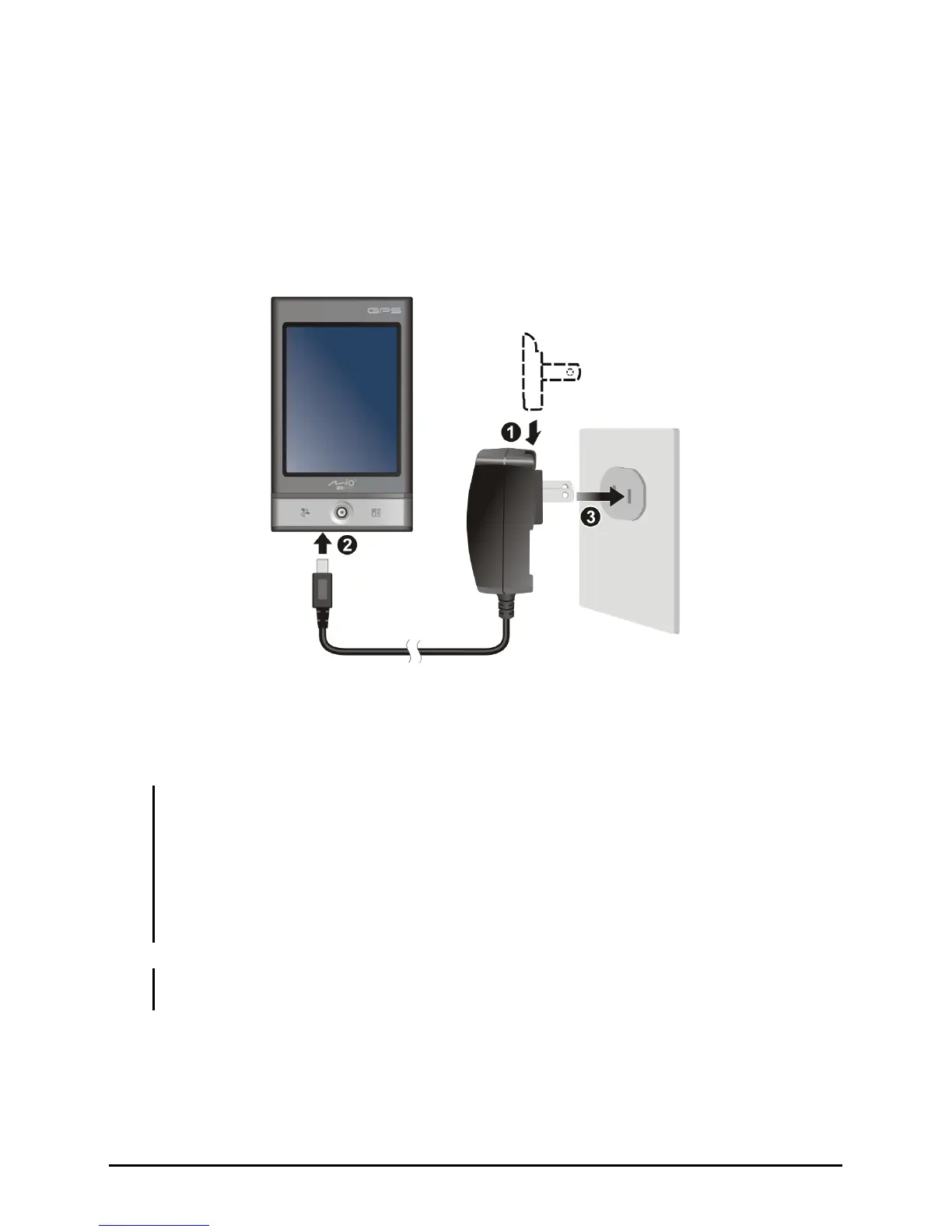
Connecting to AC Power and Charging the Battery
When charging the battery for the very first time, charge it for at least 8 hours.
1. Fit the converter plug to the AC charger (
n
).
2. Connect the mini-USB end of the AC charger to your device (
o
) and the
other end to a wall outlet (
p
).
Converter Plug
3. The power button/indicator glows amber when charging is in progress.
When the battery is fully charged, the indicator turns green. Charging may
take a couple of hours.
CAUTION: For optimal performance of the lithium battery, take note of the following:
z Do not charge the battery where the temperature is high (e.g. in direct sunlight).
z There is no need to fully discharge the battery before charging. You can charge the
battery before it is discharged.
z If you will not use the product for a long period of time, be sure to fully charge the
battery at least once every two weeks. Over discharge of the battery can affect the
charging performance.
NOTE: Your device can also be charged when it is connected to a desktop computer via
the USB cable.
6



 To Next Page