Instructions For Use – neXus Ultrasonic Surgical Aspirator
Doc #: 100-10-1000 rev A p 38
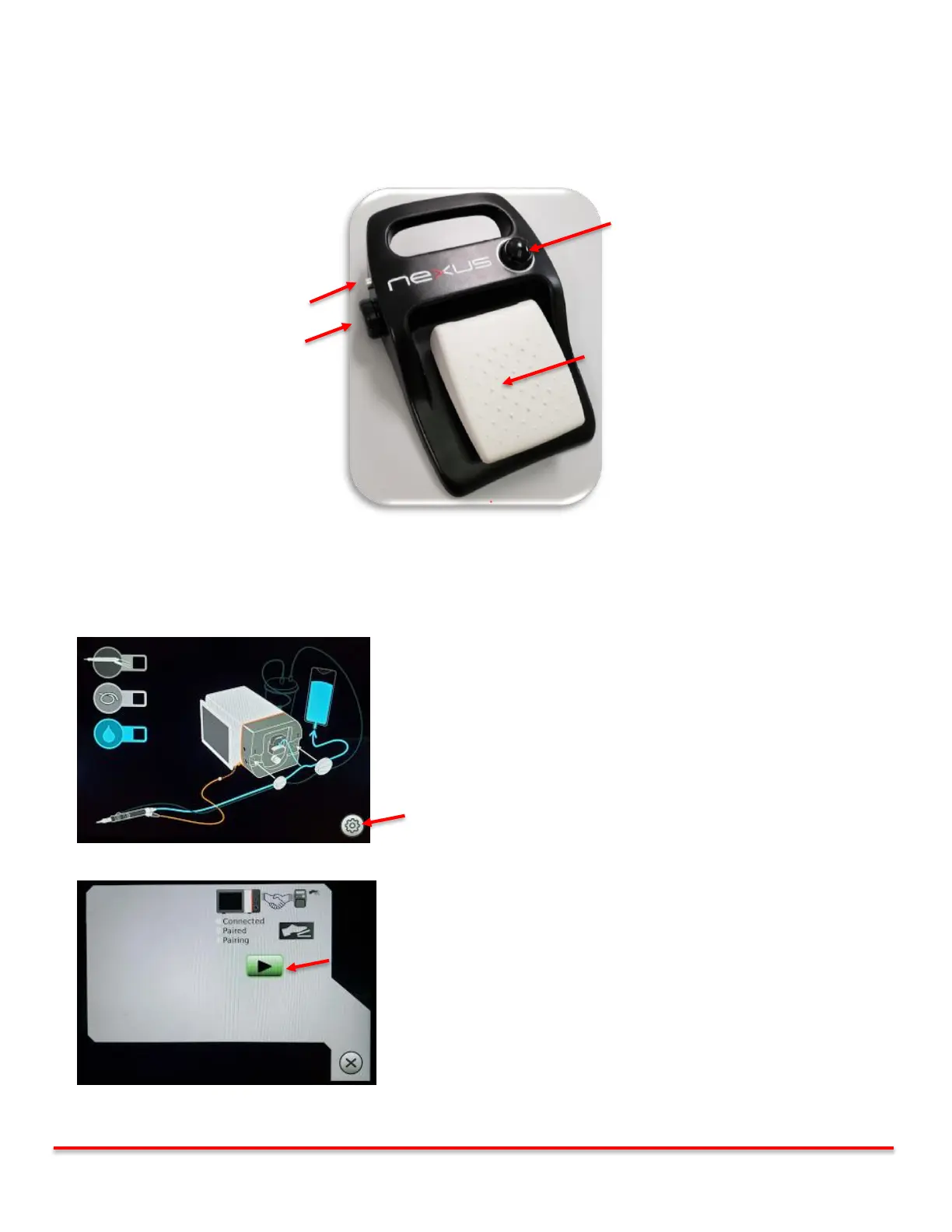
6.11.2 Footswitch Functionality and Features
The nexus system using a wireless footswitch to activate its core functions. The console monitors the
communication with the footswitch at all times. If communication is lost an alert appears on the screen (see
Troubleshooting section 8.2.7). The footswitch is powered with one “AA” alkaline battery. If the battery is low,
an alert will appear on the screen. (see Troubleshooting section 8.2.6). For battery replacement see section 10.3
.
6.11.3 Pairing the Footswitch to the Console
The nexus footswitch is paired to the console prior to delivery to the end customer. If a replacement footswitch is required, the
following 5 steps are required to pair the footswitch to the console.
Step 1: Power up the console and press the gear icon
Step 2: Press the Play button on the Pairing screen
Vibration (Linear or Preset, see Table 6.5.5),
Irrigation and Aspiration at User Preset
settings.



 To Next Page