Page | 12 © Mitchell & Johnson UK 2013 WLD+211 IB Ver 1.0 Rev 0.0
5. Connection
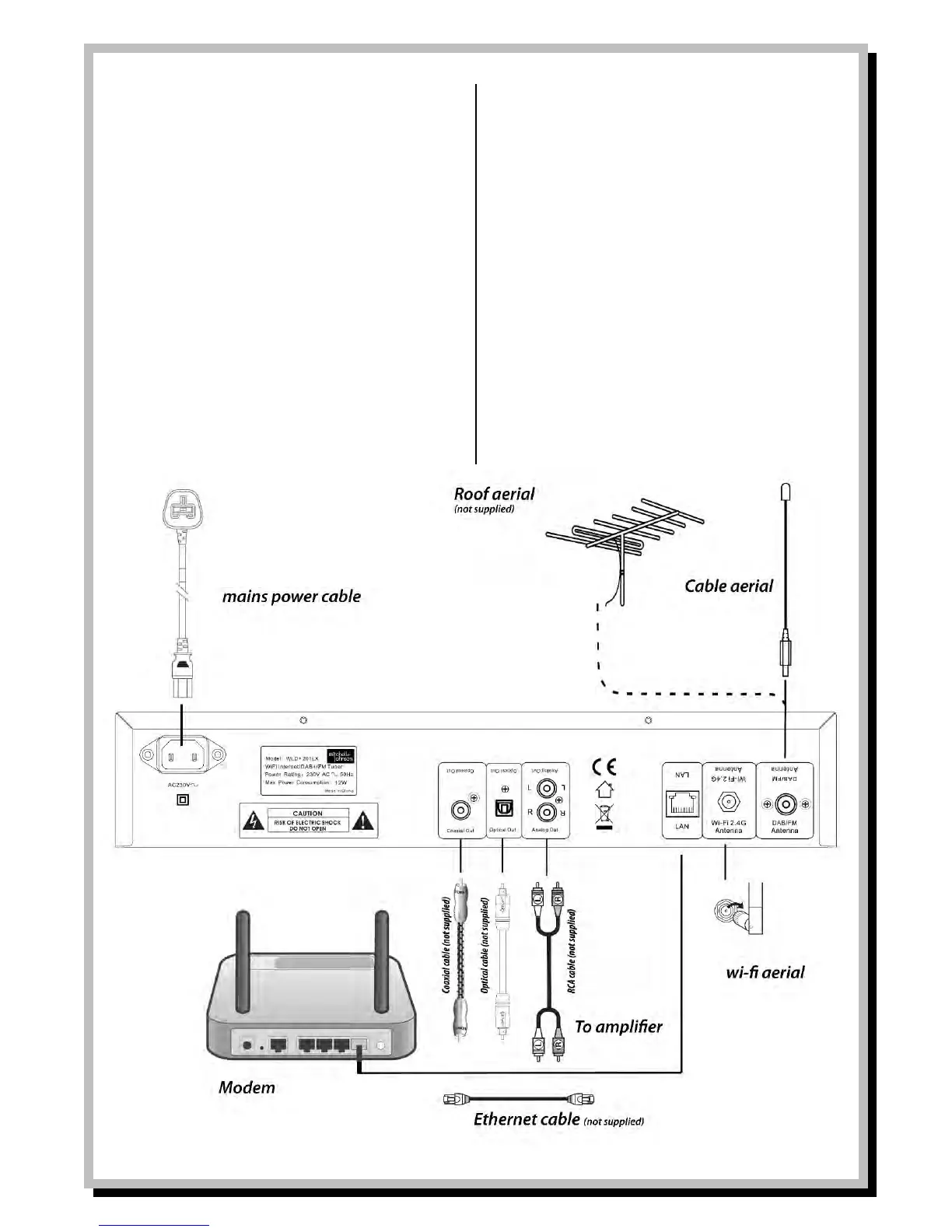
Power supply
- Plug the power cable into a correctly
installed power outlet of your home power
system.
Radio Aerials
- In order to receive DAB or FM radio
broadcasts it is necessary to connect either
the supplied wire aerial to the screw socket
marked DAB/FM Antenna or alternatively if
you have an external aerial you can connect
a cable from the socket to your aerial,
sometimes via a wall socket. Either of these
methods will work for both DAB and FM
signals.
Ethernet Network Connection
- For best results when receiving internet
radio stations or playing music files from
your network, use an Ethernet cable (not
supplied) to connect to a spare Ethernet
port on your router.
Wireless LAN
- For wireless operation, attach the antenna
to the “Wi-Fi 2.4G Antenna“ connection. This
screws in clockwise.


 To Next Page