Page | 24 © Mitchell & Johnson UK 2015 WLD+211 IB Ver 1.0 Rev 0.0
Internet radio portal registration
The Frontier Silicon Internet radio portal website allows
you to organise the ‘favourites’ lists displayed on your
internet radio devices and also listen to internet radio
directly from a computer.
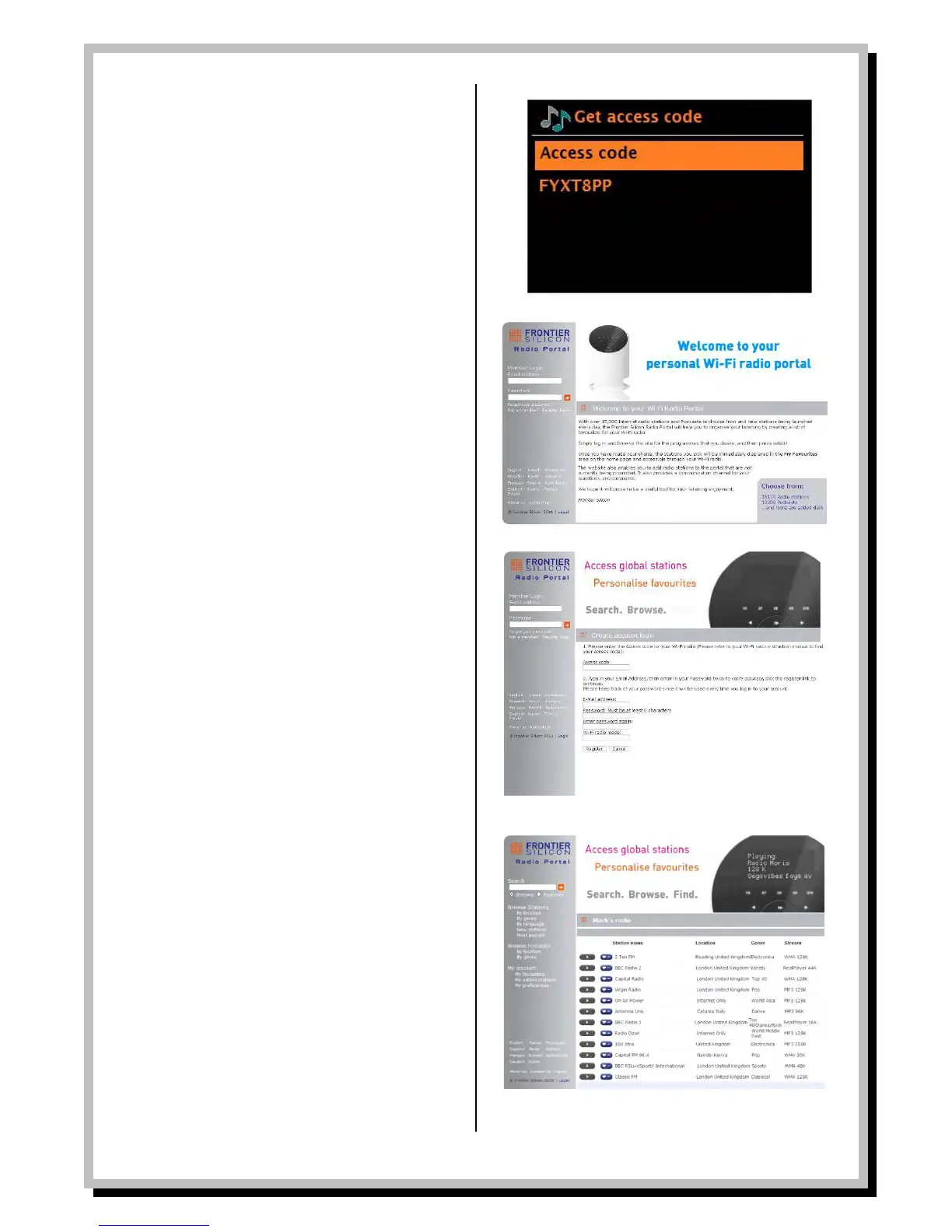
To register your WLD+211T with the portal, switch to
Internet radio mode as described in Section 4, and then
obtain your radio’s unique portal access code by
selecting
Menu > Station list > Help >Get access code >.
Write down the access code.
Note: Do not confuse the portal access code with the Radio
ID (from Menu >System settings > Info.)
Visit the portal website at www.wifiradio-frontier.com.
If this is your first visit to the portal, click register here
below login boxes to register for a new account.
You’ll be asked for the following information:
- access code
- your e-mail address
- password
- radio model (WLD+211T)
If you already have an account and wish to add the
WLD+211, log in to your account and select My
preferences > Add another Wi-Fi radio.
Once your WLD+211 is registered with the portal, you
can immediately use the Internet radio favourites and
added stations features on the unit.
My added stations
Using the internet radio portal you can add your own
stations via the portal. These added stations are
accessible from the WLD+211 by selecting
Menu > Station list > My added stations > [Station].


 To Next Page