Page | 25 © Mitchell & Johnson UK 2015 WLD+211 IB Ver 1.0 Rev 0.0
9. Music Player mode
(Network and USB)
Music Player mode plays a variety of audio file formats
such as MP3, AAC (Apple), WMA (Microsoft) as well as
the completely lossless formats WAV & FLAC. These can
be ‘streamed’ from a computer on the local network, or
from a USB Flash stick or a hard drive on the network,
known as a NAS drive (Network attached storage).
To enter Music Player mode, either press Mode until the
display shows Music player, or select
Menu > Main menu > Music player.
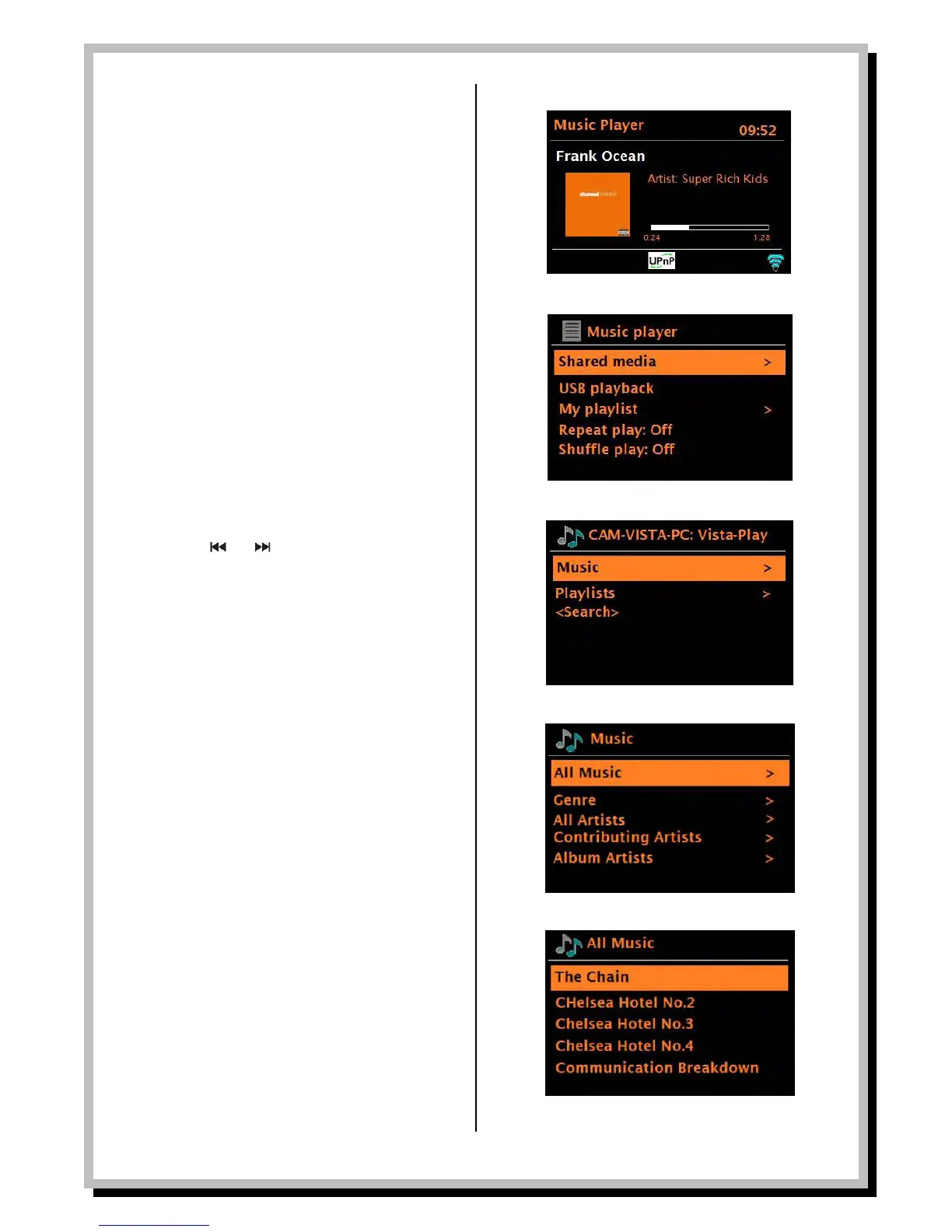
Once in Music Player mode, press Menu , then
select either Shared media or USB playback.
If you are already playing a music file, you can press
Back rather than Menu to quickly return to the last
visited branch of the menu tree.
For example, if you were listening a the track from an
album via browsing shared media as described in
section 5.1 below, pressing Back would return you to the
track listing for the album. Pressing Back again would list
all albums by that artist. Pressing Back again would list
all album artists, and so on.
You can use and on the remote or on the
WLD+211 itself to move through tracks. Press and hold
to rewind or fast forward and press quickly to select
previous or next track.
Shared media (from UPnP media server)
Select
Menu > Shared media >
If you have set up a music server (as described on page
20), you should see an entry consisting of
<computer name>: <Shared media name>, for example
JB-Laptop: Audio
If you have more than one computer sharing media, the
alternatives are listed. Select the shared media you want
to play. From this point on, the menus are generated
from the shared media server (typically Windows Media
Player). The first menu shows a list of media types, for
example Music, Video, Pictures and Playlists. The
WLD+211 can only play music and playlists.
From Music, there are numerous ways of selecting
tracks, including:
• Genre
• All Artists
• Contributing Artists
• Album Artists
• Composers
• Album
• Rating
Once you have found a track you want to play, press
Select . A short press plays the track immediately and a
long press adds the track to the playlist. You can also
add entire albums to the playlist. The WLD+211 plays
either the selected track or the playlist.


 To Next Page