Page | 30 © Mitchell & Johnson UK 2015 WLD+211 IB Ver 1.0 Rev 0.0
12. Spotify Connect mode
The WLD+211 is compatible with Spotify Connect
allowing it to act as a wireless audio system controlled
by the Spotify App, available for iOS, Android smart
devices and a desktop client for PCs.
Note: A Spotify Premium account is required to use Spotify
Connect.
Using the Spotify App with the WLD+211
To establish a connection between the Spotify App and
the WLD+211 unit both devices must be connected to
the same local network.
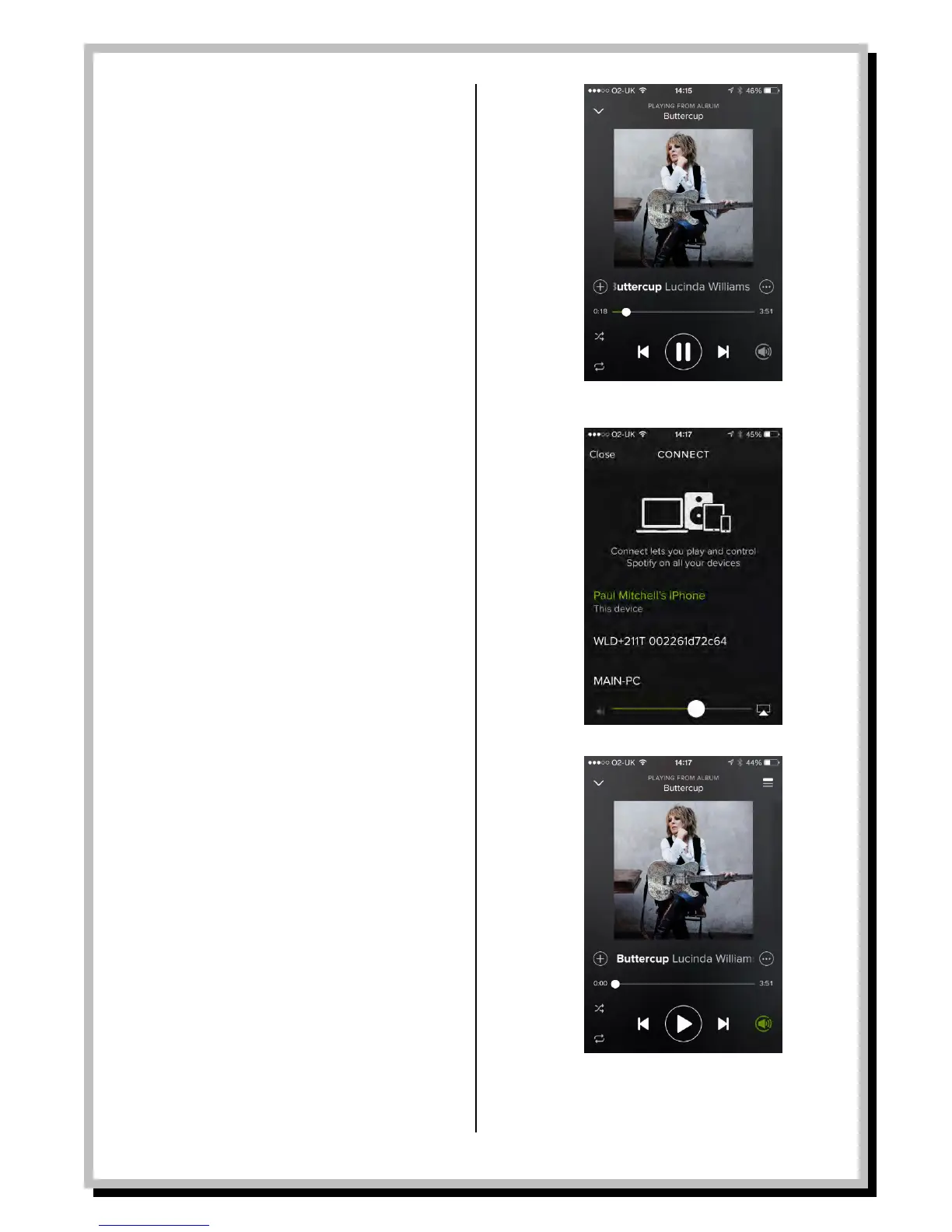
In your Spotify Connect App choose a track or play list
and select play.
From the now playing screen, tap on the grey Connect
icon on the right of the play controls at the bottom of
the app screen.
This will show a list of available Spotify compatible
devices either on your network or you have previously
connected with.
The current playback device will be shown in green
(usually the device itself IE the iPhone being used as
shown in the diagram)
Select the playback device desired, in this case the
WLD+211. The selected device will show as green once
selected.
The volume output of the WLD+211 can now be
controlled from the app.
The Connect icon will flash green while connecting and
then turn solid green to indicate playback has
commenced from the playback device. The WLD+211
displays the track playing.


 To Next Page