Page | 17 © Mitchell & Johnson UK 2015 WLD+211 IB Ver 1.0 Rev 0.0
Manual set
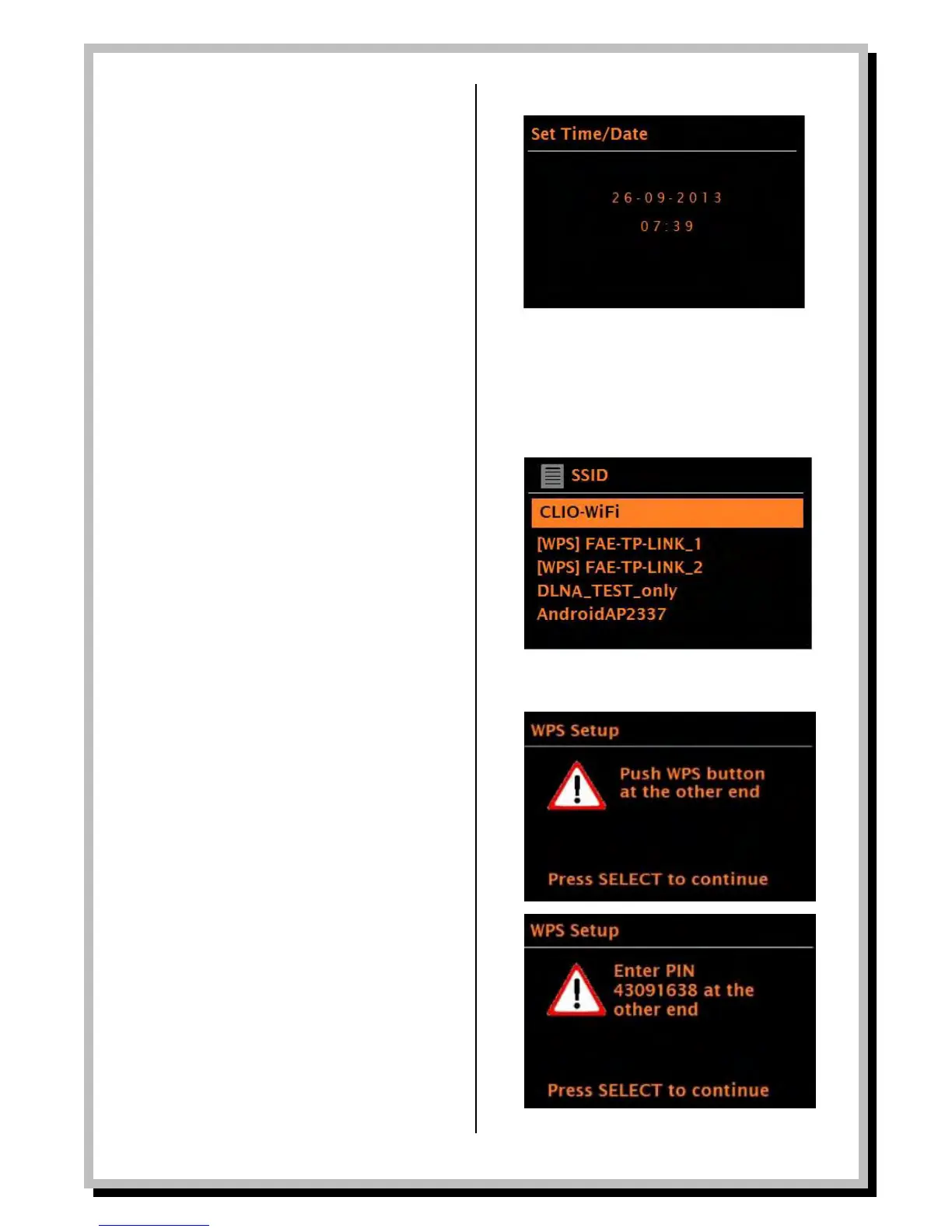
If you set No update, the wizard now prompts you to
set the time and date manually. The date and time are
displayed as dd-mm-yyyy and hh:mm AM/PM with the first
value, dd, active (flashing).
Adjust each value with the Select control. As each value
is set, the next value becomes active and flashes.
Network
The WLD+211T is compatible with all common network
protocols and encryption methods, including Wi-Fi
Protected Setup (WPS).
To connect the WLD+211T to your network, you need
one of the following:
- A wired router and an Ethernet (RJ45 network)
cable
- A Wi-Fi wireless router, together with
password key if set
Select WLAN region/country (for the UK choose Most of
Europe) > Wi-Fi network (SSID), and then select a
network from the list. To connect to a wired network,
select [Wired], after ensuring that the Ethernet cable
from the wired router is connected to the Ethernet
socket of the WLD+211. If the network is open (non-
encrypted), WLD+211T connects immediately (see
Completion below).
Standard encrypted network
To enter the network’s key (password), use the Select
control to move the cursor through the characters and
press Select. As each character is selected, the key is
built up near the top of the display. There are three
options accessible by turning Select back before the
first characters (0123…) – Backspace, OK and Cancel.
WPS encrypted network
WPS encrypted networks are identified by ‘[WPS]’ at the
start of the network name, and have three methods of
connection. Select one and follow the prompts:
- Push Button >
The WLD+211T prompts you to press the connect
button on the router. It then scans for a ready Push
Button Connect network and connects.
- Pin > (code number)
The WLD+211T generates an 8-digit code number
which you enter into the wireless router, access
point, or an external registrar (e.g. advanced
versions of Windows Vista).
- Skip WPS >
This option moves to a screen allowing you to
manually enter your routers wireless access key.
For more information on setting up a WPS encrypted
network, see your WPS router’s instructions.


 To Next Page