Page | 9 © Mitchell & Johnson UK 2015 WLD+211 IB Ver 1.0 Rev 0.0
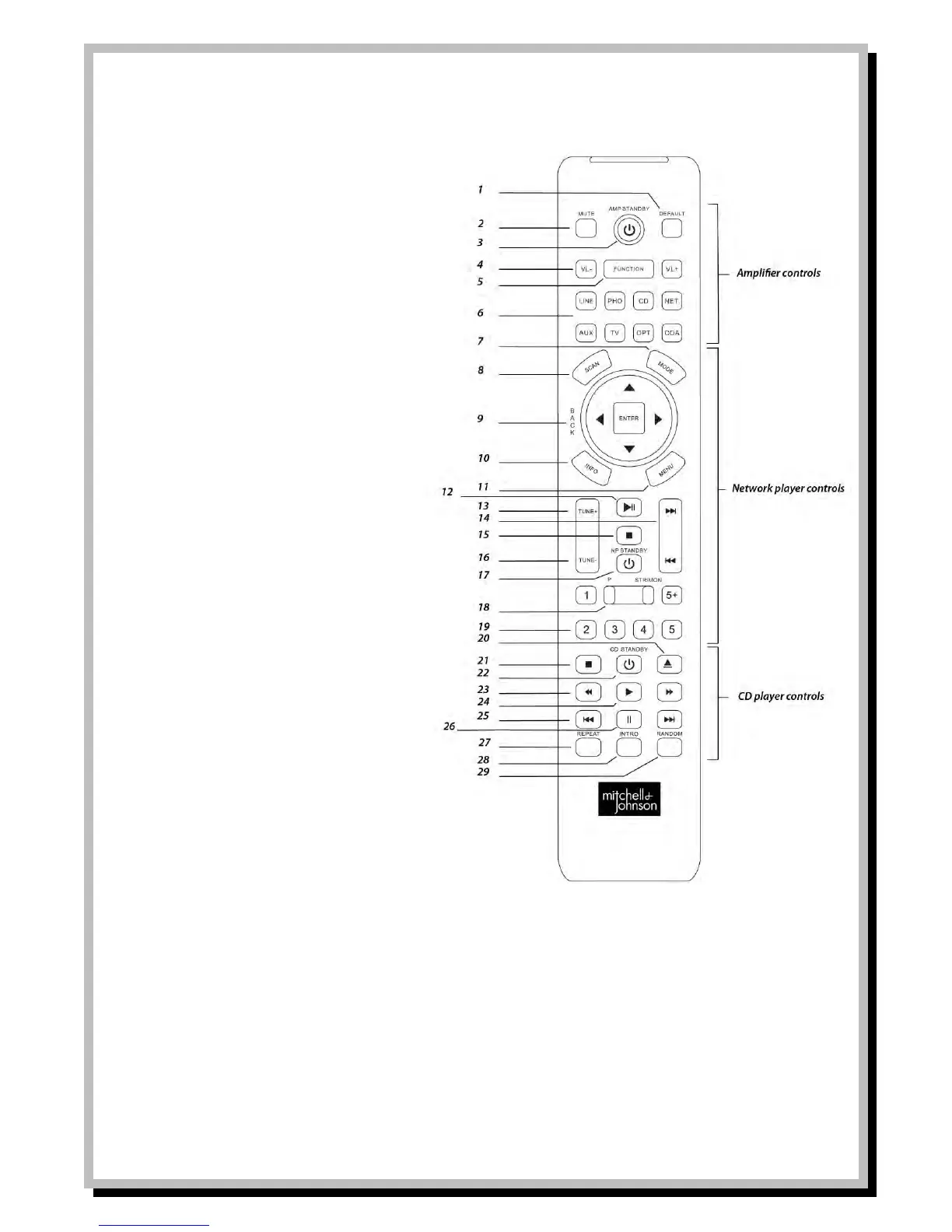
Mitchell & Johnson RM201 Remote Control Handset
Buttons 1-6 are for controlling the Mitchell &
Johnson SAP201V amplifier
1 Reset all tone controls to factory default
2 Instantly Mute all sound
3 Switch amp power to Standby or power on
from Standby
4 VL- to reduce amp volume VL+ to increase
5 Scroll through the tone functions on amp
6 Amplifier input controls
Buttons 7-19 are for controlling the Mitchell &
Johnson WLD+211 Network Player
7 Toggles between DAB Radio, Internet Radio,
Music Player and FM Radio functions
8 When operating mode is FM Radio press to
auto scan for next station. When
operation mode is DAB press to auto scan
in full frequency range.
9 Menu navigation control, Up, Down,
Forward, Back and Enter
10 Display track info or radio station info
11 Return to Main Menu
12 Play/Pause Button
13 In DAB Radio, FM Radio and Internet Radio
mode press to tune up to next station
14 In Music Player mode press to skip to next
or previous track
15 In Music Player mode press to Stop
playback
16 In DAB Radio, FM Radio and Internet Radio
mode press to tune up to previous station
17 Switch Network Player power to Standby
or power on from Standby
18 Pressing P button will browse tuner preset
station by list in display
Pressing STR/MON will switch between
Mono and Stereo mode when listening in
FM Radio mode
19 Numeric Keys
Buttons 20-29 are for controlling the Mitchell &
Johnson CDD201V CD Player
20 Open CD tray
21 Press to stop CD playback
22 Switch CD player power to Standby or power on from Standby
23 Press to fast rewind or fast forward through a CD track. Press again return to normal play.
24 Play button
25 Press to skip to previous track or next track
26 Press to Pause CD playback
27 Press to switch on Repeat CD track
28 Press to hear 10 second intro of each CD track
29 Press to play all CD tracks in Random order


 To Next Page