Page | 8 © Mitchell & Johnson UK 2013 WLD+211 IB Ver 1.0 Rev 0.0
4. Description of parts
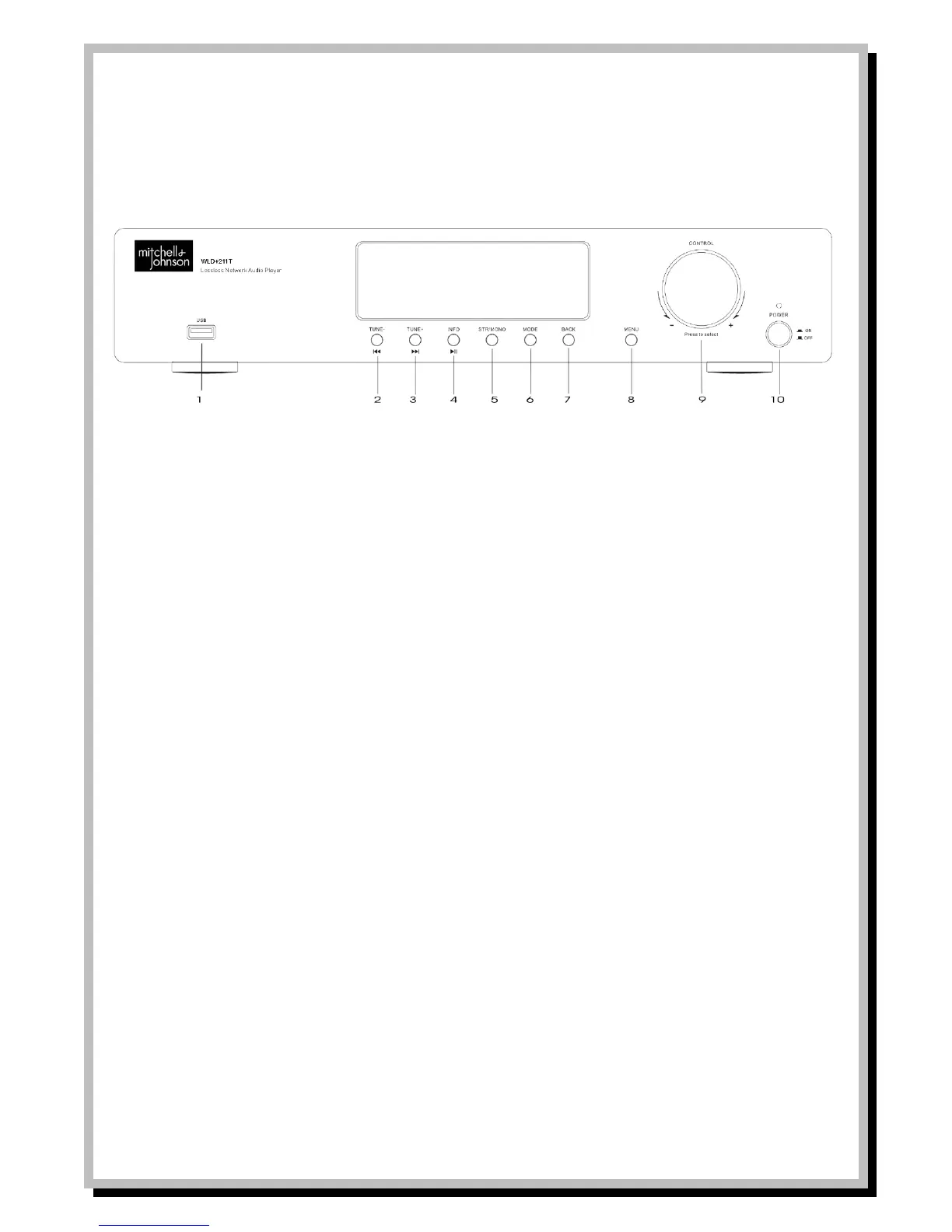
Front Panel
1 USB Port
2 When operating mode is FM Radio press to auto scan for previous station
When operating mode is Music Player, press to skip to previous track.
3 When operating mode is FM Radio press to auto scan for next station.
When operating mode is Music Player press to skip to next track.
4 When operating mode is FM Radio or DAB Radio press to see information on FM, RDS, or DAB station
When operating mode is Music Player or Spotify press to play, press again to pause.
5 When using in FM Radio mode use this button to switch between mono and stereo reception in case of interference
6 Change operating mode. Press to select modes either DAB Radio, FM Radio, Internet Radio, Spotify or Music Player.
7 Press to go to Previous Menu screen
8 Press to go to Menu screen.
9 Control selector. When in Menu mode, turn left or right to scroll through menu items. Press to confirm the selection. When in
Playback mode, the volume output can be increased or decreased with a visual reference on the display screen when the
control selector is turned to the left (decrease) or the right (increase).
10 Power switch


 To Next Page