Call Features
Page 38 Mitel
®
5312/5324 IP Phone User Guide – Issue 3, February 2011
Viewing Caller ID Information
If you are currently connected to an external caller with Caller ID, you can toggle between the
caller’s name and number. If the name is unavailable, CANNOT ACCESS FEATURE appears.
To show the outside party’s name/number:
Press (Special), and then dial 379.
Forwarding Calls
You can use Manual Call Forwarding (see page 38) or System Forwarding (see page 38) to
forward calls.
Manual Call Forwarding
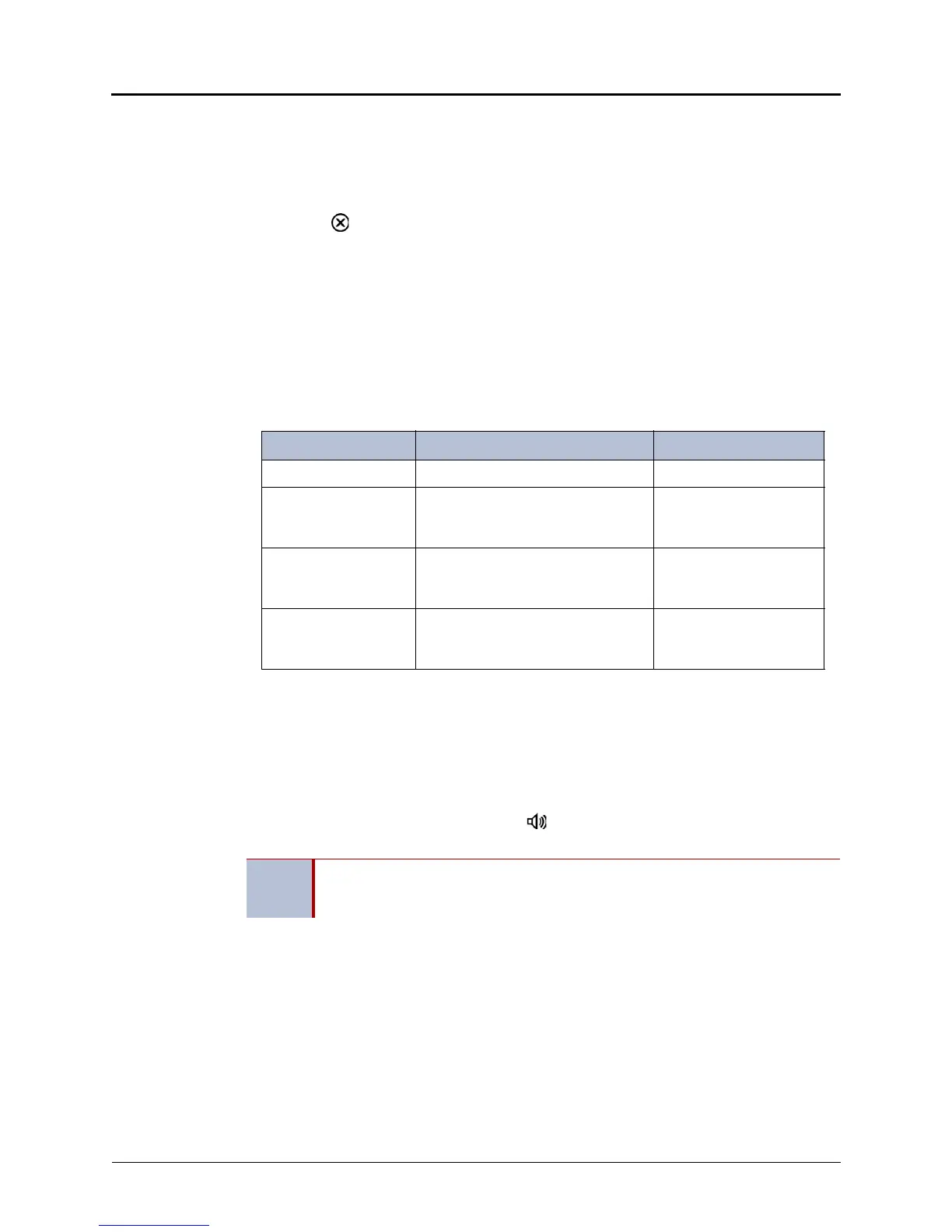
The following table describes Manual Call Forwarding options.
To use Manual Call Forwarding:
1. Press the Fwd button, or dial the Manual Call Forwarding feature code from the table
above. ENTER FORWARD DEST appears.
2. Enter the extension number, or press the Outgoing button and then dial the IP phone
number. FWD ALL CALLS TO <number> appears.
To cancel a Manual Call Forwarding request:
Press the Fwd button, and then press (Speaker), or lift and replace the handset. ANY
CALL FORWARD CANCELED appears.
System Forwarding
You can use System Forwarding to route calls based on the type of call and the idle or busy
status of your IP phone. You cannot program the System Forward destination. You can only turn
it on or off. Contact your system administrator for more information.
To turn System Forwarding on or off:
Dial 354. SYSTEM FORWARD ON appears. Dial 354 again to turn System Forwarding
off.
Call Forward Feature Description Code
Call Forward All Calls All incoming calls are forwarded. 355
Call Forward if no
Answer
All incoming calls are forwarded if
not answered. (The timer is set by
the system administrator.)
356
Call Forward If Busy When your IP phone is busy, all
incoming calls are forwarded without
ringing.
357
Call Forward If No
Answer/Busy
All incoming calls are forwarded if
your IP phone is busy, or if you do
not answer.
358
NOTE
If the Configuration Assistant feature is enabled for your system, you can access a
voice guided configuration portal that provides easy-to-use, remote access to the
Call Forwarding feature. See page 49 for details.




 To Next Page