EasyManua.ls Logo

Mitsubishi FX3U-64CCL - User Manual

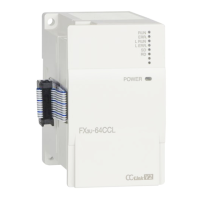
Mitsubishi FX3U-64CCL
78 pages
Print Icon
To Next Page IconTo Next Page
Loading...
FX
3U
-64CCL
USER'S MANUAL

Table of Contents

Other manuals for Mitsubishi FX3U-64CCL

Questions and Answers

  • L
    lfrostAug 19, 2025
    What does error 4B03 mean for Mitsubishi Controller?
    • S
      Shannon HowardAug 19, 2025
      If the Mitsubishi Controller displays error code 4B03, it may be because the specified route is not supported by the specified CPU unit version, or the communication target CPU is not mounted. Check whether the specified route is supported.
  • P
    pfernandezAug 21, 2025
    What does error code B112 mean on Mitsubishi FX3U-64CCL Controller?
    • A
      Amber CookAug 21, 2025
      If the Mitsubishi Controller displays error code B112, it indicates a line error has occurred. Check the line to resolve this issue.
  • Y
    yreedAug 23, 2025
    What does error B113 on Mitsubishi FX3U-64CCL mean?
    • M
      Mark SmithAug 23, 2025
      If the Mitsubishi Controller displays error code B113, it indicates a line error has occurred. Check the line to resolve this issue.
  • T
    tgonzalezAug 26, 2025
    What does B115 error mean on Mitsubishi FX3U-64CCL Controller?
    • J
      Joseph CollinsAug 26, 2025
      If the Mitsubishi Controller displays error code B115, it indicates a line error has occurred. Check the line to resolve this issue.
  • B
    bdoyleAug 28, 2025
    What to do if Mitsubishi FX3U-64CCL shows B201 error?
    • D
      Daniel CooperAug 28, 2025
      If the Mitsubishi Controller displays error code B201, it indicates a data link error occurred at the corresponding station during transient transmission. To resolve this, check the communication status of other stations, verify whether a temporary error invalid station is specified, or if the corresponding station is stopped.
  • V
    vmorganAug 30, 2025
    What to do if Mitsubishi Controller displays B771 error?
    • M
      maria48Aug 30, 2025
      If the Mitsubishi Controller displays error code B771, it means there are too many transient requests to the corresponding station. The suggested solution is to wait a while and then retransmit, as this indicates a transient overloaded status.
  • Z
    zaguilarSep 1, 2025
    What causes BBC2 error on Mitsubishi FX3U-64CCL Controller?
    • E
      Erin VasquezSep 1, 2025
      If the Mitsubishi Controller displays error code BBC2, it could be due to the station number switch setting of the module being set to a value other than "1 to 64", or the final station number being set to a value greater than 64. Check the station number and the number of occupied stations for the module.
  • K
    Kellie SullivanSep 4, 2025
    What does BBC1 mean on Mitsubishi Controller?
    • G
      garrisonpaulSep 4, 2025
      If the Mitsubishi Controller displays error code BBC1, it means that the transmission rate/hardware test switch is outside the setting range. The solution is to modify the transmission rate/hardware test switch.
  • M
    Matthew JohnsonSep 6, 2025
    What does B110 mean on a Mitsubishi FX3U-64CCL Controller?
    • B
      bergemilySep 6, 2025
      If the Mitsubishi Controller displays error code B110, it indicates a line error has occurred. Check the line to resolve this issue.
  • G
    Gordon BryanSep 8, 2025
    What does B111 mean on a Mitsubishi FX3U-64CCL?
    • J
      John WellsSep 8, 2025
      If the Mitsubishi Controller displays error code B111, it indicates a line error has occurred. Check the line to resolve this issue.

Summary

Safety Precautions

Design Precautions

Details critical design considerations to prevent hazardous conditions and accidents.

Installation Precautions

Covers safe practices for installing the product to prevent electric shock or damage.

Wiring Precautions

Outlines essential safety measures for wiring to prevent electric shock and product damage.

Startup and Maintenance Precautions

Provides safety guidelines for starting up and maintaining the PLC to avoid hazards.

2. Specification and Function

4. Installation

5. Wiring and Start-up Procedure

5.1 Power Supply Wiring

Covers the correct method for connecting the power supply, including timing and grounding.

5.2 Start-up Procedure

Outlines the step-by-step process for starting up the CC-Link system.

6. FX3 U-64 CCL Setting (Switch Setting)

7. Buffer Memory

7.2 Buffer Memory Details

Offers in-depth explanations for various buffer memory areas and their functions.

8. Program Example

9. Troubleshooting

9.1 Troubleshooting Procedure

Lists common problems and steps to check for troubleshooting CC-Link systems.

9.2 LED Status Check

Explains the meaning of various LEDs for diagnosing issues.

9.3 Troubleshooting by Error Code

Details error codes detected by the 64CCL and CC-Link network.

Mitsubishi FX3U-64CCL Specifications

General IconGeneral
ModelFX3U-64CCL
CategoryController
Number of Occupied Stations1 station
Compatible PLCFX3U, FX3UC
Number of Remote Registers256
Number of Connected Stations64 stations
CC-Link VersionVer. 1.10
Station TypeMaster station
Communication Speed156 kbps, 625 kbps, 2.5 Mbps, 5 Mbps, 10 Mbps
Power Supply5 V DC (supplied from the base unit)
Communication Ports1
Dimensions90 x 55 x 87 mm (W x H x D)
Weight0.2 kg

Related product manuals