14
<Driver for Windows NT4.0/2000/XP>
When you make the settings for Windows NT4.0/2000/XP driver, log on to Windows as "Administrators" or "Power Users" account.
3
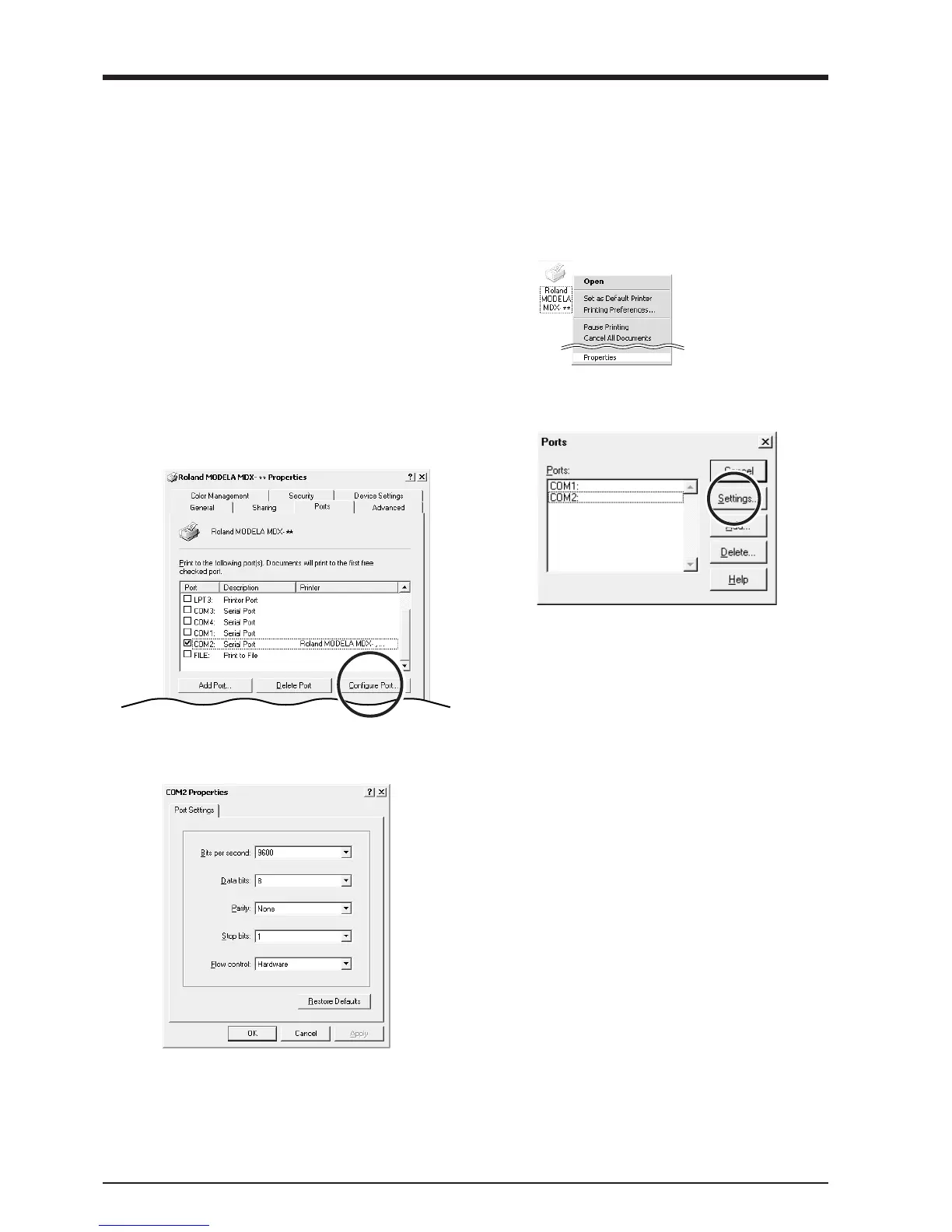
Click the [Ports] tab. For [Port], choose an unused
port other than [COM1]. Click [Configuration Port].
> Windows NT 4.0: go to step 4
> Windows 2000/XP: go to step 5
2
Right-click on the Roland MODELA MDX-20 icon,
then click [Properties].
The [Roland MODELA MDX-20 Properties] dialog
box appears.
1
Open the [Printers] folder.
Windows NT4.0/2000:
Click [Start]-[Settings]-[Printers].
Windows XP:
Click [Start]-[Control Panel]. Click [Printers and
Other Hardware], then click [Printers and Faxes].
4
Click the port you chose in step 3, then click [Set-
tings].
5
Make the settings for the following communication
parameters. Click [OK].



 To Next Page