49
1
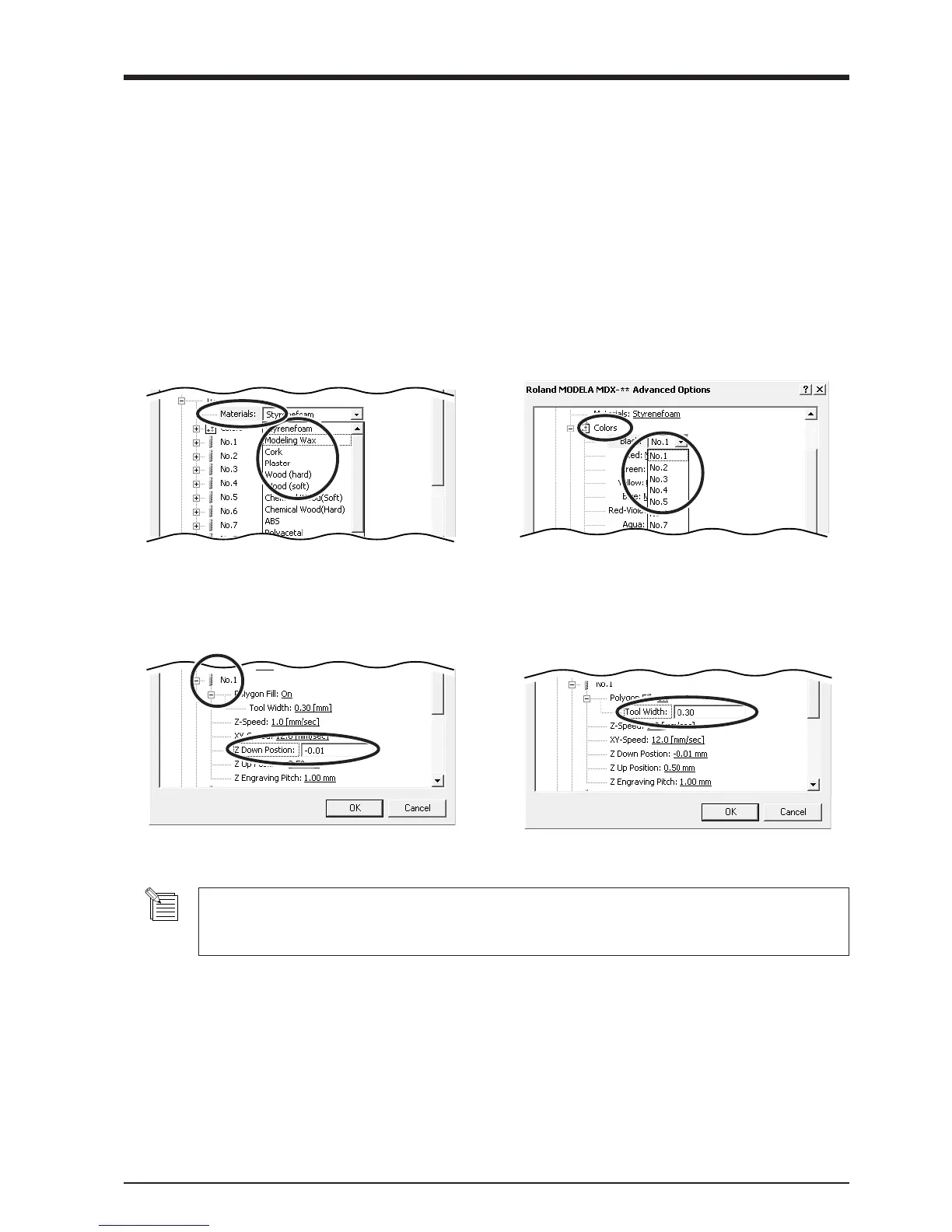
Double-click any tool from 1 to 4 to display the
lower level.
Click [Material], then click the composition of the
engraving material (workpiece).
2
Double-click [Color] to display the lower level.
Click the color to set, then click the tool number.
If you don’t wish to engrave lines of that color,
click [None].
Set the Engraving Parameters
Make the settings for the composition of the workpiece to engrave and the engraving depth.
Choosing the composition sets engraving parameters suited to this engraving. However, [Tool Down Position] and [Fill] - [Tool Width]
are determined with no relation to composition, and so they are set separately. For [Tool Down Position], enter the engraving depth. For
[Fill] - [Tool Width], enter the tool diameter.
The values for settings other than [Tool Down Position] and [Fill] - [Tool Width] are also suggested guidelines. If the results of actual
engraving are not as expected, modify the values accordingly.
Lines are distinguished by color, and parameters when engraving a line of the corresponding color are set.
3
Double-click on the tool number to display the
lower level.
Click [Tool Down Position] and enter the cutting-
in depth.
4
For [Fill], click [Tool Width], then enter the
diameter of the tool tip.
For items other than [Tool Down Position] and [Fill] - [Tool Width], suitable values are set for engraving the composi-
tion you chose in step 1. However, these values are only suggestions. If the results of actual engraving are not as
expected, adjust the values accordingly.



 To Next Page