IP67 Digital I/O Modules for EtherNet/IP
+
-
PE
Ui Uo
ETH1
LINK
ETH2
LINK
BUS
I
X
UL UB
I0
I1
I2
I3
I4
I5
I6
I7
I8
I9
I10
I11
O0
O1
O2
O3
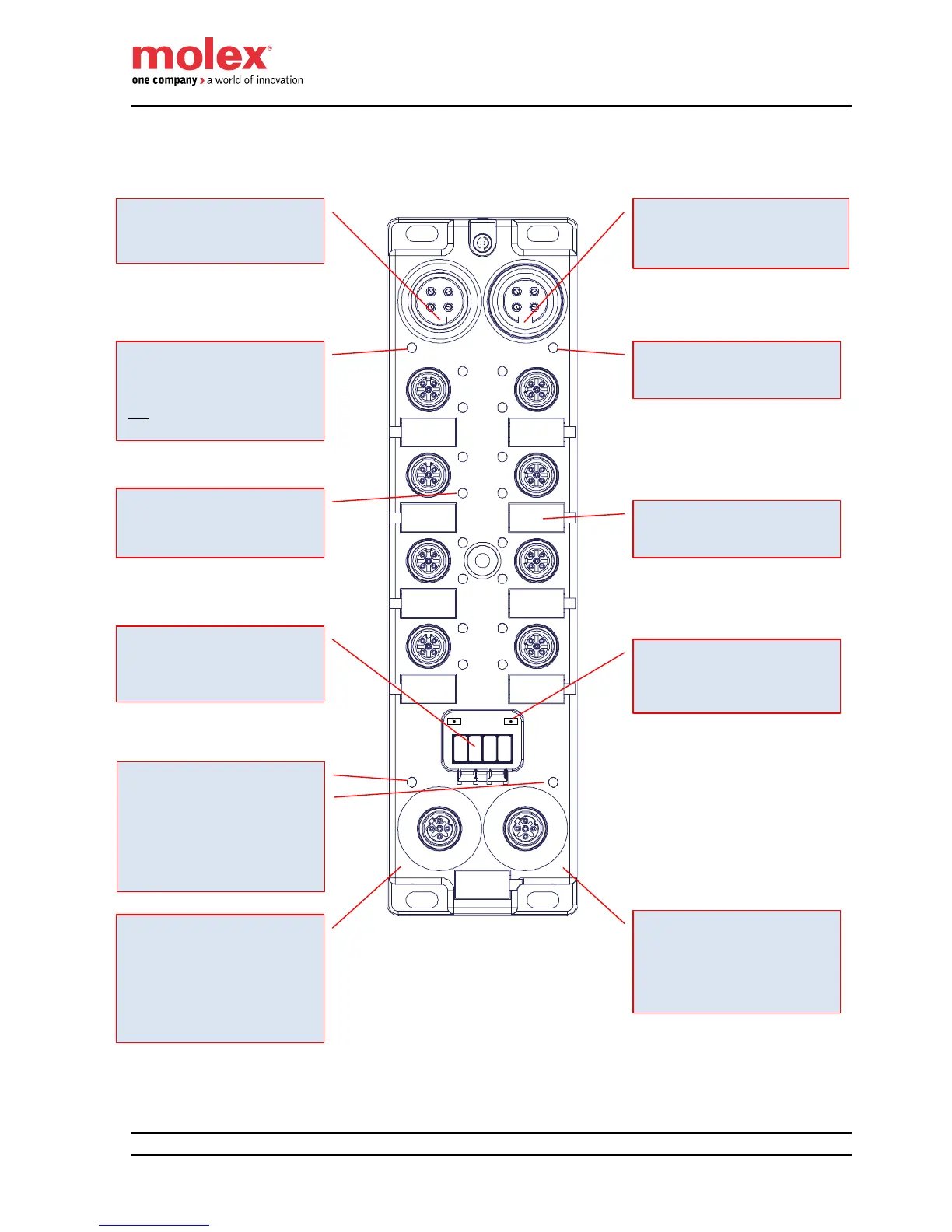
Quick Connect feature
In case of using Quick Connect mode, it
is mandatory
to connect the Ethernet cable
coming from the arm of the robot to
port ETH1
to connect a second module using
daisy chain topoology to port ETH2
Outputs Power LED (UL)
Green: Auxiliary Power supplied
Off: Auxiliary Power not supplied
Note: The outputs of the module operate
only if the LED is ON
16x Channel LED
Green: I/O Signal active
Off: I/O Signal not active
Red: Fault. Need Diagnostics
2x Ethernet Link Diagnostic LED
Green: 100 Mbps
Solid On: link without activity
Blink: link with activity
Yellow: 10 Mbps
Solid On: link without activity
Blink: link with activity
Module & Inputs power LED (UB)
Green: Auxiliary Power supplied
Off: Auxiliary Power not supplied
Scrolling digit display
IP address
I/O Fault
EtherNet/IP Status
IP Setting Push Buttons
Push button for IP Address mode and
setting
Quick Connect feature
In case of using Quick Connect, it is
mandatory to connect the port ETH2 to
the Ethernet cable going to an additional
HarshIO module mounted on the tool
changer.
In-coming Bus Power Connector (Ui)
Use this connector to power the module.
Out-coming Bus Power Connector (Uo)
Use this connector to daisy-chain the
power to an additional HarshIO eIP
module
9 Plastic labels
Available to write user information


 To Next Page