IP67 Digital I/O Modules for EtherNet/IP
Quick Connect applications
The HarshIO eIP modules are designed to support the new Quick Connect feature according the
ODVA specifications which allow to power up, connect an EtherNet/IP scanner and start I/O cyclic data
exchange in less than 500 msec.
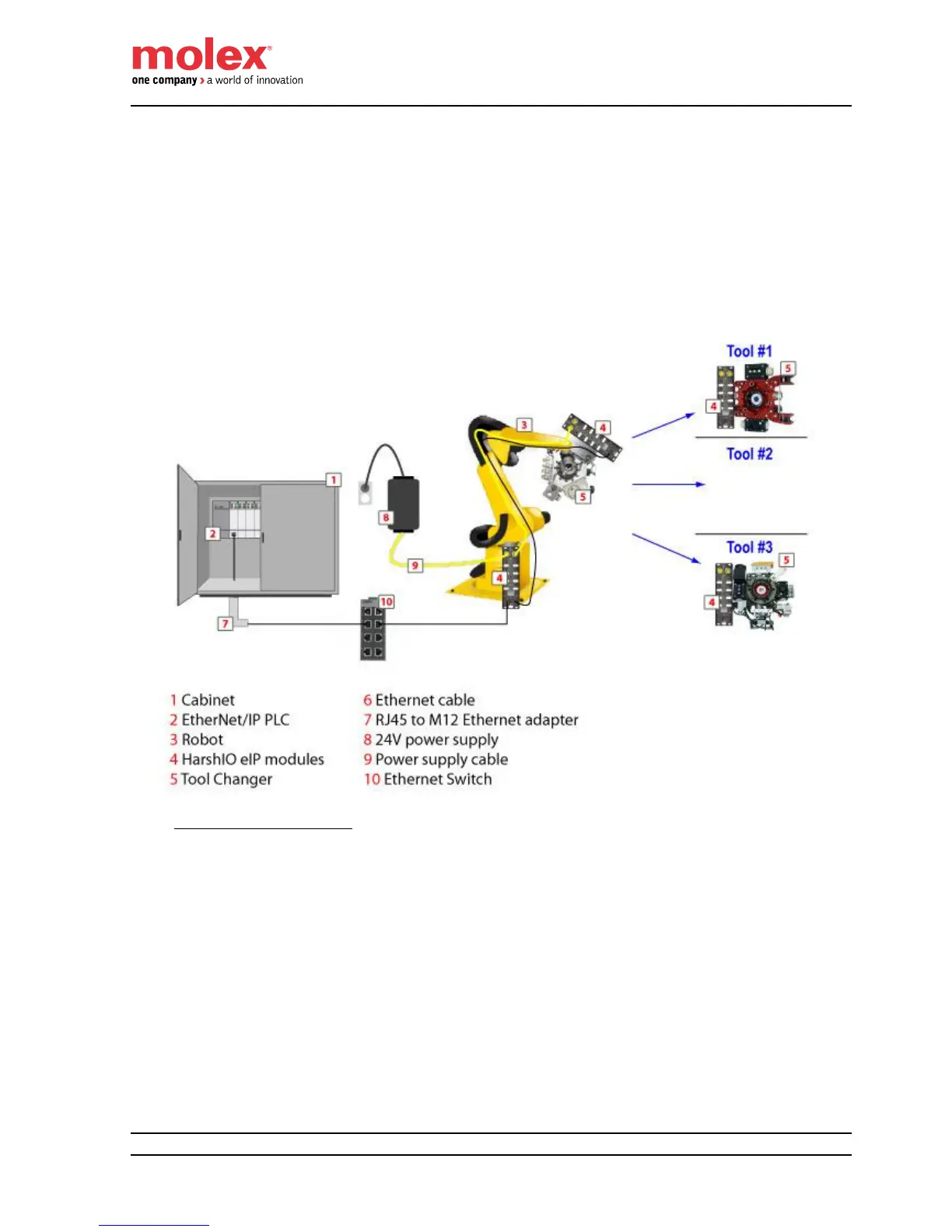
The Quick Connect feature is typically used in robotic application where some I/O devices are mounted
on a tool changer. The robot can disconnect and reconnect on the fly a new tool without stopping the
manufacturing process.
The diagram shows you an example of a robotic application using Quick Connect feature.
Quick Connect Architecture
When Quick Connect feature is used, the following recommendations should apply:
The Quick Connect device Ethernet switch ports must be configured with fixed speed to
100Mbps and full duplex enabled (auto negotiation is prohibited).
The Ethernet cable mounted on the robot must be connected to the ETH1 port (MDI port) of the
HarshIO eIP module. Quick Connect devices shall not use Auto-MDIX (detection of the required
cable connection type). This detection may take more time than the allowed Quick Connect
system connection time (see diagram below).
The maximum number of Quick Connect HarshIO eIP modules connected using daisy-chain
topology on the robot tool changer is recommended to be less or equal to 8. This limit can be
reduced depending of the Quick Connect performance supported by the EtherNet/IP controller.


 To Next Page