IP67 Digital I/O Modules for EtherNet/IP
Enabling Quick Connect mode
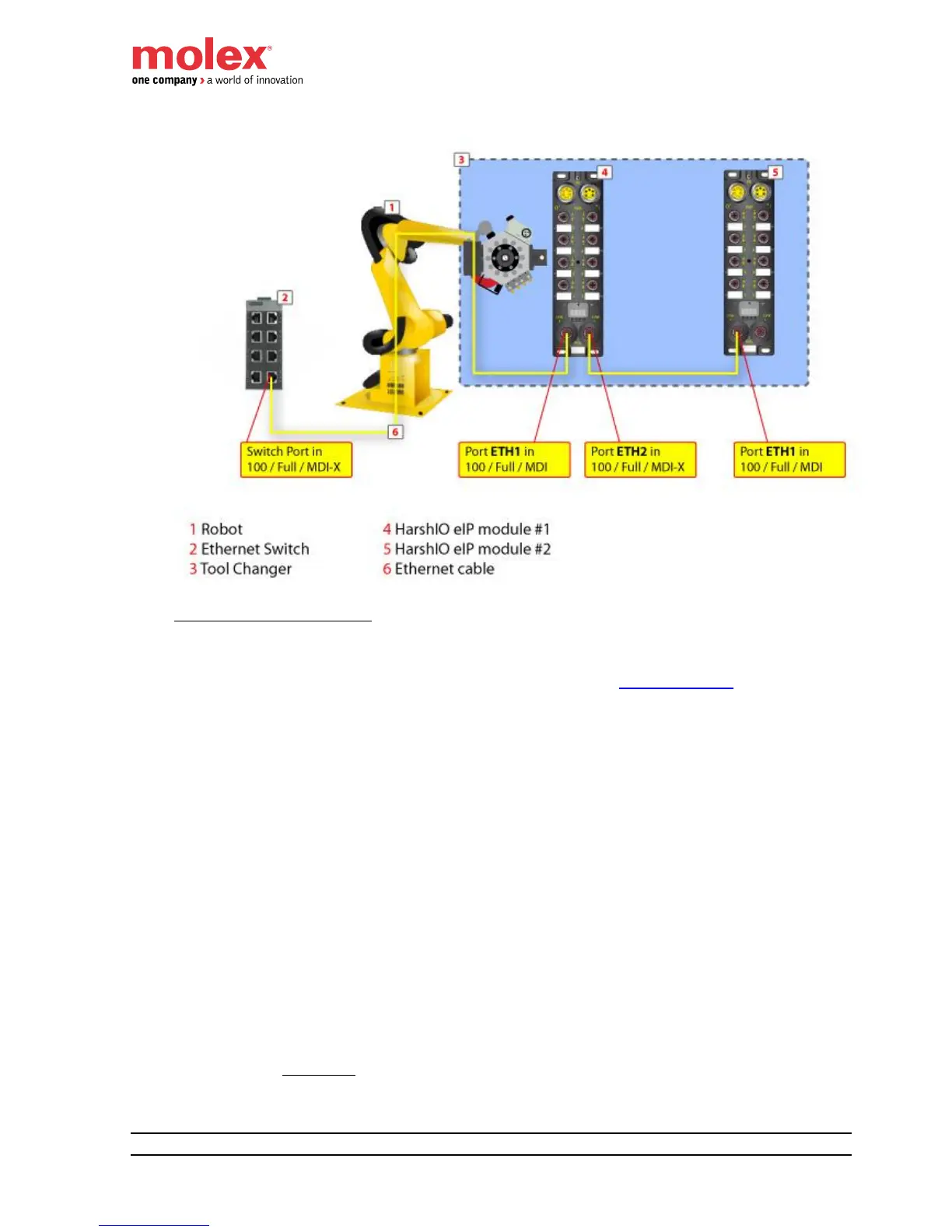
The HarshIO eIP modules can be configured for Quick Connect mode according the 2 methods:
1. Set Byte 9, Bit 0 of the configuration assembly (see chapter I/O Data Mapping).
- a value of “0” automatically
o disables Quick Connect
o sets ETH1 and ETH2 Ethernet ports to autonegociation and Auto-MDIX
- a value of “1” automatically
o enables Quick Connect
o sets ETH1 port to 100 Full Duplex MDI
o sets ETH2 port to 100 Full Duplex MDIX
2. Set Attribute 12 of CIP TCP/IP object (0xF5) using Explicit Messaging
- a value of “0” automatically
o disables Quick Connect
o sets ETH1 and ETH2 Ethernet ports to Auto-MDIX
- a value of “1” automatically
o enables Quick Connect
o sets ETH1 port to MDI
o sets ETH2 port to MDIX
Remember: Don’t forget also to force the ETH1/ETH2 ports speed to 100 Full Duplex
by setting to 1 the Attribute 6 of CIP Ethernet Link object (0xF6).


 To Next Page