EnDaL smart DEVICE DESCRIPTION OF MONI LOG® ENDAL SMART
- 11 -
3.2 O P E R A T I O N O F T H E
®
E n D a L s m a r t
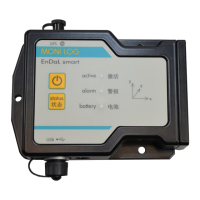
For the operation of the device, there is an “On/Off” key and a “status” key. The “On/Off” key
serves to activate and to deactivate the device. The “status” key serves to request a simple visual
status output. For the visualisation of the possible statuses, there are 3 LEDs available at the
device.
Checking the on-state of the device
In order to determine whether the EnDaL smart is switched on or off, briefly press
the On/Off key:
Green active-LED does not light up the device is OFF
Green active-LED briefly lights up the device is ON
Switching on the device
To switch on the EnDaL smart, press the On/Off key (~1 second) until the green LED lights up.
After that, release the key. Subsequently, the device starts recording data.
If the device is provided with a switch-on/switch-off code, it can only be activated via the
software. In order to signalise this, the active LED and the alarm-LED begin to flash when the
On/Off key is pressed for a longer time (~1 second). If no activation is carried out via the
software, the device switches of again after 20 seconds. In order to activate the device, connect it
to a PC while the active and the alarm-LEDs are flashing, and start the Analyzer.
When reading out the device, it is recognised that the device is password-protected. At this point
you are requested to enter the device password. Follow the instructions of the software in order to
switch on the device.
Explanations for the configuration of the switch-on/switch-off code can be found in chapter
4.3.11 in the paragraph „Password configuration“
Switching off the device
To switch off the EnDaL smart, keep the On/Off key pressed. After a short time, the red alarm-
LED will start to flash. If you continue to keep it pressed, it will light permanently. Now it can be
released. Then the device switches off. This can be verified by briefly pressing the On/Off key or
the status key.
If the On/Off key is released while the alarm-LED is flashing, the device remains switched on.


 To Next Page