PC SOFTWARE – MONI LOG® ANALYZER EnDaL smart
- 24 -
4.3 E n D a L s m a r t ….
4.3.1 R e ading o u t s t a tus, c onfigu r a tion a nd m e a surem e n t
data
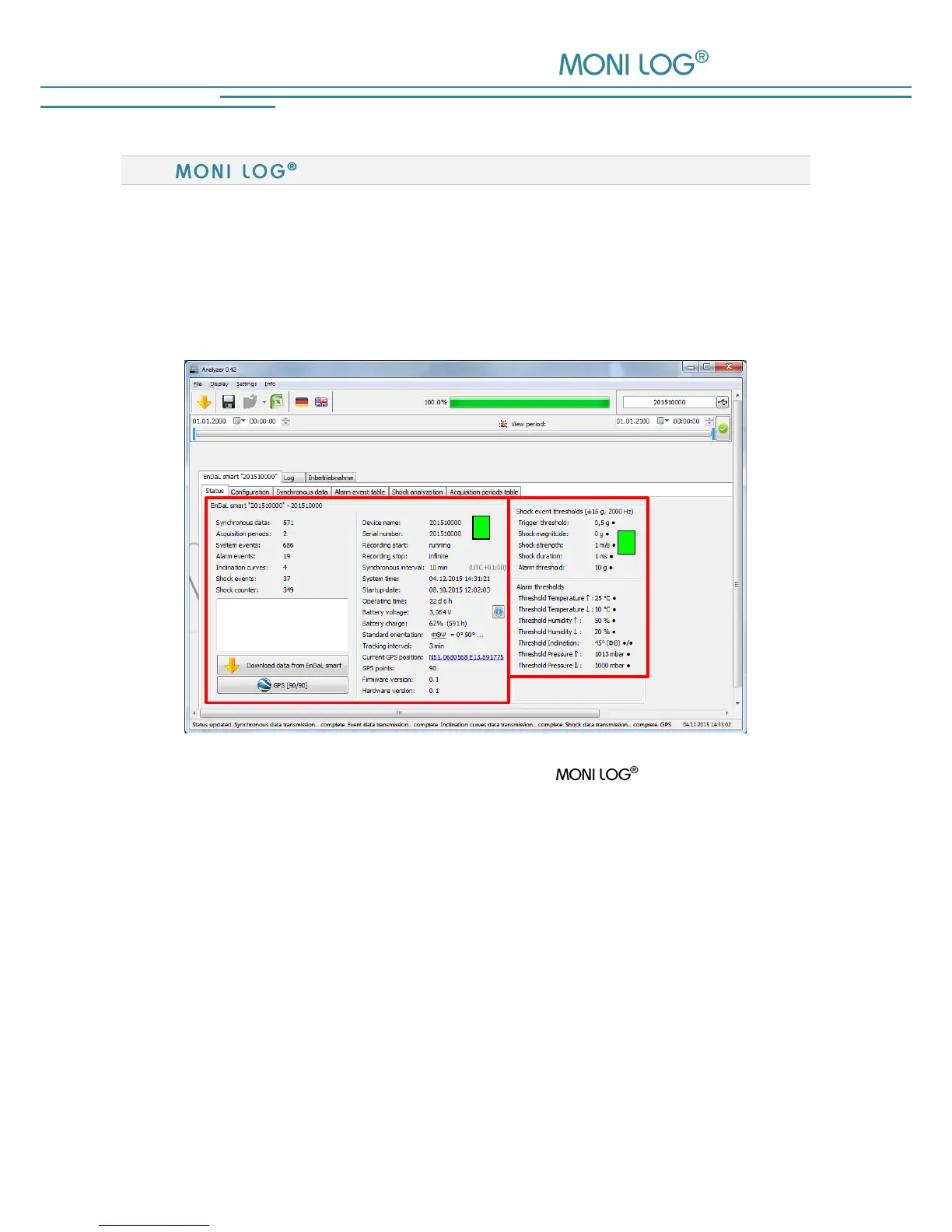
After the connection to the EnDaL smart is successfully established, the following information is
shown in the PC programme:
Figure 9: Programme view during connection with EnDaL smart
1) Status data EnDaL smart
2) set configuration parameters
After the connection to the device is established, the status data, configuration and acquisition
periods are read out automatically. The measurement data, such as synchronous data or shock
curves, are retrieved manually via the button „Read out EnDaL smart“. This can take up,
depending on the number of the data sets, a few seconds to several minutes.
A progress bar shows the current readout status. According to the available measured values the
corresponding programme tabs and graphs open. According to the available measured values
the corresponding programme tabs and graphs open.
A detailed description of the programme areas can be found in the following chapters.


 To Next Page