EasyManua.ls Logo

MONI LOG EnDal smart - 3.3 Meaning of the LED Statuses

MONI LOG EnDal smart
49 pages
Print Icon
To Next Page IconTo Next Page
To Previous Page IconTo Previous Page
Loading...
DEVICE DESCRIPTION OF MONI LOG® ENDAL SMART EnDaL smart
- 12 -
If the device is provided with a switch-on/switch-off code, it can only be deactivated via the
software. In order to signalise this, the active-LED begins to light up and the alarm-LED begins to
flash when the On/Off key is pressed for a longer time (~1 second). In order to switch off the
device, connect it to a PC and start the Analyzer. When reading out the device, it is
recognised that the device is password-protected. At this point you are requested to enter the
device password. Via the tab Configuration and the button Code word configuration, you
can switch off the device now.
Explanations for the configuration of the switch-on/switch-off code can be found in chapter
4.3.11 in the paragraph Password configuration
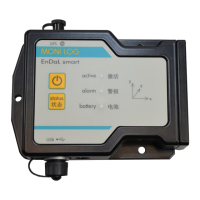
3.3 M E A N I N G O F T H E LED S T A T U S E S

LED
What?
How?
When?
2
nd
L
E
D
?
Meaning
Green
(active)
illuminated
~ 1 second
switching on
-
device switched on
Green
(active) &
Red
(alarm)
flashing
max. 20 seconds
switching on
Green
& Red
a switch-on password
via software is expected
Green
(active)
illuminated
1x flashing
briefly
key pressed
briefly
-
device is active
Green
(active)
illuminated
~ 1 second
USB active
-
USB
connected/disconnected
Green
(active)
flashing
irregularly
USB active
-
USB data transmission
Green
(active)
illuminated
0.1 - 8 seconds
device active
-
recording of
shock, synchronous or
event data
Green
(active)
flashing
regularly
device active
searching for
GPS coordinates
Green &
Red
illuminated
4 seconds
permanently
USB configuration
Green
& Red
memory is deleted