PC SOFTWARE – MONI LOG® ANALYZER EnDaL smart
- 20 -
4.2 G E N E R A L U S E O F T H E PC S O F T W A R E
4 . 2 . 1 E s t a b l i s h i n g t h e d e v i c e c o n n e c t i o n
When the device driver is installed and a device is connected via USB, the connection will be
established automatically as a rule upon start of the evaluation software.
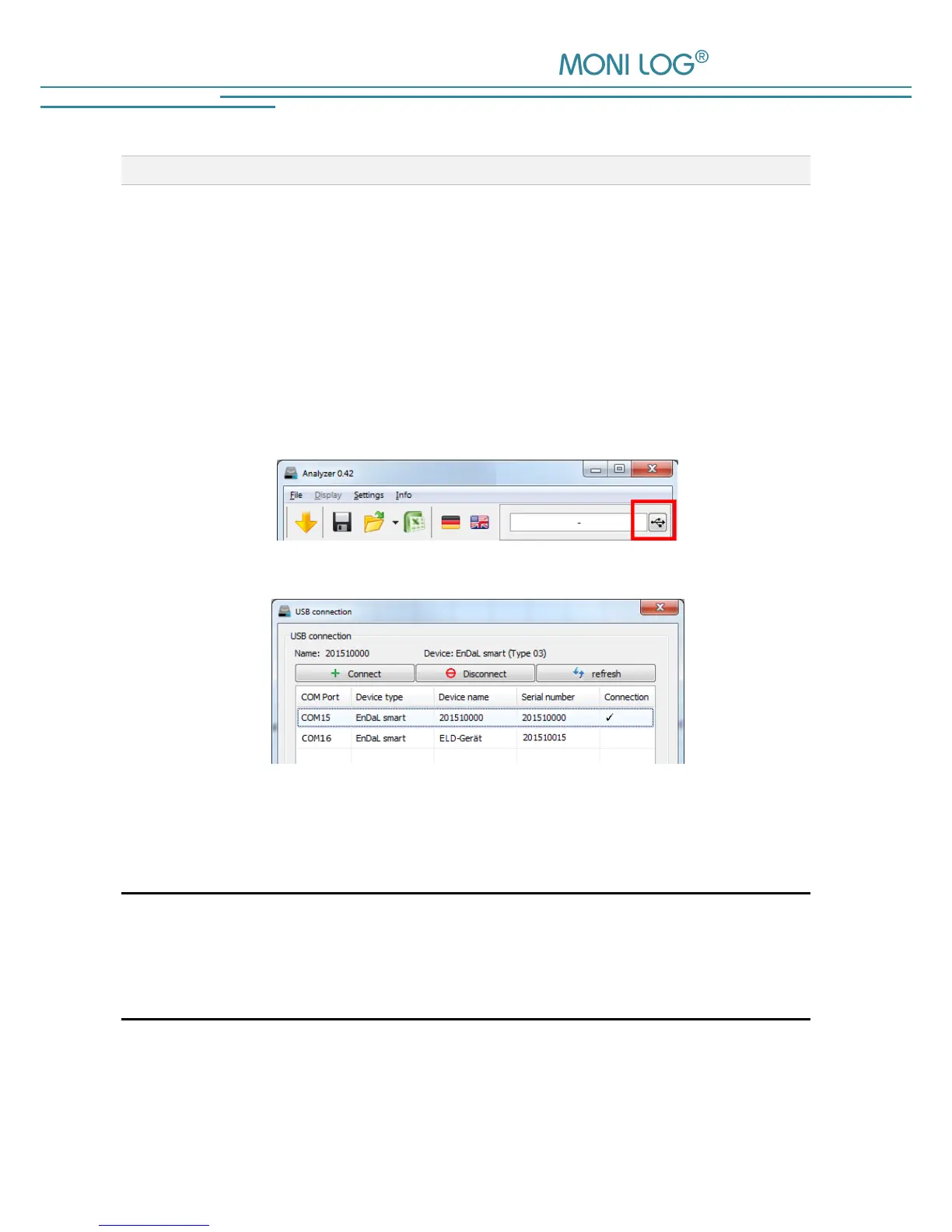
If the evaluation programme has already been active before plugging the device, move the mouse
in the area [COM-Port] (Figure 3). The connection is established automatically. If you would like
to connect a device at another COM-Port, click onto the USB symbol and select it in the selection
window (see for this Figure 4).
Figure 3: No connection
select COM-Port
Figure 4: USB connection window: currently connected to COM15
COM16 also available
In case of connection problems:
If no connection can be established to the device, select the
Refresh button (blue double arrow) and disconnect the USB cable from the
device. Afterwards, reconnect it with the USB cable.


 To Next Page