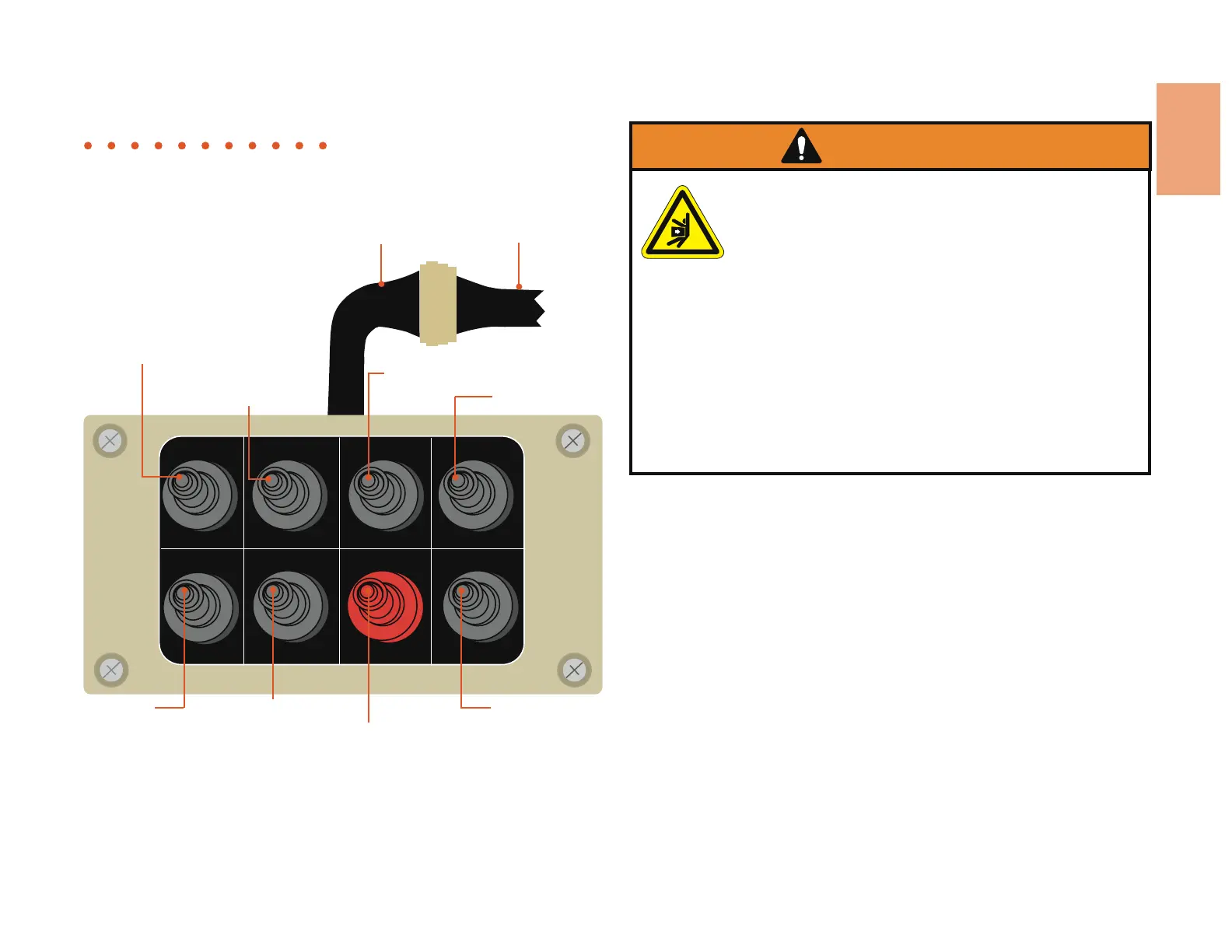
Tether
Remote
76347-281 • 12-08 3.47
SPOUT RIGHT
SPOUT LEFT
FEED FORWARD
FEED REVERSE
LEFT STAB. UP
ENGINE STOP
RIGHT STAB. UP
FEED ENGAGE
YOKE UP
YOKE DOWNRIGHT STAB. DOWNLEFT STAB. DOWN
THROTTLE UP
THROTTLE DOWN
Safety
Figure 3.27
Raises and lowers
the yoke
Raises and lowers
the left stabilizer
Raises and lowers the right
stabilizer
Directs the flow of chips
to the right or left
Increases or
decreases the
engine RPM’s
Operates the
feedwheels
forward or
reverse
Shuts down the
engine
Moves the control bar
actuator to the
forward position
Tether Harness Machine Harness
Function
The remote tether can be used in place of the valve bank controls to
operate the discharge spout, stabilizers, yoke, feedwheels, and throttle.
NOTE: The options of your machine may use all or only certain functions.
Use
To use the tether remote, you must unplug the machine harness from
under the receiver box (mounted to machine), then plug that into the
tether harness.
Each toggel switch has a description of its function. The four switchs in
the top row control the discharge spout, left and right stabilizers, and
yoke. The four switches on the bottom row control the feedwheels,
feedwheel engage, engine stop, and throttle.
Maintenance
• Tether remote should be turned off when not in use
• Do not store tether remote in direct sunlight or wet areas
• Handle tether remote with care. Do not drop, throw, or subject to
severe physical shock
WARNING!
Improper operation of these controls can cause serious
injury. Do not allow anyone to operate this equipment
before completely reading the manual.
When using the tether remote always stay within
working radius and always point transmitter toward
receiver.
Stray radio signals, high voltage power lines, and other
forms of interference may cause the tether remote to
stop working or work erratically. Never use the tether
remote when interference is present.
Never unplug machine harness while the machine is
running.
Features and Function • Components • tether remote Option
Tether Remote Control, Options


 To Next Page