Page 21
INTRODUCTION TO GPS MODE / USING GPS MODE
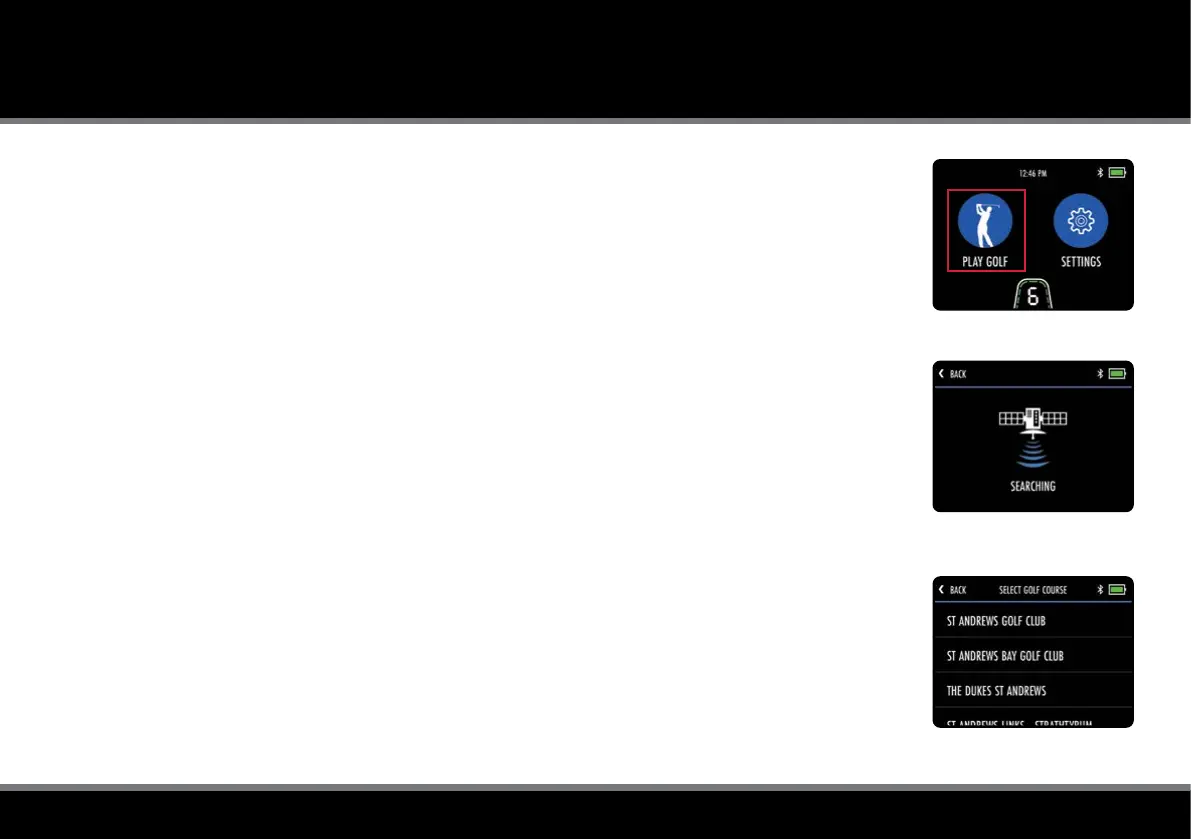
Fig 1 - Home - Play Golf
Fig 2 - Course Search
Fig 3 - Course Selection
Introduction to GPS Mode
The M-TECH GPS is pre-loaded with 40,000+ worldwide courses and includes front, middle and back of
green distances, along with hole information, hazards, score tracking, shot measurement and round timer.
IMPORTANT : Distance Measurement Device (DMD) features are legal to use when local USGA
and R&A rule 4.3 is in effect. Always check local and competition rules regarding the use of DMD
and Push Notications prior to commencing play.
Using GPS Mode
It is really simple to start a round in GPS Mode:
1. From the Home screen select “Play Golf” (g. 1)
2. The trolley will display “Searching” while it acquires an accurate GPS location (g. 2)
3. A list of local courses will be displayed, with the nearest at the top (g. 3)
4. Select the course you wish to start playing
It is also possible to select an alternative course from the GPS Mode settings menu.
Please be aware that the Round Timer and Score Tracking will be reset when a course is changed.
The trolley also features a Demo Mode to allow feature demonstration when a GPS signal is not available.
To enable Demo Mode, navigate to the "Settings" menu from the Home screen and select "Demo Mode".
Demo Mode can be toggled "On" and "Off". Once enabled, "Play Golf" will display a list of demo courses.
It is important to disable Demo Mode before attempting to play a round of golf.



 To Next Page