Page 22
DYNAMIC PIN / HOLE ADVANCEMENT / TEE SELECTION
Dynamic Pin Location
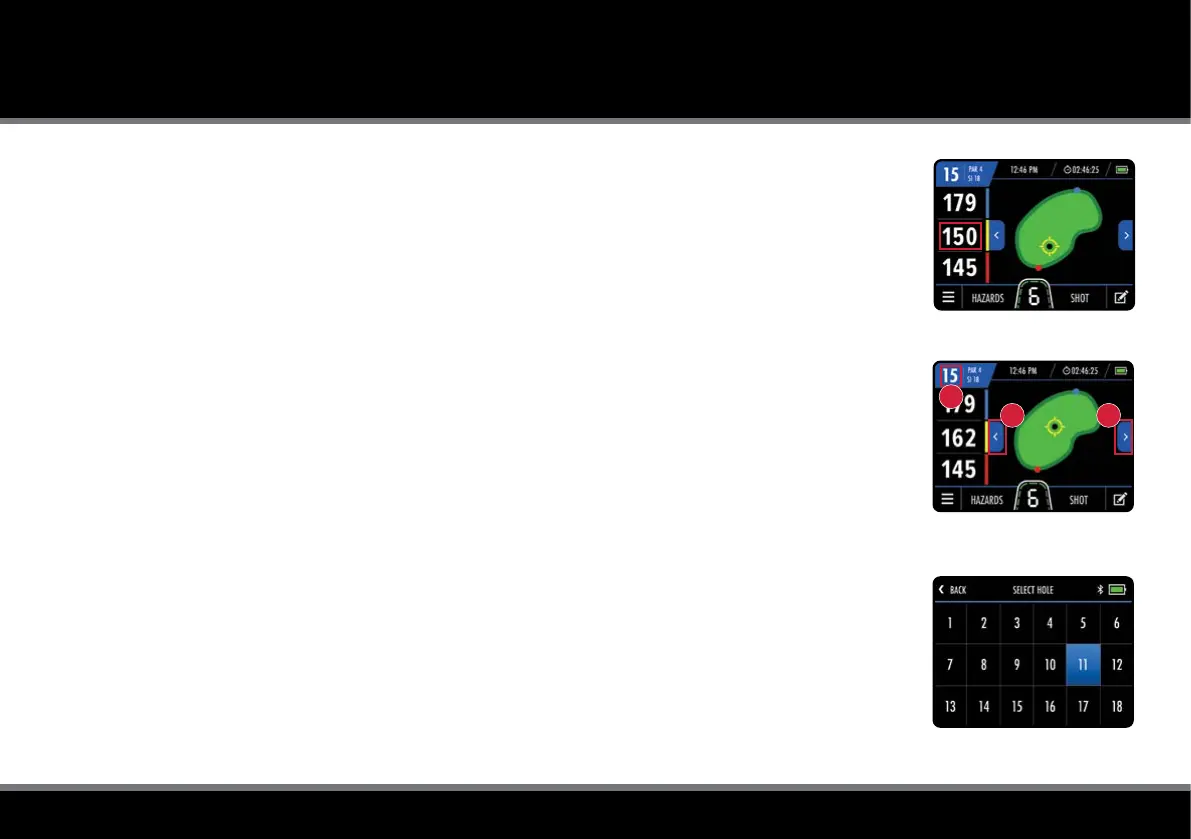
The M-TECH GPS allows you to move the location of the pin to give a more accurate distance measurement.
Touch the point on the green that you want to move the pin to and the middle distance will update (g. 1).
Hole Advancement
The M-TECH GPS will automatically advance to the next hole when you move towards the next tee.
It is also possible to change the hole manually using one of the following methods:
• Using the left and right arrows (g. 2a)
• Touching the hole number in the top left corner (g. 2b) and selecting the required hole
• Selecting “Select Hole” from the GPS Mode menu and tapping the required hole (g. 3)
Please be aware that holes will advance sequentially from the 1
st
hole onwards. If you are commencing
play at a different location, you will need to manually advance to the required hole.
Tee Selection
It is possible to set the default tee type to display correct hole information (Par and Stroke Index).
This can be set within the Home settings or GPS Mode settings menu.
Fig 2 - GPS Mode - Hole Advance
Fig 3 - Select Hole
Fig 1 - GPS Mode - Pin Location
AA
B



 To Next Page